
February 19, 2026


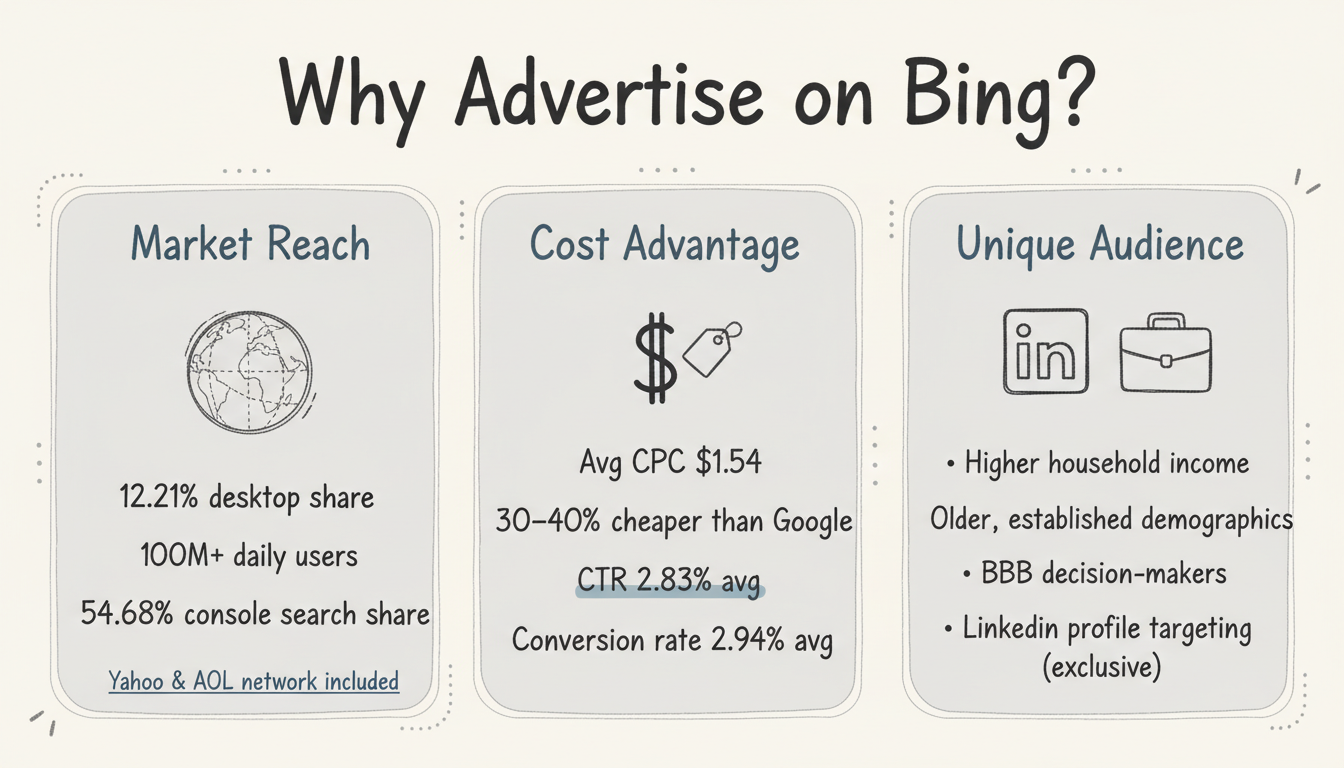
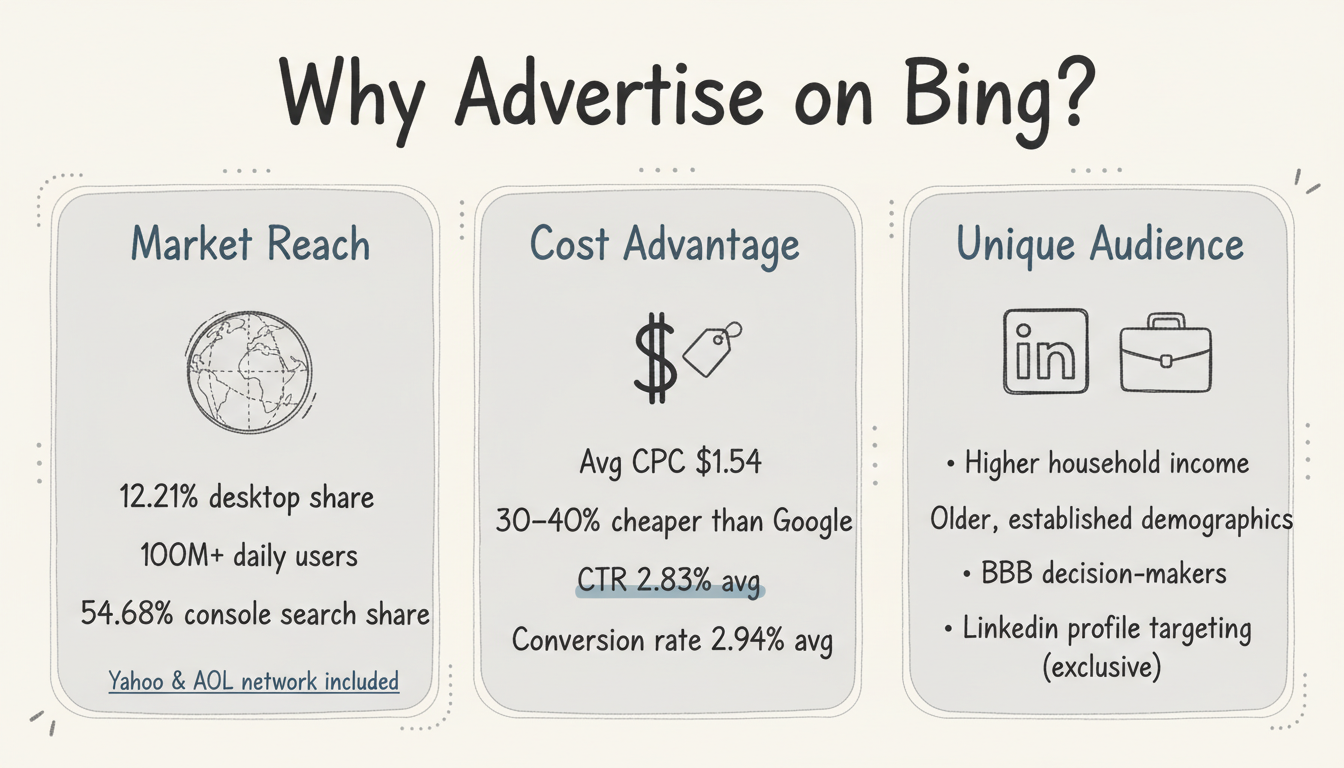
Bing paid search advertising offers a compelling opportunity for businesses looking to expand beyond Google Ads. With over 100 million users searching on Bing daily and CPCs averaging 30-40% lower than Google, Microsoft Advertising deserves a place in your paid search strategy. This guide walks you through why Bing matters, how to set up your first campaign, and best practices for success.
Many advertisers overlook Bing, focusing exclusively on Google. That's a mistake that leaves opportunity on the table.
Despite Google's dominance, Bing commands meaningful market share:
For advertisers, this translates to millions of potential customers your Google-only competitors miss entirely. When comparing Microsoft Ads vs Google Ads, market reach is just one of several factors to consider.
The economics of Bing advertising often favor advertisers:
According to Landingi, Microsoft Ads generally cost 30-40% less than Google Ads, with CPCs falling between $1.50 and $2.80. This cost advantage addresses many of the common disadvantages of paid search advertising by improving ROI and reducing budget pressure.
Bing users tend to differ from Google users in valuable ways:
These demographics often translate to higher conversion values, making the lower CPCs even more attractive.
Microsoft is the only search platform offering LinkedIn profile targeting. This exclusive feature enables B2B advertisers to target users by:
No other search advertising platform offers this capability.
Setting up your first Bing paid search campaign is straightforward, especially if you already run Google Ads.
You have two options for getting started:
Import from Google Ads: Microsoft Advertising allows you to import campaigns directly from Google Ads. This is the fastest path if you have established Google campaigns.
Build Native Campaigns: For better optimization, consider building campaigns specifically for the Microsoft platform. According to Aureate Labs, simply replicating Google campaigns often yields suboptimal results because audience behavior differs.
Install the Universal Event Tag (UET) on your website to track:
Accurate conversion tracking is essential for optimizing your campaigns and measuring ROI.
Start with a modest daily budget to test performance. Microsoft Ads don't require large budgets to get started—even $10-20 per day provides meaningful data for initial optimization.
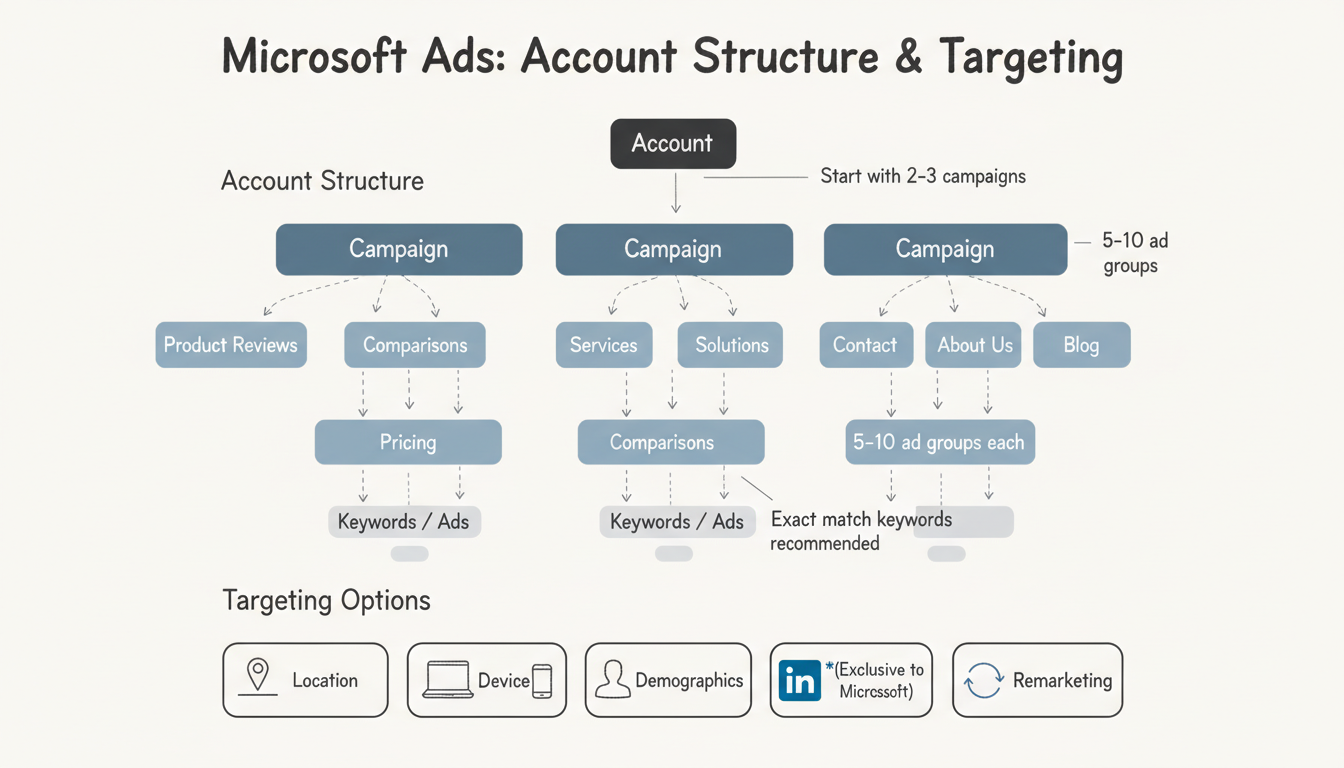
Proper campaign structure sets the foundation for success, whether you manage campaigns in-house or outsource PPC management to specialized agencies.
Organize your Microsoft Advertising account following this hierarchy:
Account → Campaigns → Ad Groups → Keywords/Ads
Best practices from Digital Position recommend:
While keyword targeting on Microsoft Ads is similar to Google Ads, important differences exist:
Focus on high-intent commercial keywords that indicate buying readiness. Start narrow and expand based on performance data.
Write compelling ads that include:
Microsoft Ads supports similar ad formats to Google, including responsive search ads with multiple headline and description options.
Refine your audience with Microsoft's targeting capabilities:
Apply these strategies to maximize your Microsoft Advertising performance.
Begin with manual CPC bidding to maintain control while you learn the platform. Once you have sufficient conversion data (typically 30+ conversions per month), consider testing automated bidding strategies.
While importing from Google Ads is convenient, audience behavior differs between platforms. Review and adjust:
If you're targeting business audiences, LinkedIn integration is your competitive advantage. Layer LinkedIn targeting on top of keyword targeting to reach decision-makers at specific companies or in particular roles.
Review the search terms report weekly to:
Beyond search, Microsoft offers Audience Ads that appear on MSN, Outlook, and partner sites. These image-based ads can expand your reach beyond search results.
Once your campaigns are running, focus on continuous improvement.
Allow campaigns to gather sufficient data before making major changes. Monitor for any issues but avoid over-optimizing too early.
Review performance and make adjustments:
With initial optimization complete:
Bing paid search advertising costs vary by industry, but average CPC is approximately $1.54—about 40% lower than Google Ads. You can start with any budget; even $300-500 per month provides meaningful data for small businesses.
Yes, for most businesses. Lower costs, less competition, and unique audience demographics make Microsoft Advertising a valuable complement to Google Ads. The LinkedIn targeting feature alone makes it essential for B2B advertisers.
Yes. Microsoft Advertising offers direct import from Google Ads, making it easy to get started. However, you should review and adjust imported campaigns rather than running them unchanged, as audience behavior differs between platforms.
By submitting this form, you agree to our Privacy Policy and Terms & Conditions.



