
February 19, 2026


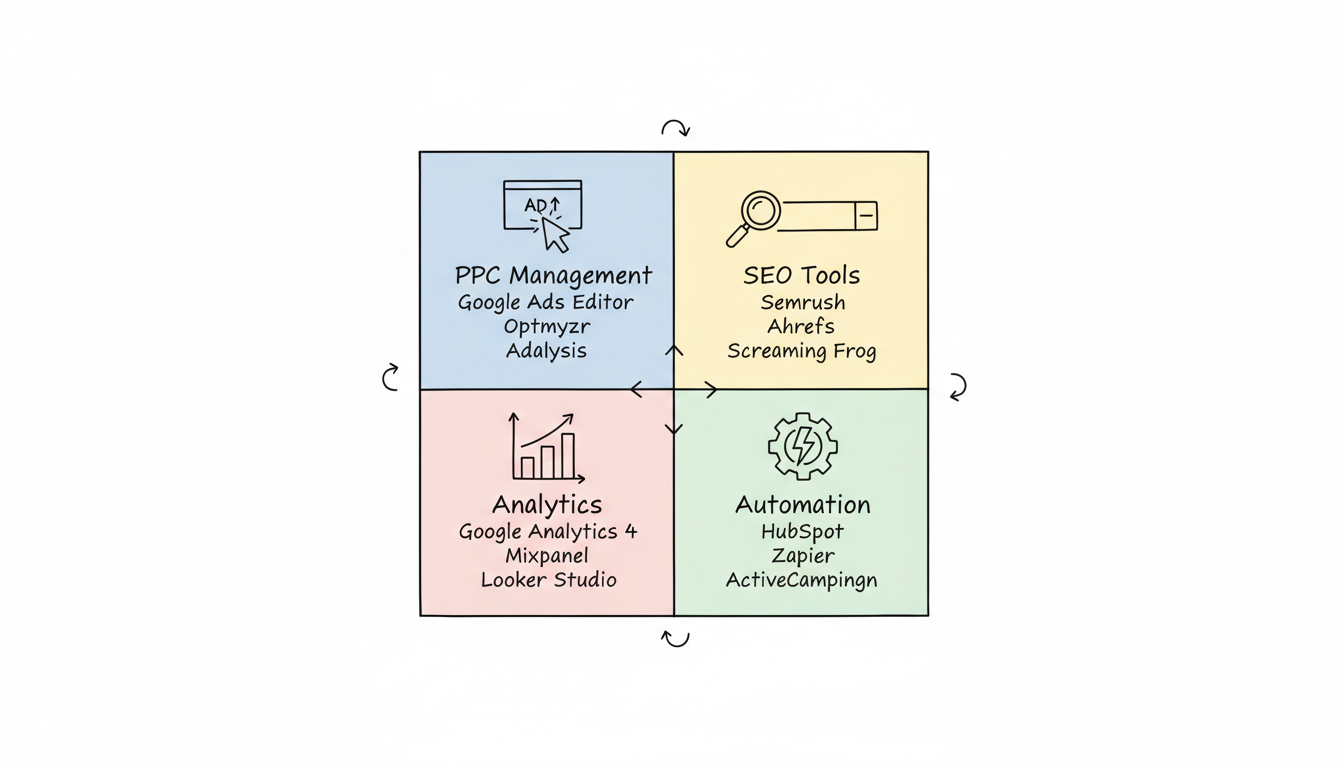
The right digital marketing tools can transform your campaigns from guesswork to data-driven success. With 75% of PPC professionals now using AI-powered features and automation becoming standard across marketing disciplines, selecting the best marketing software tools is more important than ever. This guide covers essential tools for PPC, SEO, analytics, and automation to help you build a high-performing marketing tech stack.
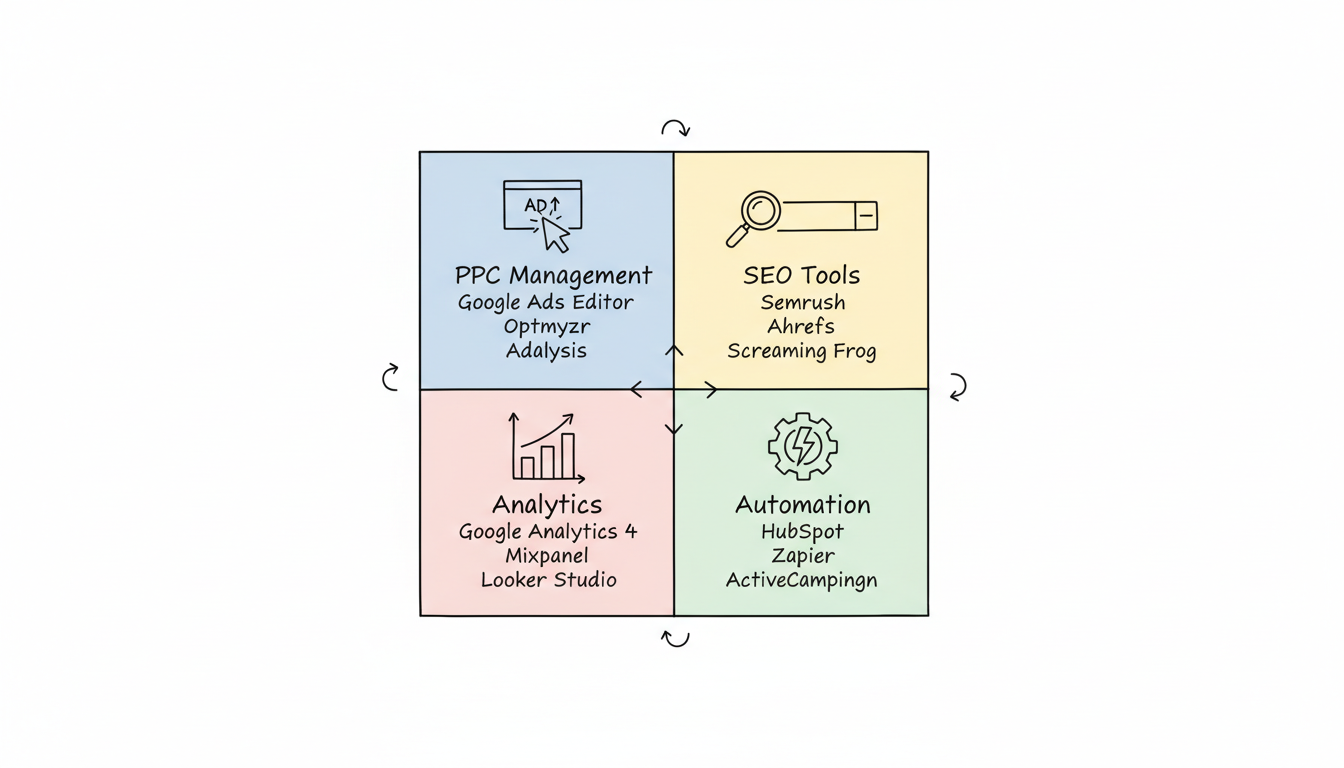
Effective paid advertising requires tools that help you manage campaigns, optimize bids, and track performance across platforms.
Google's free desktop application for managing Google Ads campaigns at scale.
Key features:
Best for: Businesses running Google Ads who need efficient campaign management.
Pricing: Free
The equivalent tool for Microsoft Ads (Bing Ads) campaign management.
Key features:
Best for: Advertisers on Microsoft's network needing efficient management. For comprehensive guidance on Microsoft's advertising platform, see our Microsoft Ads PPC agency services guide.
Pricing: Free
A comprehensive PPC management platform for Google, Microsoft, and Amazon ads.
Key features:
Best for: Agencies and businesses managing multiple PPC accounts.
Pricing: From $249/month
Focuses on automated ad testing and optimization recommendations.
Key features:
Best for: Advertisers focused on improving ad copy and Quality Scores. For broader optimization strategies, explore our PPC campaign optimization tips.
Pricing: From $149/month
For businesses using Google's Performance Max campaigns, MonsterInsights connects WordPress to GA4 automatically tracking conversions that feed Google's AI optimization.
Search engine optimization requires tools for keyword research, site auditing, and competitive analysis.
Semrush has been one of the most powerful all-in-one SEO tools for over a decade, combining SEO, PPC, content, and competitive intelligence.
Key features:
Best for: SEO specialists, agencies, and content marketers. Learn more about integrating SEO and paid search in our SEO SEM strategies integrated marketing guide.
Pricing: From $139.95/month; limited free plan available
A comprehensive SEO platform known for its backlink database and content explorer.
Key features:
Best for: Link building, content research, and competitive analysis.
Pricing: From $129/month
A desktop crawler that finds common SEO issues on your website quickly and efficiently.
Key features:
Best for: Technical SEO audits and large site analysis.
Pricing: Free up to 500 URLs; £239/year for full version
Free tool from Google providing insights into your site's search performance.
Key features:
Best for: All websites; essential baseline SEO monitoring.
Pricing: Free
AI-powered tool for improving content relevance and search rankings.
Key features:
Best for: Content teams focused on SEO-driven content creation.
Pricing: From $189/month
Measuring marketing performance requires robust analytics platforms.
Google Analytics 4 remains the flagship analytics platform used by over 14.2 million websites across 190 countries.
Key features:
Best for: All digital marketers; free and essential for conversion tracking.
Pricing: Free; GA360 enterprise version available
Product analytics platform focused on user behavior and engagement.
Key features:
Best for: SaaS, mobile apps, and product-led companies.
Pricing: Free up to 20M events; paid from $28/month
Built specifically for agencies, offering 75+ integrations across SEO, PPC, and social media.
Key features:
Best for: Marketing agencies managing multiple clients.
Pricing: From $79/month
Free dashboard and visualization tool from Google.
Key features:
Best for: Creating custom reports combining multiple data sources.
Pricing: Free
Marketing automation streamlines repetitive tasks and enables personalized customer journeys.
All-in-one marketing automation platform integrating CRM, email marketing, and automation workflows.
Key features:
Best for: Small to mid-sized businesses wanting integrated marketing tools.
Pricing: Free CRM; Marketing Hub from $20/month
Connects different apps and automates workflows between them.
Key features:
Best for: Connecting marketing tools that don't natively integrate.
Pricing: Free up to 100 tasks/month; paid from $19.99/month
Email marketing and automation platform with strong CRM features.
Key features:
Best for: Businesses needing sophisticated email automation at scale.
Pricing: From $29/month
Complete marketing platform that started as email but now includes CRM and automation features.
Key features:
Best for: Small businesses wanting accessible, user-friendly automation.
Pricing: Free up to 500 contacts; paid from $13/month
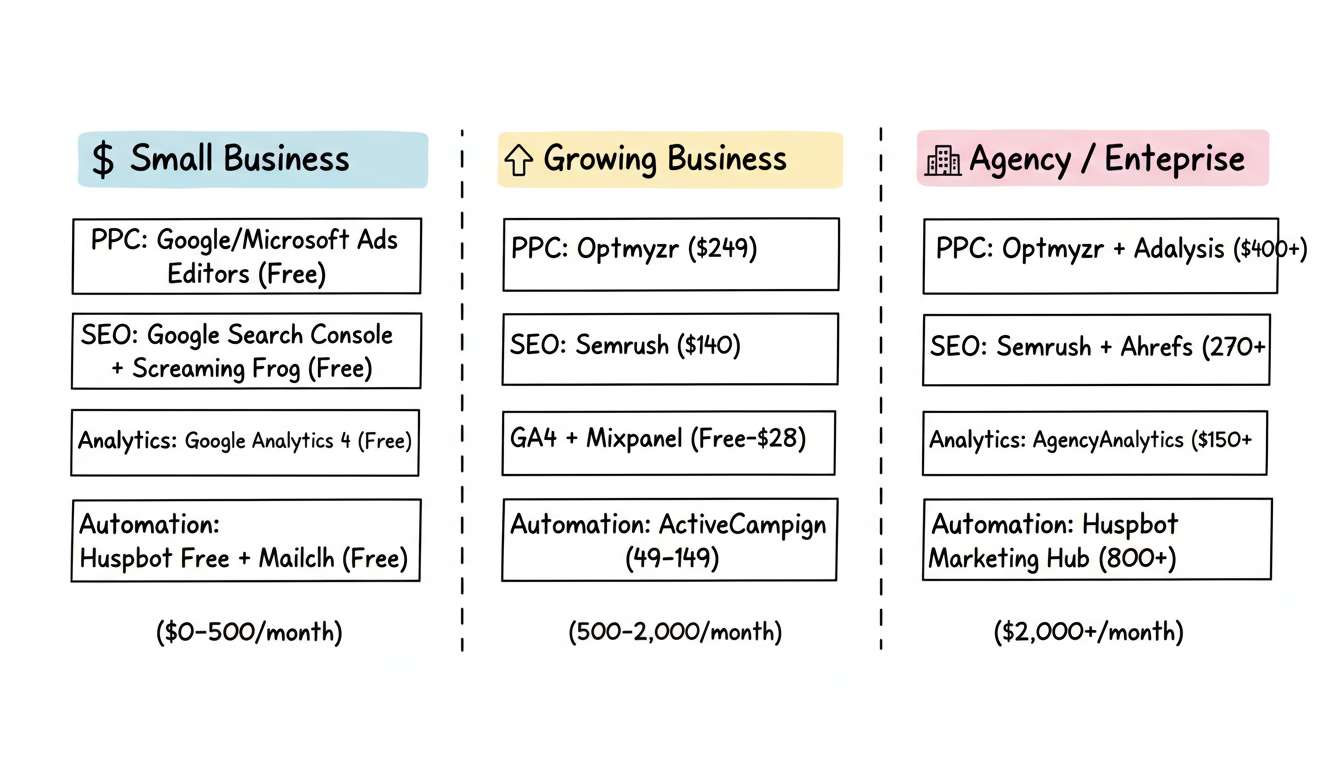
Selecting the right tools depends on your business size, budget, and marketing focus.
Category | Tool | Monthly Cost |
PPC Management | Google/Microsoft Ads Editors | Free |
SEO | Google Search Console + Screaming Frog | Free |
Analytics | Google Analytics 4 | Free |
Automation | HubSpot Free + Mailchimp Free | Free |
Category | Tool | Monthly Cost |
PPC Management | Optmyzr | $249 |
SEO | Semrush | $140 |
Analytics | GA4 + Mixpanel | Free-$28 |
Automation | ActiveCampaign | $49-149 |
Category | Tool | Monthly Cost |
PPC Management | Optmyzr + Adalysis | $400+ |
SEO | Semrush + Ahrefs | $270+ |
Analytics | AgencyAnalytics | $150+ |
Automation | HubSpot Marketing Hub | $800+ |
The best marketing software tools work together. Prioritize platforms that integrate with your existing stack, especially ensuring your analytics connects properly with your ad platforms for accurate conversion tracking.
Start with free tools: Google Analytics 4 for tracking, Google Search Console for SEO basics, Google/Microsoft Ads Editors for PPC management, and HubSpot's free CRM for contact management. As you grow, add specialized tools like Semrush for SEO and dedicated automation platforms.
Small businesses can operate effectively with free tools. Growing businesses typically spend $500-2,000/month on marketing software. Agencies and enterprises often invest $2,000-10,000+/month for comprehensive tool stacks. Focus on ROI rather than just cost.
Both approaches work. All-in-one platforms like HubSpot simplify management but may lack depth in specific areas. Best-of-breed tools excel at specific functions but require integration. Many successful teams use a hybrid: an all-in-one core with specialized tools for critical functions.
By submitting this form, you agree to our Privacy Policy and Terms & Conditions.



