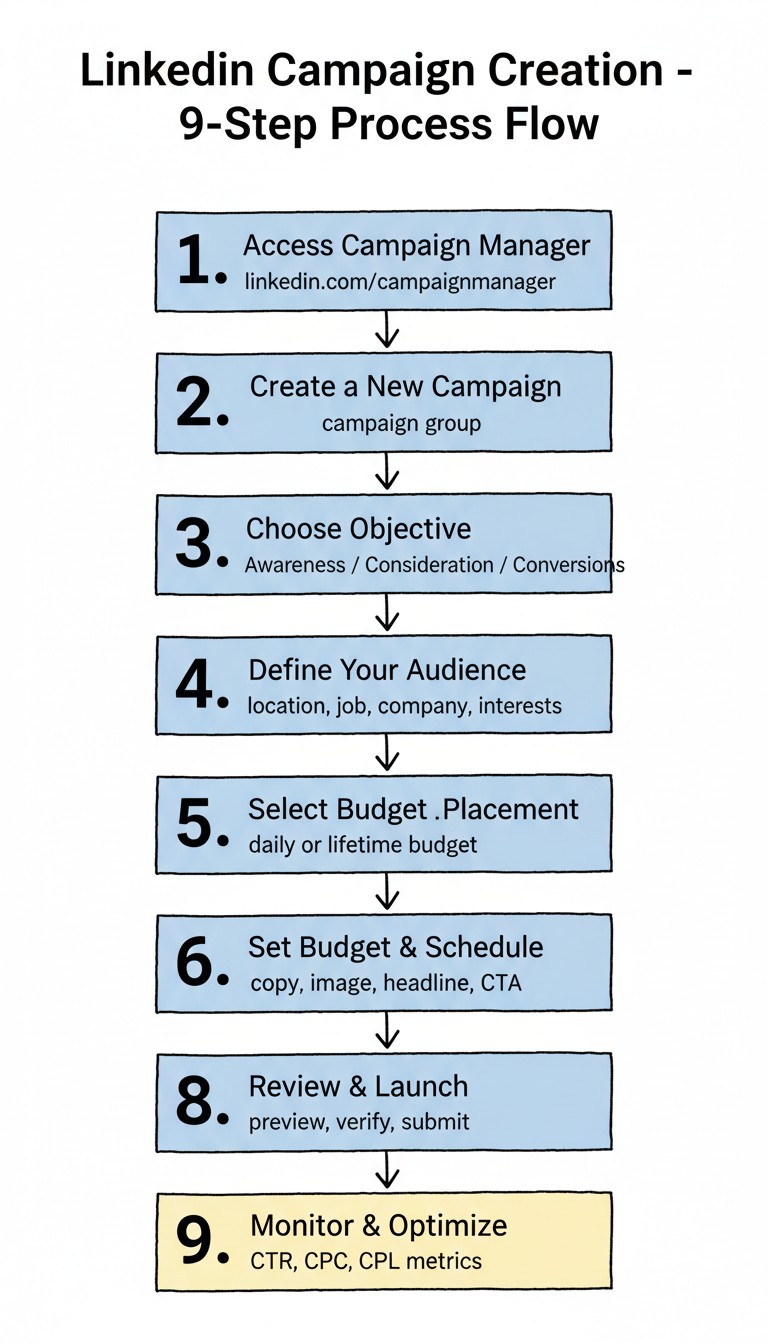
How to Create LinkedIn Ads: Step-by-Step Tutorial

Creating your first LinkedIn ad campaign can feel overwhelming with all the options available. This step-by-step tutorial walks you through the entire process—from setting up your account to launching your first campaign.

Prerequisites

Before you start, you'll need:

  • LinkedIn personal profile (your regular login)
  • LinkedIn Company Page (required to run ads)
  • Campaign Manager access (create at linkedin.com/campaignmanager)
  • Payment method (credit card or invoicing for larger accounts)

If you don't have a Company Page yet, create one first—it takes about 5 minutes.
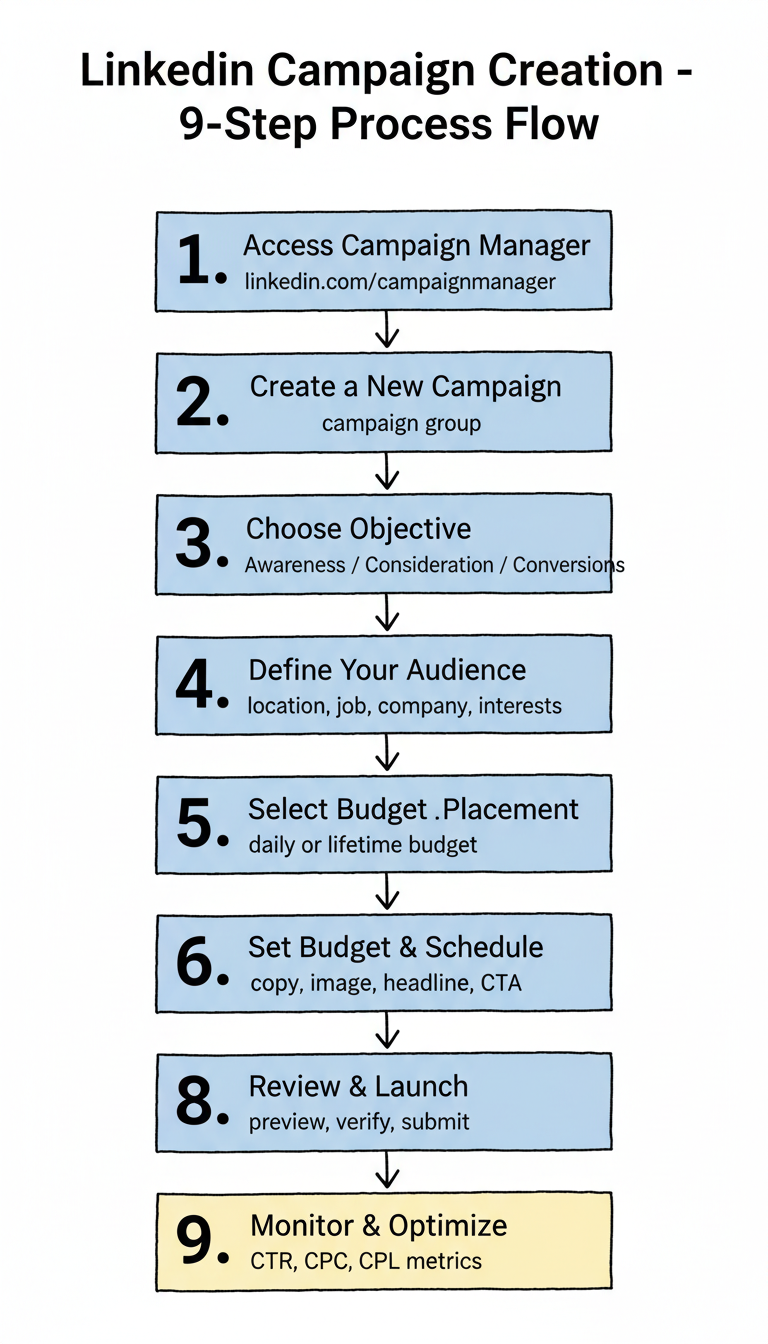
Step 1: Access LinkedIn Campaign Manager

  1. Go to linkedin.com/campaignmanager
  2. Sign in with your LinkedIn credentials
  3. If this is your first time, click Create account
  4. Select your Company Page from the dropdown
  5. Choose your currency and agree to terms

You'll land on the Campaign Manager dashboard, where all your advertising activity lives.

Step 2: Create a New Campaign

  1. Click Create in the top left
  2. Select Campaign
  3. Choose a Campaign Group (or create a new one)

Campaign Groups help organize related campaigns. For example, group all Q1 lead generation campaigns together.

Step 3: Choose Your Objective

LinkedIn offers objectives organized by marketing goal:

Awareness

  • Brand awareness: Maximize impressions

Consideration

  • Website visits: Drive traffic to your site
  • Engagement: Get likes, comments, shares
  • Video views: Maximize video watch time

Conversions

  • Lead generation: Collect leads via Lead Gen Forms
  • Website conversions: Drive specific actions on your site
  • Job applicants: For recruiting campaigns

For most B2B campaigns, start with Lead generation or Website conversions. These objectives optimize for business outcomes, not vanity metrics.

Step 4: Define Your Audience

This is where LinkedIn's targeting power shines. Build your audience with these options:

Location (Required)

  • Select countries, regions, or cities
  • Choose "Recent or permanent" vs "Permanent" location

Audience Attributes

Add criteria from these categories:

Category Options
Company Name, industry, size, growth rate
Job Title, function, seniority, years of experience
Education Schools, degrees, fields of study
Demographics Age, gender
Interests Member interests, groups

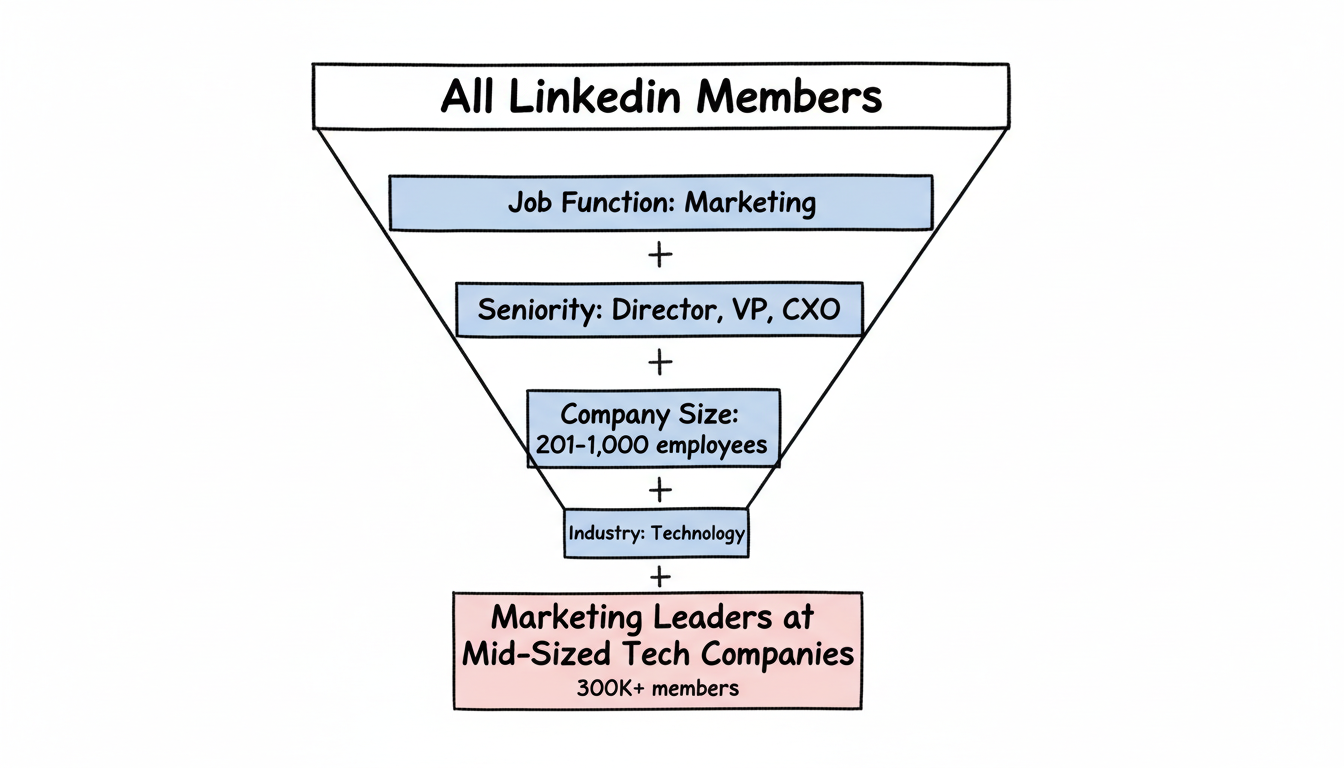
Best Practice: Layered Targeting

Combine multiple attributes for precision. For example:

  • Job function: Marketing
  • Seniority: Director, VP, CXO
  • Company size: 201-1,000 employees
  • Industry: Technology

This targets marketing leaders at mid-sized tech companies—much more valuable than broad targeting.
Audience Size

LinkedIn shows your estimated audience size on the right. Aim for:

  • Minimum: 50,000 members
  • Recommended: 300,000+ for Sponsored Content

If your audience is too small, remove criteria. If too large, add filters.

Step 5: Select Ad Placement

Choose where your ads appear:

  • LinkedIn feed: Primary placement for most campaigns
  • LinkedIn Audience Network: Extend reach to partner sites (optional)

For your first campaign, stick to LinkedIn feed only to maintain quality and control.

Step 6: Set Budget and Schedule

Budget Options

Daily budget: Spend up to this amount per day Lifetime budget: Spend this total over the campaign duration

For testing, start with a daily budget of $50-100 to gather data quickly.

Bidding

Choose how LinkedIn optimizes delivery:

  • Maximum delivery: LinkedIn auto-bids to maximize results within budget (recommended for beginners)
  • Manual bidding: Set specific CPC, CPM, or CPL caps (for experienced advertisers)

Schedule

Set start and end dates, or run continuously. For testing, run campaigns for at least 2 weeks to gather meaningful data.

Step 7: Create Your Ad

Now build the creative. Options depend on your objective:

Single Image Ad

  1. Introductory text: 600 characters max (keep under 150 for full visibility)
  2. Image: Upload at 1200 x 627 pixels
  3. Headline: 200 characters (keep under 70)
  4. Destination URL: Where clicks go
  5. CTA button: Select from options like Learn More, Download, Sign Up

Writing Effective Ad Copy

According to high-performing ad research, conversational, authentic tones outperform corporate communications by about 45% in engagement.

Strong hook examples:

  • "78% of B2B buyers ignore generic outreach. Here's what works instead."
  • "Still spending 10 hours weekly on manual reporting?"
  • "The framework 500+ sales teams use to hit quota."

Weak hooks to avoid:

  • "We're excited to announce..."
  • "Introducing our new solution..."
  • "Learn about our products..."

Lead Gen Form Setup (If Using)

If your objective is lead generation:

  1. Click Create new form
  2. Add a compelling Offer headline (what they get)
  3. Write Offer details (expand on the value)
  4. Select Form fields (start with 3-4)
  5. Add Privacy policy URL
  6. Configure Thank you message and landing page

Keep forms short—conversion rates drop significantly after 5 fields.

Step 8: Review and Launch

Before launching:

  1. Preview your ad on desktop and mobile
  2. Check targeting one more time
  3. Verify budget and schedule
  4. Review any tracking setup

Click Launch campaign when ready. LinkedIn reviews ads within 24 hours before they go live.

Step 9: Monitor and Optimize

After launch, check Campaign Manager regularly:

Key Metrics to Watch

Metric What It Tells You
CTR Ad relevance and appeal
CPC Cost efficiency
CPL Lead generation efficiency
Conversion rate Offer and landing page effectiveness

Optimization Actions

  • Low CTR: Test new hooks and images
  • High CPC: Expand audience or improve relevance
  • Low conversion: Review landing page or form
  • Low volume: Increase budget or expand targeting

Common Mistakes to Avoid

1. Targeting Too Broadly

"All marketers" wastes budget. Add seniority, company size, or industry filters.

2. Too Many Form Fields

Every field reduces completions. Start with 3-4 essentials.

3. Generic Copy

"Learn more about our solution" doesn't compel action. Lead with specific value.

4. No Tracking

Install the LinkedIn Insight Tag on your site to track conversions beyond leads.

5. Giving Up Too Early

LinkedIn campaigns need 2+ weeks and 10,000+ impressions to optimize properly.

Frequently Asked Questions

How much does it cost to create LinkedIn ads?

LinkedIn has no setup fee—you only pay for ad delivery. Minimum daily budget is $10. Most B2B advertisers spend $50-200/day during testing, scaling to $500-2,000/day for proven campaigns. CPCs typically range from $5-15 depending on targeting and competition.

How long does it take for LinkedIn ads to get approved?

LinkedIn typically reviews and approves ads within 24 hours. Some ads may take longer if they require additional review. You'll receive notification when your ads are approved or if any changes are needed.

Can I run LinkedIn ads without a Company Page?

No, a LinkedIn Company Page is required to run ads. This ensures advertisers represent legitimate businesses. Creating a Company Page is free and takes about 5 minutes if you don't already have one.


Key Takeaways

  • Set up Campaign Manager and connect your Company Page before creating ads
  • Choose Lead generation or Website conversions objectives for B2B campaigns
  • Layer targeting criteria (job function + seniority + company size) for precision
  • Write hooks that address specific pain points rather than promoting features
  • Run campaigns for 2+ weeks before making major optimization decisions

Need help creating LinkedIn ads that convert? Our team specializes in B2B LinkedIn advertising and can help you launch campaigns that generate qualified leads. Contact us | Get a free consultation

Get started with Stackmatix!

Get Started

Share On:

blog-facebookblog-linkedinblog-twitterblog-instagram

Join thousands of venture-backed founders and marketers getting actionable growth insights from Stackmatix.

Thank you! Your submission has been received!
Oops! Something went wrong while submitting the form.

By submitting this form, you agree to our Privacy Policy and Terms & Conditions.

Related Blogs

