Getting a Meta agency ad account provides significant advantages for advertising professionals: better support, higher spending limits, and access to beta features. However, the path to obtaining agency status involves meeting specific requirements and navigating Meta's approval process.
This guide covers everything you need to know about getting a Meta agency ad account—requirements, the application process, tips for approval, and alternatives if direct partnership isn't the right fit for your situation.
Requirements
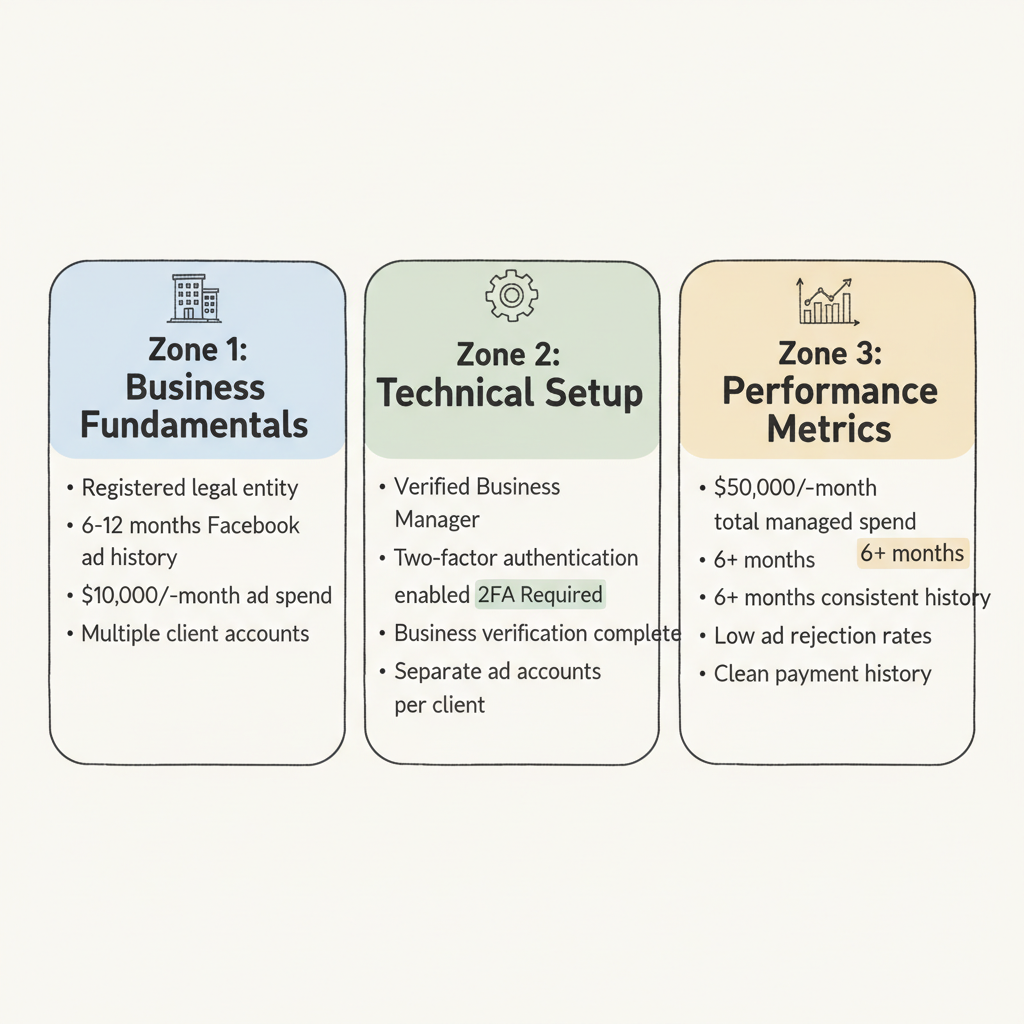
Business Fundamentals
Before applying for agency status, your business must meet baseline requirements:
Legal Business Entity
- Registered business (LLC, Corporation, etc.)
- Valid business address and contact information
- Business email domain (not Gmail, Yahoo, etc.)
- Clear agency-client business model
Established Operations
- Minimum 6-12 months of active Facebook advertising
- Consistent ad spend history (typically $10,000+ monthly)
- Clean account history with no policy violations
- Multiple client accounts under management
Technical Requirements
Business Manager Setup According to Meta's partner access guidelines, your Business Manager must be properly configured:
- Verified Business Manager account
- Two-factor authentication enabled
- Complete business verification (business documents submitted and approved)
- Proper user roles and permissions established
Account Structure
- Separate ad accounts for each client
- Organized asset structure (pixels, catalogs, pages)
- Clean billing setup with valid payment methods
- No shared login credentials across accounts
Meta evaluates agencies based on advertising performance:
Spending Thresholds
- Minimum monthly ad spend across all accounts (typically $50,000+)
- Consistent spending patterns over 6+ months
- Growth trajectory in managed spend
Account Health
- Low ad rejection rates
- No policy violations or account restrictions
- Healthy ad relevance scores
- Stable payment history
Application Process
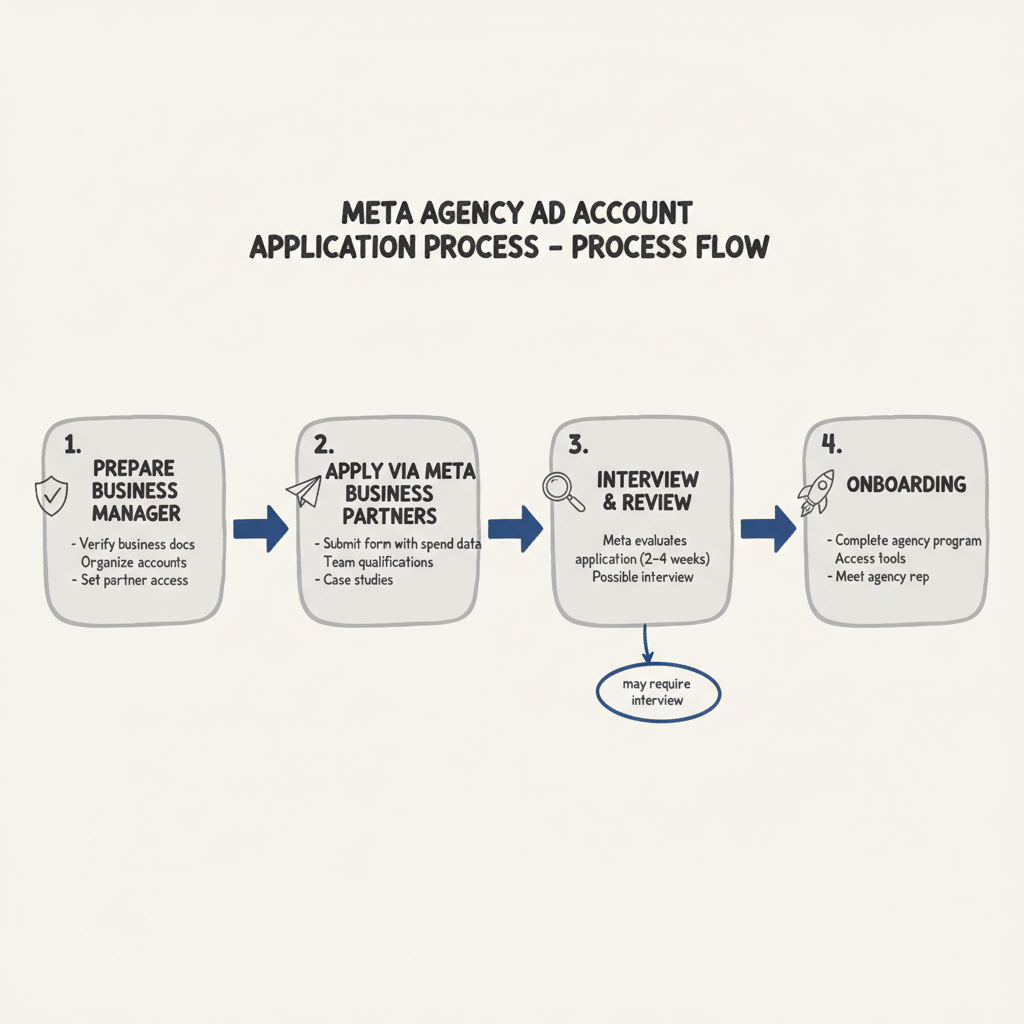
Step 1: Prepare Your Business Manager
Before applying, ensure your Business Manager is optimized:
- Complete business verification
- Submit required business documents
- Verify your domain
- Confirm your business address
- Organize your accounts
- Clean up inactive ad accounts
- Ensure proper naming conventions
- Remove any accounts with past violations
- Document your client relationships
- Proper partner access setup (not ownership transfer)
- Clear asset permissions
- Clients should maintain ownership of their accounts while you have partner access
The primary path to agency status is through the Meta Business Partners program. Understanding facebook-ads-agency-pricing models can help you structure your business before applying:
- Visit the Meta Business Partners application page
- Complete the application form with:
- Business information
- Client list (anonymized if needed)
- Monthly ad spend data
- Team qualifications and certifications
- Submit supporting documentation:
- Business registration documents
- Proof of advertising experience
- Client testimonials or case studies
Step 3: Interview and Review
After application submission:
- Meta reviews your application (typically 2-4 weeks)
- You may be contacted for additional information
- Some applications require an interview with Meta representatives
- Final decision communicated via email
Step 4: Onboarding
If approved:
- Complete Meta's agency onboarding program
- Access agency-specific tools and resources
- Meet your dedicated agency representative
- Begin using enhanced features
Approval Tips
Build a Strong Track Record
Maintain Clean Accounts Meta has tightened AI enforcement significantly. Any policy violations in your history will hurt your application. Before applying, review the meta-ads-policy to ensure full compliance:
- Review all active campaigns for policy compliance
- Address any past warnings or violations
- Ensure all landing pages meet advertising standards
- Remove any questionable creative or targeting
Demonstrate Consistent Performance
- Show steady growth in managed spend
- Document strong ROAS across client accounts
- Prepare case studies with measurable results
Get Certified
Meta values certified advertisers. Complete relevant certifications:
- Meta Blueprint Certification
- Media Buying Professional Certification
- Marketing Science Professional Certification
Obtaining meta-ads-certification demonstrates competency and commitment to the platform.
Document Your Expertise
Build Your Portfolio
- Case studies with anonymized client data
- Before/after performance improvements
- Industry-specific expertise demonstrations
Establish Thought Leadership
- Publish content about Meta advertising
- Share insights on social media
- Present at industry events
Proper Account Structure
The proper way to work with clients involves partner access, not account ownership. If you're considering alternatives, explore facebook-agency-account options:
Correct Structure:
- Client owns their Business Manager
- Client owns their ad accounts
- You receive partner access with appropriate permissions
- You have Advertiser or Admin access as needed
Avoid:
- Taking ownership of client ad accounts
- Managing client assets in your own Business Manager
- Shared login credentials
Meta views proper structure as a sign of professional, trustworthy agency operations.
Alternatives
If you don't qualify for direct agency partnership, several alternatives exist:
Work Through an Established Agency
Many agencies offer white-label or reseller arrangements:
- Run campaigns under an established agency's umbrella
- Gain access to agency-level features
- Build your track record toward direct partnership
Use Partner Access Effectively
Even without official agency status, partner access provides substantial capabilities:
What You Can Do:
- Manage client ad accounts
- Create and optimize campaigns
- Access reporting and analytics
- Manage pixels and audiences
Limitations:
- No dedicated agency support
- Standard spending limits
- No access to beta features
- No Meta Business Partner badge
Build Toward Partnership
If partnership is your goal, create a roadmap:
Year 1: Foundation
- Establish clean advertising history
- Complete Meta certifications
- Build client base with proper account structure
Year 2: Growth
- Scale managed ad spend
- Document results and case studies
- Apply for partnership
Partner With Existing Agencies
For businesses needing agency-level capabilities immediately:
- Work with established Meta Business Partners
- Access their enhanced features and support
- Focus on client service while they handle platform relationships
Frequently Asked Questions
The application review typically takes 2-4 weeks, but building the track record required for approval takes much longer—usually 6-12 months of consistent advertising history. Plan for at least a year from when you start building toward partnership to when you might receive approval.
While Meta doesn't publish exact figures, agencies typically need to demonstrate $50,000+ in monthly ad spend across all managed accounts. This threshold ensures you have meaningful experience managing significant budgets and can justify dedicated agency support.
Yes, but you'll need a registered business entity and meet all other requirements. Freelancers often find it easier to build toward agency status by incorporating, establishing proper Business Manager structure, and documenting client relationships formally.



