
February 19, 2026


Running an online store means two jobs: selling great products and getting those products in front of people who'll actually buy. A solid ecommerce Meta ads strategy handles the second part at scale—putting your products in front of billions of potential customers across Facebook and Instagram.
In this guide, we'll cover everything you need to run high-performing campaigns for your online store, from catalog setup to dynamic ads, retargeting strategies, and ROAS optimization.
Your product catalog is the foundation of any ecommerce Meta ads strategy. Without it, you can't run dynamic product ads, Advantage+ shopping campaigns, or collection ads.
A product catalog is a database of your products that Meta uses to automatically generate ads. It includes product names, descriptions, images, prices, and availability—synced directly from your store.
Option 1: Platform Integration (Recommended)
Most ecommerce platforms offer native integrations:
These integrations automatically sync your products and keep inventory updated in real-time.
Option 2: Manual Data Feed
Upload a CSV or XML file containing your product data to Meta Commerce Manager. You'll need to update this regularly to keep pricing and availability accurate.
Element | Best Practice |
Product images | High-quality, white background preferred |
Titles | Include key attributes (size, color, material) |
Descriptions | Feature benefits, not just specs |
Pricing | Keep synced—wrong prices kill conversions |
Categories | Use Google Product Categories for accuracy |
According to ecommerce advertising experts, "Connect your product catalog via your ecom platform or data feed to Meta Ads Manager, install the Meta Pixel or Conversions API, and set your campaign objective to 'sales' with a DPA format."
Dynamic Product Ads (DPAs) are the workhorse of ecommerce Meta advertising. They automatically show personalized products to users based on their browsing behavior.
No manual creative creation required—Meta pulls product images, titles, and prices directly from your catalog.
Retargeting (DPA Retargeting)
Shows products to people who've already interacted with your site:
Broad Audience (DPA Prospecting)
Shows products to new users based on their interests and behaviors—no prior site visit required. Meta's algorithm finds people likely to be interested.
If you're working with a Meta ad agency to set up your campaigns, they'll typically handle this configuration process and ensure your catalog is optimized for performance.
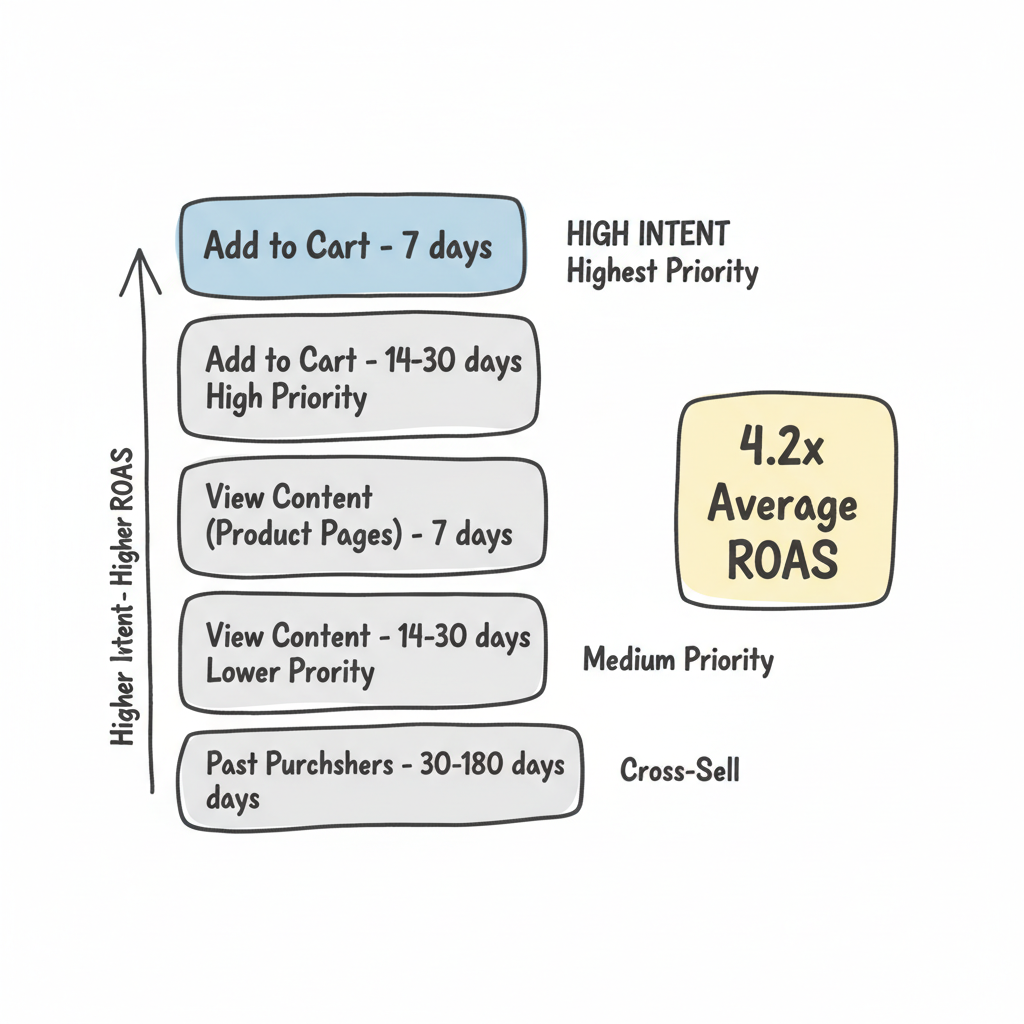
Retargeting is where ecommerce brands see the highest ROAS. You're reaching people who've already shown interest—warm audiences that convert at higher rates.
Build these audiences in Meta Ads Manager:
Audience | Window | Priority |
Add to Cart (no purchase) | 7 days | Highest |
Add to Cart (no purchase) | 14-30 days | High |
View Content (product pages) | 7 days | Medium |
View Content | 14-30 days | Lower |
Past Purchasers | 30-180 days | Cross-sell |
Shorter windows = higher intent, higher ROAS Longer windows = larger audience, lower cost
Abandoned Cart Recovery
Target users who added products but didn't complete purchase.
According to retargeting research, "Retargeting in 2026 delivers an average 4.2x ROAS" when done correctly.
Product Page Viewers
Target users who viewed products but didn't add to cart.
Post-Purchase Cross-Sell
Target recent buyers with complementary products.
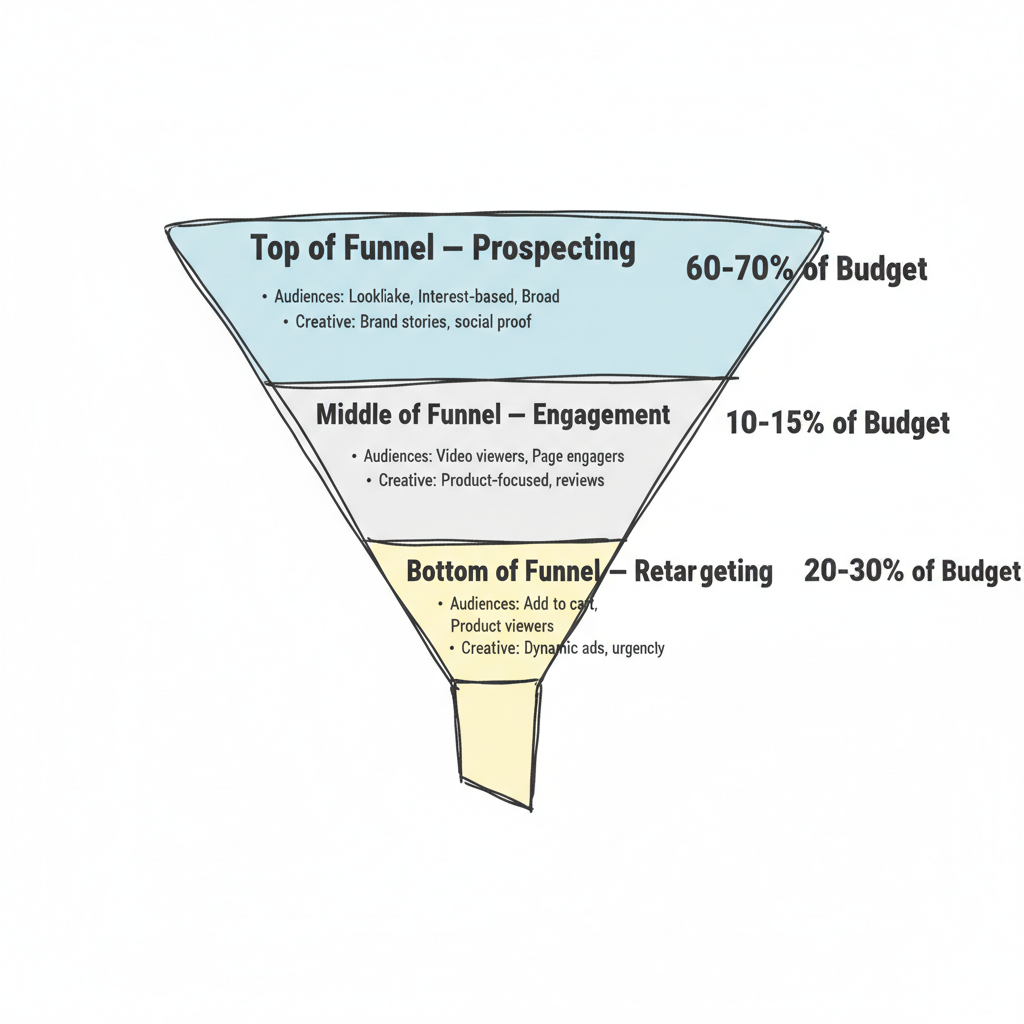
A common split for established stores:
Newer stores may need 80%+ on prospecting until they build retargeting audiences. Understanding how to calculate ROI Facebook ads is essential for determining optimal budget splits.
Return on Ad Spend (ROAS) is the north star metric for ecommerce advertising. Here's how to optimize for profitability.
ROAS = Revenue from Ads / Ad Spend

Example: $5,000 revenue / $1,000 spend = 5.0x ROAS
A "good" ROAS depends on your margins:
Meta's AI-powered campaign type designed specifically for ecommerce. According to industry testing, "Broad audiences with Advantage+ got 22% better ROAS than interest-segmented campaigns with manual optimization."
How to use Advantage+:
Advantage+ works best with:
Meta's Andromeda algorithm—rolled out in recent years—changes how ecommerce advertisers should think about targeting. According to algorithm analysis, "Andromeda analyzes your ad creative first, identifies behavioral patterns associated with that creative style, then finds users matching those patterns."
What this means for ecommerce:
Many brands invest in a Meta ads creative strategy to ensure they're producing enough variations to feed the algorithm effectively.
1. Use Minimum ROAS Bidding
Set a floor for acceptable return. Meta will only bid when it predicts hitting your target.
2. Segment by Product Margin
Run separate campaigns for high-margin vs. low-margin products. Apply different ROAS targets to each.
3. Exclude Low-Performers
Review product-level performance in catalog reports. Pause or exclude products with consistently poor ROAS.
4. Optimize for Value Events
Instead of optimizing for "Purchase," optimize for "Purchase Value" when you have sufficient data. This tells Meta to prioritize higher-value orders.
5. Test Creative Aggressively
According to Meta ads best practices, continuous creative testing is essential. Test:
Here's a proven structure for ecommerce stores:
Campaign Type: Advantage+ Shopping or manual broad targeting
Audiences:
Creative: Brand stories, product benefits, social proof
Budget: 60-70% of total spend
Campaign Type: Manual campaigns with warm audiences
Audiences:
Creative: Product-focused content, reviews, use cases
Budget: 10-15% of total spend
Campaign Type: DPA Retargeting
Audiences:
Creative: Dynamic product ads, urgency messaging, offers
Budget: 20-30% of total spend
No. You can run ecommerce ads without a Facebook Shop by linking your product catalog directly. However, having a Shop unlocks Collection Ads and creates a smoother in-app shopping experience that can increase conversions. According to ecommerce advertising guides, "having one unlocks formats like Collection Ads and makes the shopping experience smoother."
Start with enough to drive 50 conversions per week per ad set—Meta's recommended minimum for optimization. For most stores, that means $20-$50 per day minimum to exit the learning phase. Scale up as you prove profitability. For specific budget recommendations, check out guides on how much to run ads on Facebook.
It depends entirely on your profit margins. Calculate your break-even ROAS first: if your margin is 40%, break-even is 2.5x ROAS. Target at least 1.5-2x your break-even for sustainable growth. High-margin businesses can profit at 2x; low-margin products may need 5x+.
By submitting this form, you agree to our Privacy Policy and Terms & Conditions.



