LinkedIn Advertising for Beginners: Getting Started Guide
LinkedIn advertising offers B2B marketers unmatched access to professionals and decision-makers. If you're new to the platform, this guide walks you through everything you need to launch your first campaign in 2026.
Why Advertise on LinkedIn
Before diving into the how, understand the why.
According to 2026 platform data, LinkedIn now has over 1.1 billion members, with 82% directly influencing or approving purchasing decisions. For B2B marketers, this represents the largest concentration of decision-makers available on any social platform.
Key LinkedIn Advertising Benefits:
- Target by job title, company, industry, and seniority
- Reach decision-makers in professional context
- Generate higher-quality leads than consumer platforms
- Average B2B ROAS of 4.1-8.3x when optimized
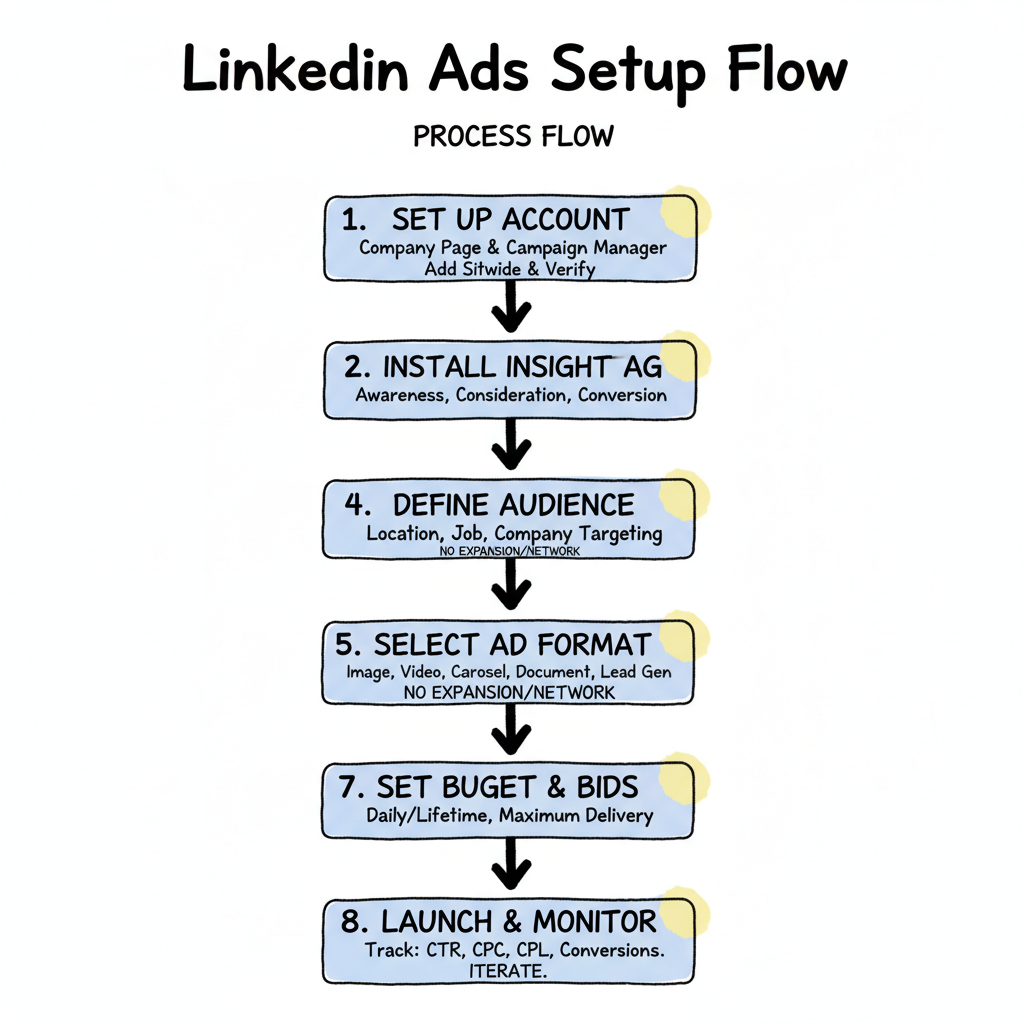
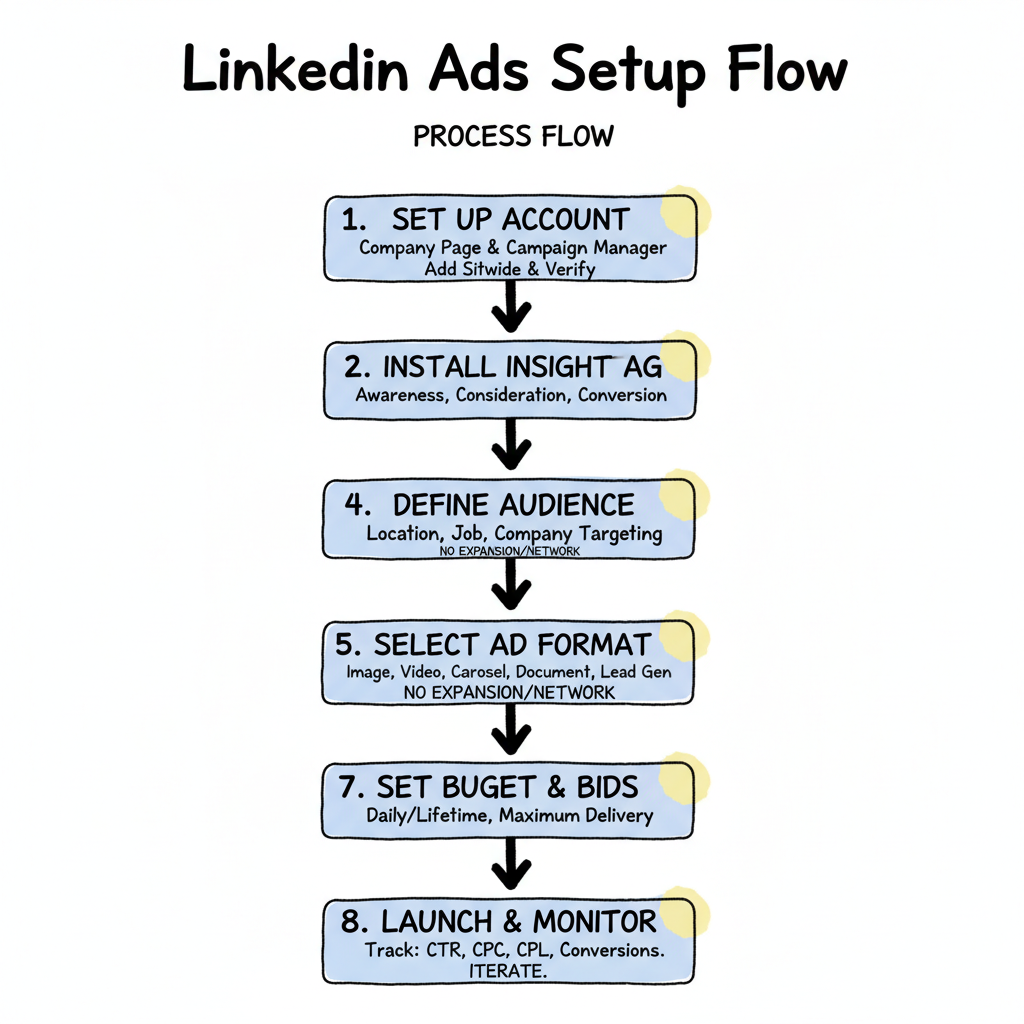
Step 1: Set Up Your LinkedIn Ads Account
You need two things before running ads: a LinkedIn Company Page and access to Campaign Manager.
Create a Company Page
If your company doesn't have a LinkedIn Page:
- Click "Work" icon in top navigation
- Select "Create a Company Page"
- Choose your page type (Small business, Medium/Large company)
- Complete company details and verify your email
Access Campaign Manager
Campaign Manager is LinkedIn's advertising platform:
- Go to linkedin.com/campaignmanager
- Sign in with your LinkedIn credentials
- Create an ad account linked to your Company Page
- Add billing information
Step 2: Install the LinkedIn Insight Tag
The Insight Tag tracks website visitors and enables conversion tracking.
Installation Steps:
- In Campaign Manager, go to Account Assets → Insight Tag
- Copy your unique JavaScript code
- Add to every page of your website (before
</body>)
- Verify installation with LinkedIn's tag validator
According to best practices, install the tag before running any campaigns to build retargeting audiences from day one.
Step 3: Choose Your Campaign Objective
LinkedIn offers objectives aligned to the marketing funnel.
Awareness Objectives
- Brand Awareness: Maximize impressions to build recognition
Consideration Objectives
- Website Visits: Drive traffic to your site
- Engagement: Increase interactions with your content
- Video Views: Promote video content
Conversion Objectives
- Lead Generation: Collect leads with native forms
- Website Conversions: Drive specific actions on your site
Beginner Tip: Start with Website Visits or Lead Generation for measurable results.
Step 4: Define Your Target Audience
LinkedIn's targeting is what makes it powerful for B2B. According to 2026 marketing guides, precise targeting separates successful campaigns from wasted spend.
Basic Targeting Options
Location: Required for all campaigns. Select countries, regions, or cities.
Job Targeting:
- Job Titles (e.g., "Marketing Director")
- Job Functions (e.g., "Marketing")
- Job Seniority (e.g., "Director," "VP," "C-Suite")
Company Targeting:
- Company Names (upload lists or select specific companies)
- Company Size (1-10, 11-50, 51-200, 201-500, 500+)
- Industry (Technology, Financial Services, Healthcare, etc.)
Audience Size Guidelines
- Minimum: 15,000-25,000 members for efficient delivery
- Optimal: 50,000-300,000 members for testing
- Too Large: Over 500,000 may indicate over-broad targeting
Settings to Avoid
According to 2026 advertising guidance, turn these off:
- Audience Expansion: Lets LinkedIn show ads outside your targeting—disable it
- LinkedIn Audience Network: Extends ads to third-party sites—disable it
These features prioritize reach over precision, which defeats LinkedIn's targeting advantage.
Step 5: Select Your Ad Format
Choose the format that matches your objective.
Single Image Ads
Best for: General awareness and lead generation
Simple to create with compelling image and copy.
Video Ads
Best for: Brand storytelling and engagement
Optimal length: 15-60 seconds for most objectives.
Carousel Ads
Best for: Showcasing multiple products or features
Use 3-5 cards with distinct messages.
Document Ads
Best for: Lead generation with gated content
According to benchmark data, Document Ads deliver CPL of $38-$82—the lowest of any format.
Lead Gen Forms
Best for: Capturing leads without landing pages
Pre-fill with LinkedIn profile data for 15-20% completion rates.
Beginner Tip: Start with Single Image Ads or Lead Gen Forms for simplicity.
Step 6: Create Your Ads
Strong creative makes or breaks campaigns.
Ad Copy Best Practices
- Hook in first line: Lead with the benefit or problem
- Be specific: Numbers and specifics outperform generic claims
- Clear CTA: Tell users exactly what action to take
- Keep it concise: Headlines under 70 characters perform best
Image Best Practices
- Use real people: Authentic photos outperform stock by 3.1x
- Bold colors: Orange, coral, purple stand out in the feed
- Readable text: If using text on images, keep it minimal
- Correct dimensions: 1200 x 627 pixels for feed ads
Test Multiple Variations
According to optimization research:
- Create 4-5 ad variations per campaign
- Test different headlines, images, and CTAs
- Monitor for 10,000+ impressions before judging
Step 7: Set Your Budget and Schedule
Budget Options
- Daily Budget: LinkedIn spends up to this amount each day
- Lifetime Budget: Total spend across campaign duration
Minimum: $10/day per campaign
Recommended Starting Budget: $50-$100/day for meaningful data
Bidding Strategies
- Maximum Delivery: LinkedIn optimizes for results (recommended for beginners)
- Cost Cap: Set target cost per result
- Manual Bidding: Full control over bid amounts
Start with Maximum Delivery until you understand your baseline metrics.
Step 8: Launch and Monitor
Once everything is set, launch your campaign and monitor closely.
Key Metrics to Watch
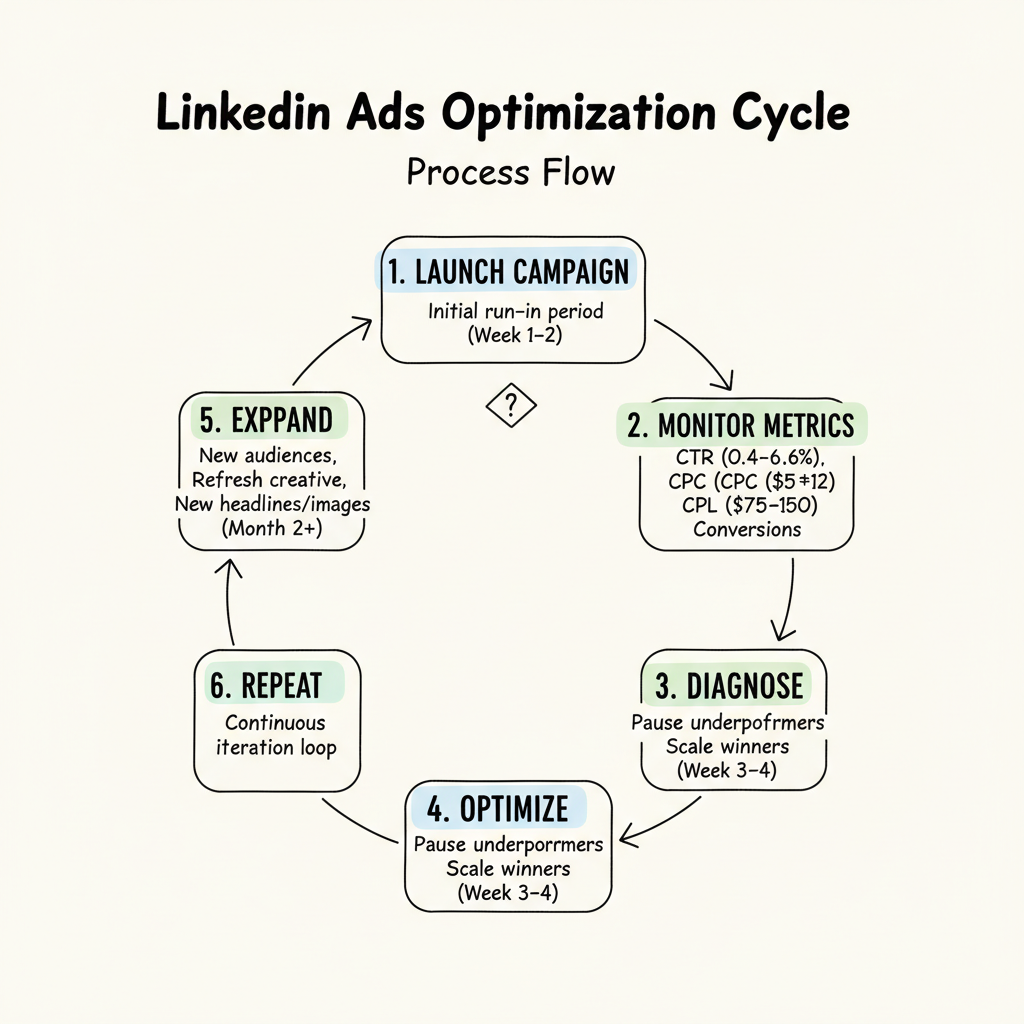
- CTR: Click-through rate (benchmark: 0.4-0.6%)
- CPC: Cost per click (benchmark: $5-$12)
- CPL: Cost per lead (benchmark: $75-$150)
- Conversion Rate: Landing page or form completion rate
First Week Checklist
- Check daily for delivery issues
- Verify conversions are tracking correctly
- Monitor audience size and delivery
- Watch for ad fatigue signals
Optimization Schedule
According to campaign roadmaps:
- Week 1-2: Gather data, don't make major changes
- Week 3-4: Pause underperformers, increase winners
- Month 2+: Test new audiences, refresh creative
Frequently Asked Questions
How much should beginners spend on LinkedIn ads?
Start with $50-$100/day ($1,500-$3,000/month) to gather meaningful data. LinkedIn's minimum is $10/day, but smaller budgets take longer to optimize. Plan for 90 days of testing before evaluating ROI.
What's the best LinkedIn ad format for beginners?
Single Image Ads and Lead Gen Forms are easiest for beginners. Single Image Ads are simple to create and test; Lead Gen Forms capture leads without requiring landing pages and achieve 15-20% completion rates.
How long before LinkedIn ads show results?
Expect 2-4 weeks to gather enough data for initial optimization. Full optimization typically requires 90-120 days. Avoid making major changes in the first week while the algorithm learns.
Key Takeaways
- Set up Campaign Manager and install the Insight Tag before launching any campaigns
- Disable Audience Expansion and Audience Network for precision targeting
- Start with Single Image Ads or Lead Gen Forms for simplicity
- Target audiences of 50,000-300,000 members for optimal testing
- Budget $50-$100/day minimum for meaningful data collection
- Monitor CTR, CPC, and CPL as primary metrics
- Allow 90-120 days for full optimization before judging ROI
Ready to launch your first LinkedIn campaign? Get a free consultation with our team. Contact us | Get a free consultation