
February 19, 2026


Schema markup has become essential for AI search visibility. But implementing structured data is only half the equation—validation ensures AI systems can actually parse and use your markup. Invalid schema gets ignored entirely, making your optimization efforts worthless.
Here are the essential validators and testing tools for ensuring your schema markup works for both traditional search and AI-powered answer engines.
AI systems like Google's Gemini, ChatGPT, and Perplexity rely on structured data to understand content meaning and relationships. Syntax errors, missing properties, or incorrect implementations cause these systems to skip your markup entirely.
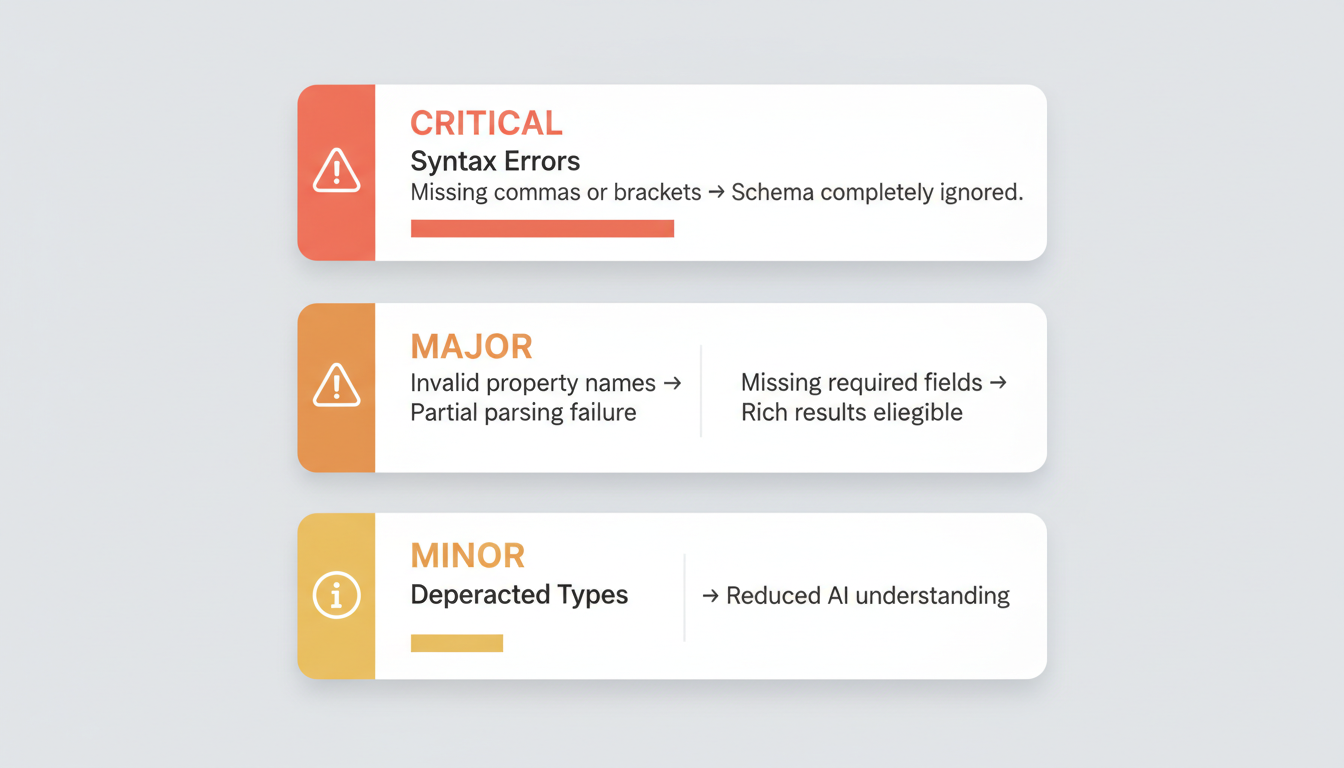
Validation Issue | Impact on AI Visibility |
Missing commas or brackets | Schema completely ignored |
Invalid property names | Partial parsing failure |
Missing required fields | Rich results ineligible |
Deprecated schema types | Reduced AI understanding |
Even small errors make the difference between visibility and invisibility in AI-generated responses.
Best for: Verifying Google-specific implementation and rich result eligibility
Google's Rich Results Test remains the gold standard for schema validation. It checks whether your markup meets Google's specific requirements and previews how rich results might appear in search.
Key capabilities:
Limitations: Only validates schema types eligible for Google rich results. Won't catch all Schema.org errors.
Access: search.google.com/test/rich-results
Best for: Catching syntax errors and Schema.org compliance
The Schema.org Validator identifies coding mistakes that make markup invalid. It catches missing commas, unclosed brackets, and invalid properties that would cause search engines to ignore your structured data.
Key capabilities:
Limitations: Doesn't tell you how to fix errors—just identifies them. Doesn't check Google-specific requirements.
Best practice: Run Schema.org Validator first to catch syntax issues, then Google Rich Results Test for search-specific compliance.
Best for: Detailed syntax and general structured data validation
The Schema Markup Validator (SMV), powered by Google for the Schema.org community, provides comprehensive validation beyond Google-specific rich results.
Key capabilities:
This tool catches issues that might affect visibility in AI systems like Perplexity or Claude that use structured data differently than Google.
Best for: Ongoing monitoring and site-wide schema health
Search Console doesn't validate individual pages but monitors schema health across your entire site over time. Understanding AI overview Google SEO technical requirements helps you interpret Search Console data correctly.
What to monitor:
Schema issues in Search Console typically take days to weeks to appear after implementation changes.
Best for: Site-wide schema audits and bulk validation
For larger sites, Screaming Frog crawls your entire domain to identify missing or malformed schema markup at scale. This complements strategies outlined in our LLM optimization guide by ensuring technical implementation matches strategic intent.
Key capabilities:
This tool complements page-level validators by revealing patterns across thousands of pages.
Best for: Understanding entity relationships in your schema
Classy Schema visualizes the relationships you've created through schema markup, showing how entities connect to form a basic knowledge graph. For deeper knowledge graph implementation, see our knowledge graph case study demonstrating real-world results.
This visualization helps verify that your schema creates the entity connections AI systems need to understand your content context.
Follow this three-step validation process for reliable AI visibility:
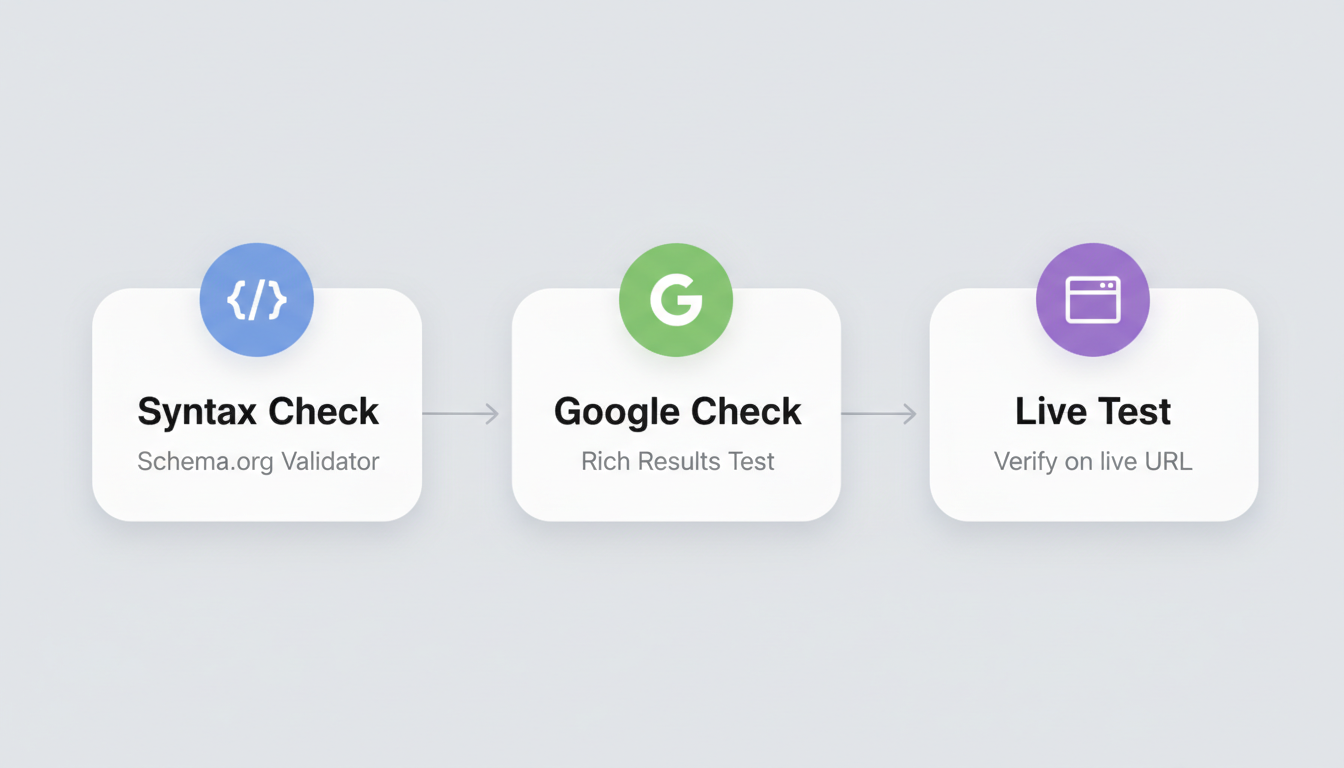
Run your JSON-LD through Schema.org Validator first. Fix any syntax errors before proceeding—a single missing comma invalidates entire schema blocks.
Common syntax issues:
After passing syntax validation, run Google Rich Results Test to verify Google-specific requirements. Even syntactically correct schema may not meet Google's enhanced result criteria.
Check for:
After deployment, verify implementation with both validators using your live URL. Server configurations, CMS processing, or JavaScript rendering can affect how schema appears on live pages versus development.
While no tools specifically validate schema for ChatGPT or Perplexity, following these practices increases AI visibility. For ChatGPT-specific optimization tactics, review our ChatGPT SEO optimization guide.
Comprehensive coverage: AI systems use more schema types than Google rewards with rich results. Validate all your schema, not just types eligible for enhanced SERP features.
Entity relationships: Use tools like Classy Schema to verify sameAs connections to Wikipedia, Wikidata, and authoritative sources. These relationships help AI systems verify entity authenticity.
Freshness signals: Ensure dateModified properties update when content changes. AI systems factor freshness into source selection.
Validate after every implementation change and during monthly technical SEO audits. Set up Search Console alerts for immediate notification of new schema errors across your site.
Yes. Validation confirms technical correctness, but Google decides whether to show rich results based on content quality, site authority, and user experience factors. Valid schema is necessary but not sufficient.
Start with Schema.org Validator to catch syntax errors, then Google Rich Results Test for search-specific compliance. This sequence prevents wasting time on Google requirements when basic syntax issues exist.
By submitting this form, you agree to our Privacy Policy and Terms & Conditions.



