
February 19, 2026


GitHub Copilot has evolved from a code completion tool into a sophisticated AI development partner fundamentally changing how software gets built. With over 20 million developers globally using Copilot and 90% of Fortune 100 companies integrating it into their workflows, understanding this platform matters for anyone creating technical content or marketing to developer audiences. The integration depth between Copilot and the broader GitHub ecosystem reveals how AI is becoming embedded in professional workflows.
GitHub Copilot represents a different category of AI tool than consumer chatbots—it's deeply integrated into development environments where professionals spend their working hours.
Core architecture:
How developers interact: Rather than switching to a separate AI interface, developers receive suggestions inline as they type. Copilot understands the code already written, the programming language context, and common patterns to offer completions that fit naturally into ongoing work. This workflow integration represents a significant shift in how developers interact with AI tools, similar to how ChatGPT vs Perplexity comparison reveals different approaches to AI-assisted search and research.
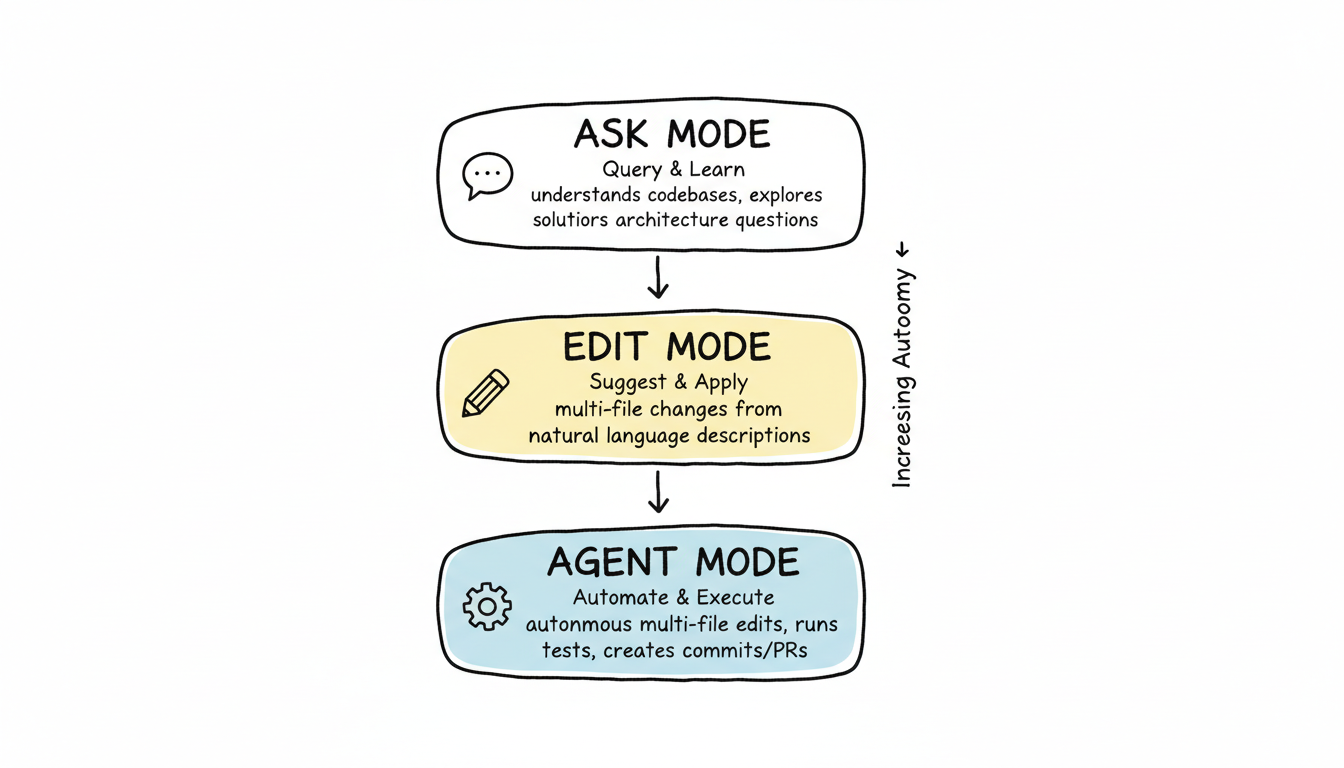
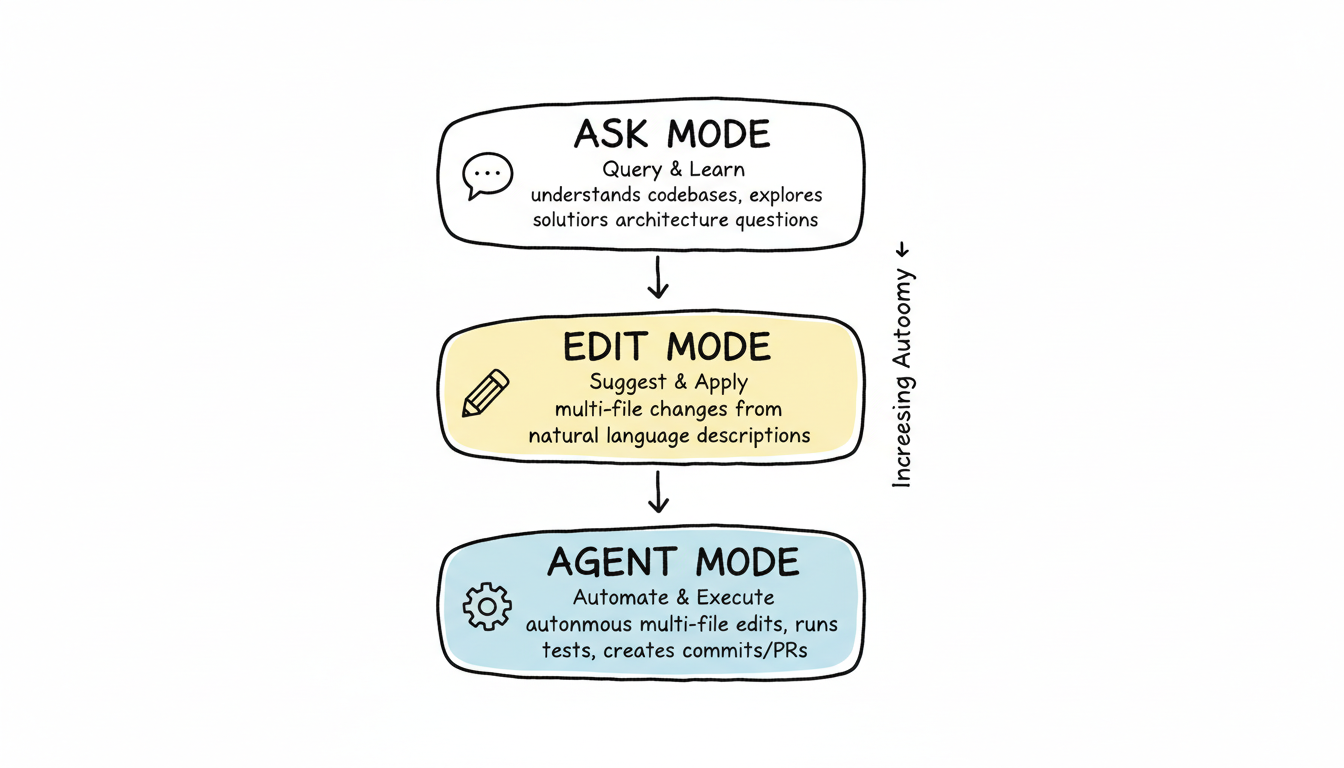
GitHub Copilot has expanded far beyond simple code completion into multiple interaction modes.
Ask Mode: Developers query Copilot about code architecture, logic, and implementation approaches. This conversational interface helps with understanding unfamiliar codebases, learning new frameworks, or exploring solution alternatives.
Edit Mode: Copilot suggests and applies code changes across files. Developers describe desired modifications in natural language, and Copilot proposes edits maintaining consistency with existing code style and patterns.
Agent Mode: The most advanced capability—Agent Mode automates multi-file coding tasks. This enables:
Agent Mode transforms Copilot from an assistant into a collaborative AI developer capable of autonomous work on complex tasks.
Copilot's value comes largely from its deep integration with development environments.
VS Code integration:
Visual Studio integration:
GitHub.com integration:
This multi-surface presence means developers encounter Copilot throughout their workflow, not just while actively coding. Understanding these integration points matters for technical content creators optimizing for AI search platform market share comparison 2026, where developer tools represent a distinct category from consumer search experiences.
GitHub Copilot for Business and Enterprise tiers address organizational requirements beyond individual productivity.
Enterprise features:
Security considerations: Organizations can implement controls over which repositories Copilot accesses and what code can be sent to AI models. For enterprises concerned about code leaving their environment, policy configurations address data governance requirements.
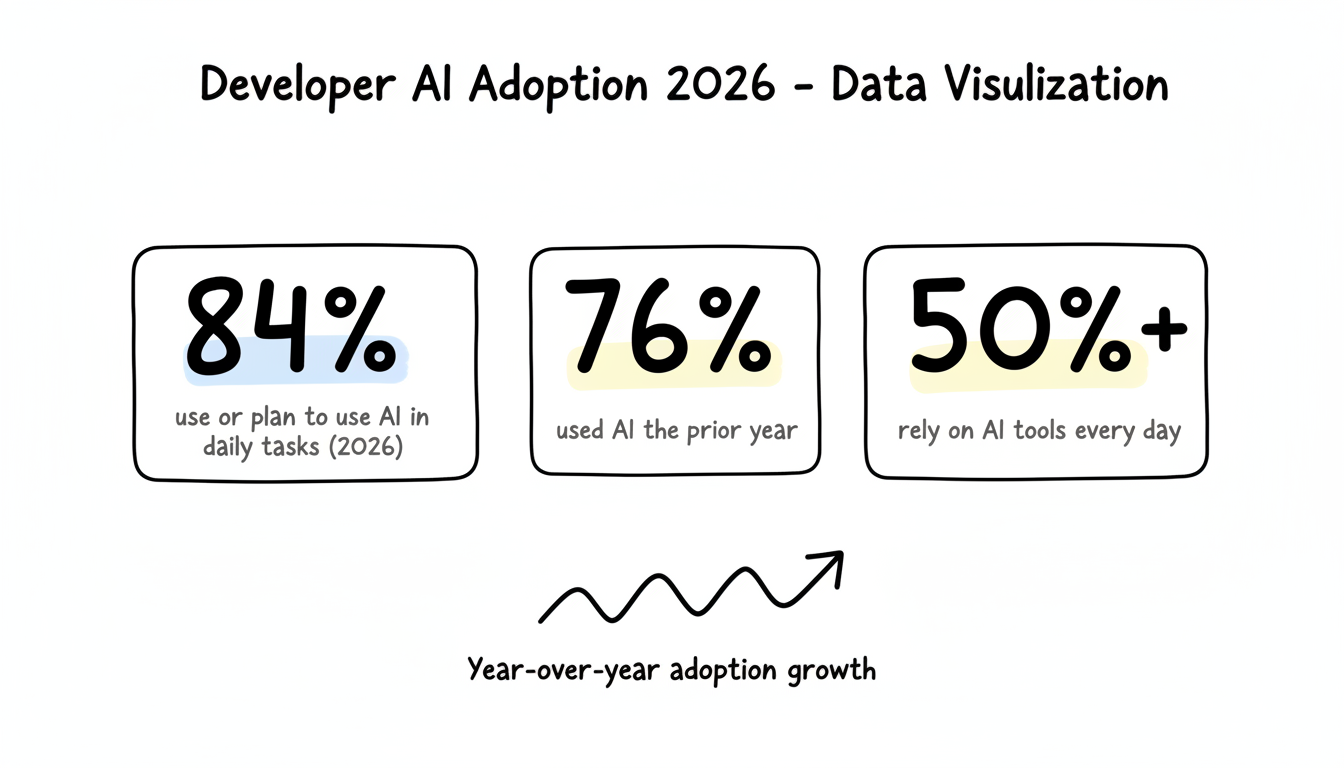
Adoption metrics: By 2026, 84% of developers use or plan to use AI solutions in daily tasks—up from 76% the previous year. Over half rely on AI tools every day. These adoption rates indicate AI coding assistance has become standard practice rather than experimental technology.
Copilot's productivity effects extend beyond faster typing.
Measured benefits:
Workflow transformation: Developers increasingly use AI not only for writing code but also for architecture design, documentation generation, deployment automation, and application monitoring. The tool has shifted from optional add-on to essential workflow component.
Learning acceleration: Junior developers can learn patterns and best practices through Copilot suggestions. The AI provides implicit mentorship by demonstrating how experienced developers typically approach similar problems.
Recent updates have expanded Copilot's capabilities significantly.
Agent Skills (VS Code 1.108+): Developers can now "teach" their AI agent custom skills specific to their workflows. This personalization creates truly customized coding assistance tailored to individual or team preferences.
Copilot CLI: Command-line integration brings AI assistance into terminal workflows:
Custom Instructions: Teams can create reusable prompt files and instruction sets maintaining consistency across developers. These custom rules integrate with community libraries like "Awesome Copilot" while enforcing organizational coding standards.
GitHub Copilot now offers choice in underlying AI models.
Available models:
Copilot Pro+ tier: Premium plans provide access to all available AI models with increased usage capacity. Developers can choose optimal models for specific tasks rather than accepting one-size-fits-all inference.
Understanding developer AI tools matters for technical content strategy.
Documentation impact: As developers increasingly research through AI-assisted workflows, technical documentation must be structured for AI extraction. Clear, well-organized content gets cited when Copilot answers developer questions about technologies and approaches. This principle aligns with broader AEO technical audit practices that ensure content is optimized for AI consumption and citation.
Content strategy considerations:
Developer marketing implications: Reaching developers increasingly means appearing in AI-assisted research and learning flows. Content optimized for AI citation reaches developers during active problem-solving moments, a strategy that complements ChatGPT optimization tactics focused on conversational AI interfaces.
No. GitHub Copilot requires cloud connectivity to function, as code analysis and suggestions involve sending context to AI models hosted by Microsoft/OpenAI. Organizations with strict air-gapped requirements cannot use standard Copilot deployments, though some on-premises alternatives exist for specific enterprise scenarios.
Studies show mixed results depending on usage patterns. Copilot can improve code quality through better test coverage, consistent patterns, and reduced errors from manual typing. However, developers must still review AI-generated code carefully—treating suggestions as starting points requiring validation rather than finished solutions.
Copilot supports many languages but performs best on popular ones with extensive training data—Python, JavaScript, TypeScript, Ruby, Go, C#, and C++. Less common languages or domain-specific languages may receive lower-quality suggestions due to limited training examples.
By submitting this form, you agree to our Privacy Policy and Terms & Conditions.



