
February 19, 2026


Scaling Meta ads is where most advertisers struggle. You find a winning campaign, increase the budget, and watch performance tank. Sound familiar? The key to scaling Facebook ads profitably isn't just spending more—it's understanding when to scale, how to scale, and how to maintain performance as budgets grow.
This guide covers the fundamentals of Meta ads scaling: knowing when you're ready, choosing between horizontal and vertical scaling, budget management techniques, and avoiding the common performance drops that kill profitable campaigns.
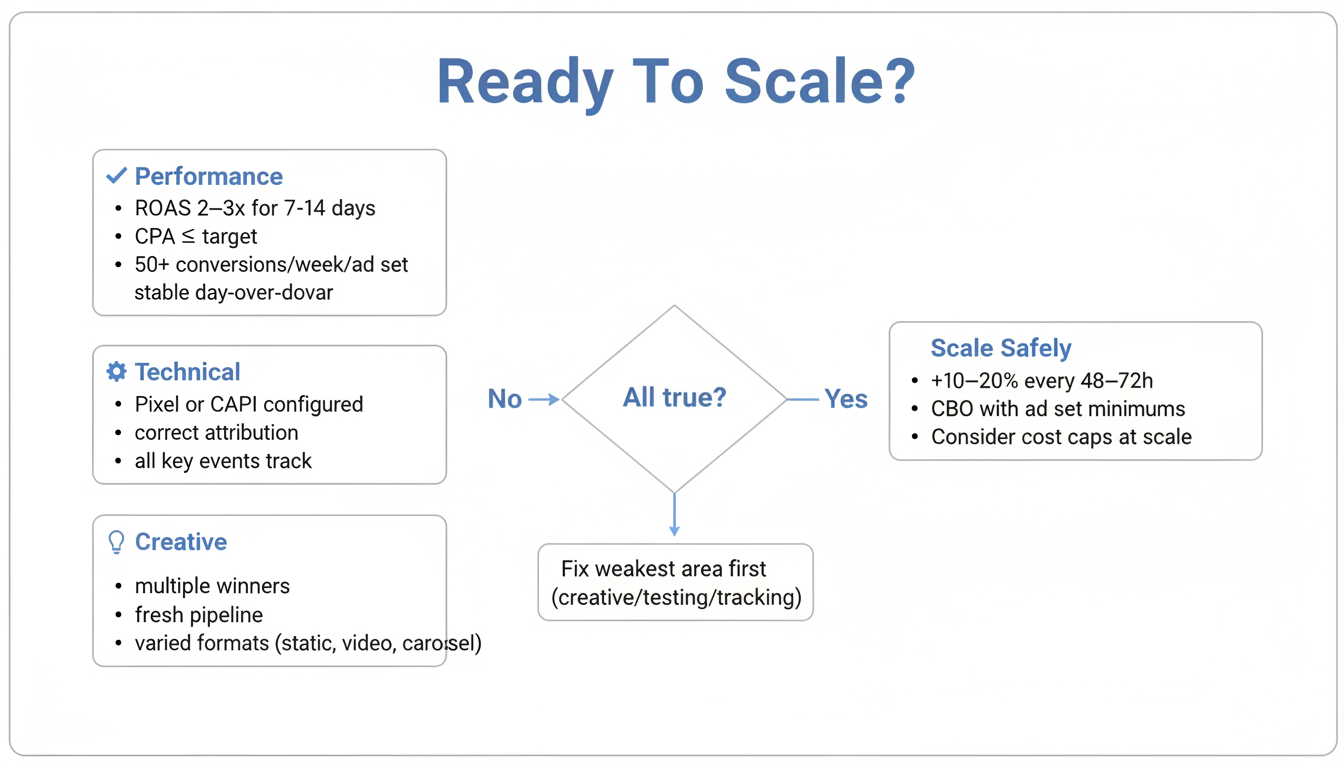
Before increasing spend, verify your campaigns are actually ready to scale. Scaling a weak campaign will only waste money.
Your campaigns should meet these criteria before scaling:
Performance Requirements:
Technical Requirements:
Creative Requirements:
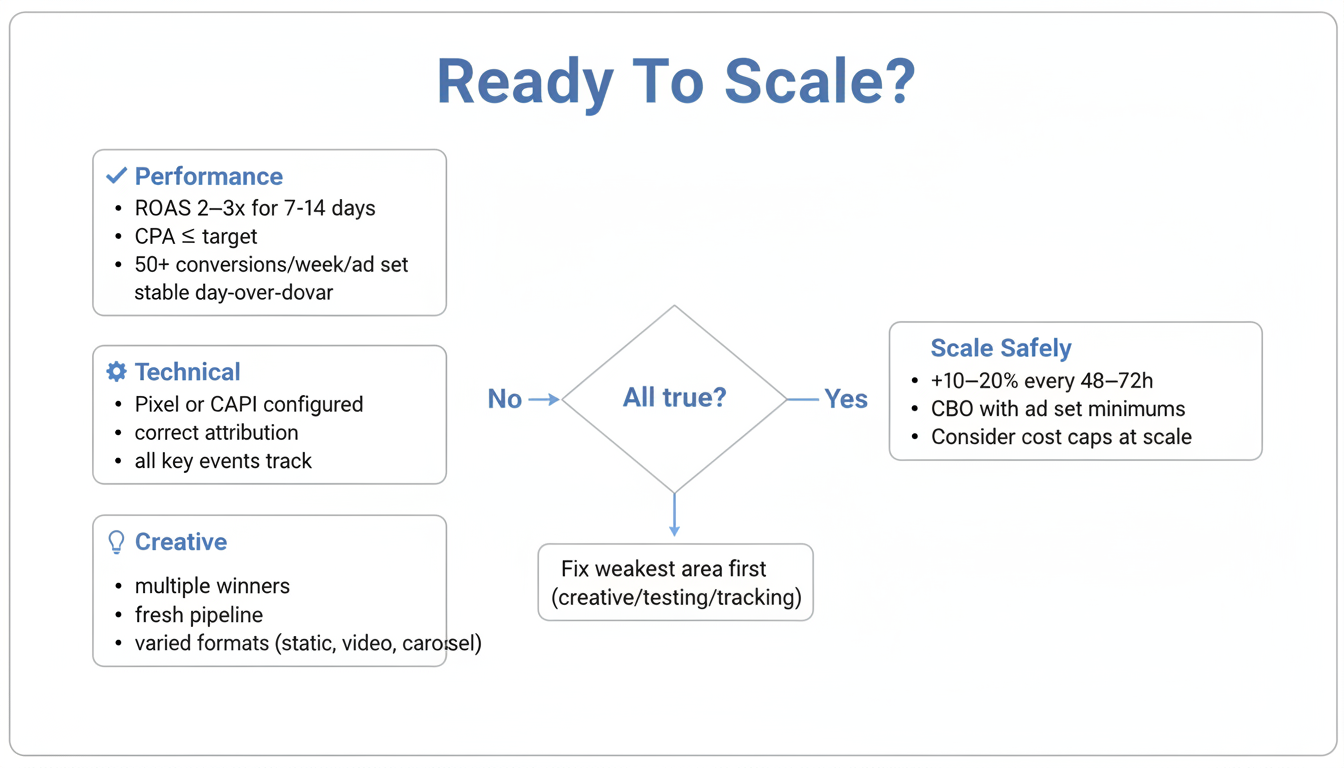
If you're seeing profitable results but only have one winning ad creative, prioritize creative testing before aggressive budget scaling. Single-creative scaling leads to rapid fatigue and performance collapse.
There are two fundamental approaches to scaling Meta ads, and the most successful advertisers use both.
What it is: Increasing budget on campaigns and ad sets that are already performing well.
How to do it:
Pros:
Cons:
What it is: Expanding reach by testing new audiences, creatives, and campaign structures alongside existing winners.
How to do it:
Pros:
Cons:
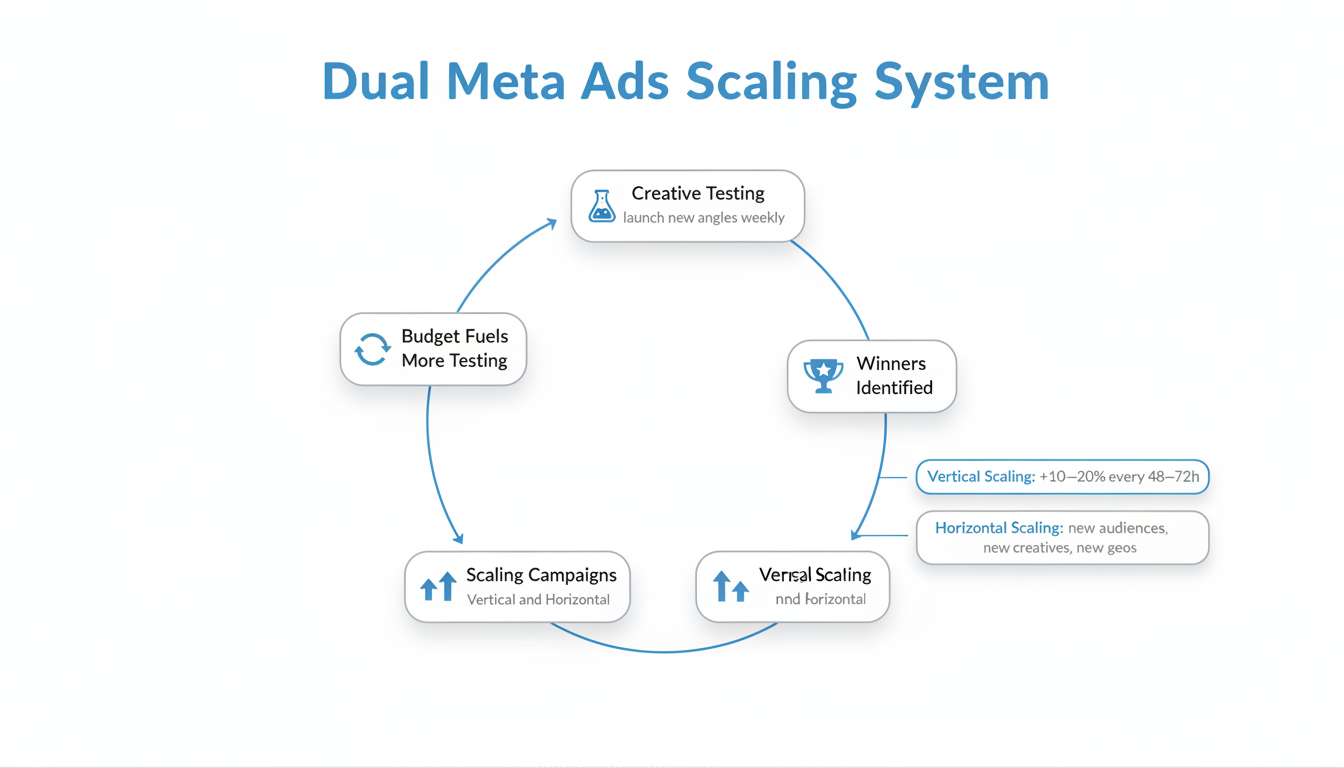
The best-performing accounts combine both strategies:
This dual approach builds a self-sustaining system: testing finds new winners, winners graduate to scaling, and scaling funds more testing.
How you increase budgets matters as much as how much you increase.
Increase budgets by 10-20% maximum per adjustment. Larger increases reset the learning phase and destabilize performance.
Example scaling path:
Day | Daily Budget | Change |
1 | $100 | Starting point |
3 | $115 | +15% |
6 | $130 | +13% |
9 | $150 | +15% |
12 | $175 | +17% |
Meta's delivery system needs time to stabilize after budget modifications. Adjusting more frequently forces ad sets back into learning phase, increasing CPA and reducing consistency.
Campaign Budget Optimization (CBO) lets Meta allocate budget across ad sets automatically. However, new ad sets often get starved while one dominant ad set absorbs all spend.
Set ad set spending minimums equal to your target CPA. This guarantees each ad set gets sufficient budget to test while still allowing Meta to favor top performers. Understanding how to run effective Facebook ads is crucial for maximizing your CBO strategy.
At scale ($30K+/month), cost caps become essential. They tell Meta your maximum acceptable CPA:
Start cost caps at 1.2x your target CPA, then gradually lower once the algorithm stabilizes.
Scaling failures usually stem from predictable mistakes. Here's how to avoid them.
The problem: Increasing budget means the same people see your ad repeatedly. Frequency rises, CTR drops, CPA increases.
The solution:
Looking at successful meta ads examples can provide inspiration for your creative refreshes.
The problem: Your target audience gets exhausted. You've reached everyone who's likely to convert.
The solution:
The problem: Rapid budget changes trigger constant learning phases, preventing optimization.
The solution:
The problem: Too much budget goes to existing customers instead of new customer acquisition.
The solution:
Safe scaling means 10-20% budget increases every 2-3 days. More aggressive scaling risks performance drops. If you're at $100/day and want to reach $1,000/day, expect 6-8 weeks of gradual increases while maintaining profitability. Learning how to increase roi facebook ads will help you maintain profitability throughout your scaling journey.
Common causes include creative fatigue (frequency too high), audience saturation (reached most of your potential customers), or algorithmic disruption from too-rapid budget changes. Check frequency, expand audiences, refresh creative, and ensure you're making gradual adjustments.
Advantage+ Shopping campaigns can work well for scaling ecommerce accounts with sufficient conversion data. They require less management and let Meta's algorithm optimize fully. However, they offer less control—test them alongside your proven manual campaigns rather than replacing everything. For specialized needs, consider working with a facebook ads marketing agency to optimize your Advantage+ strategy.
By submitting this form, you agree to our Privacy Policy and Terms & Conditions.



