
February 19, 2026


Table featured snippets occupy valuable SERP real estate for comparison, pricing, and specification queries. Unlike paragraph or list snippets, tables require specific structural optimization to win position zero. Google extracts and displays table data when it determines a tabular format best serves the user's query intent.
This guide covers the specific triggers, formatting requirements, and optimization tactics for winning table featured snippets.
Google displays table snippets for queries where structured comparison or specification data best answers the question.
Query patterns that trigger table snippets:
Query Type | Example Queries |
Comparison | "X vs Y comparison", "differences between X and Y" |
Pricing | "[product] pricing", "how much does [service] cost" |
Specifications | "[product] specs", "[model] features" |
Rankings | "best [category] for [use case]" |
Conversion | "[unit] to [unit] conversion chart" |
Key trigger signals:
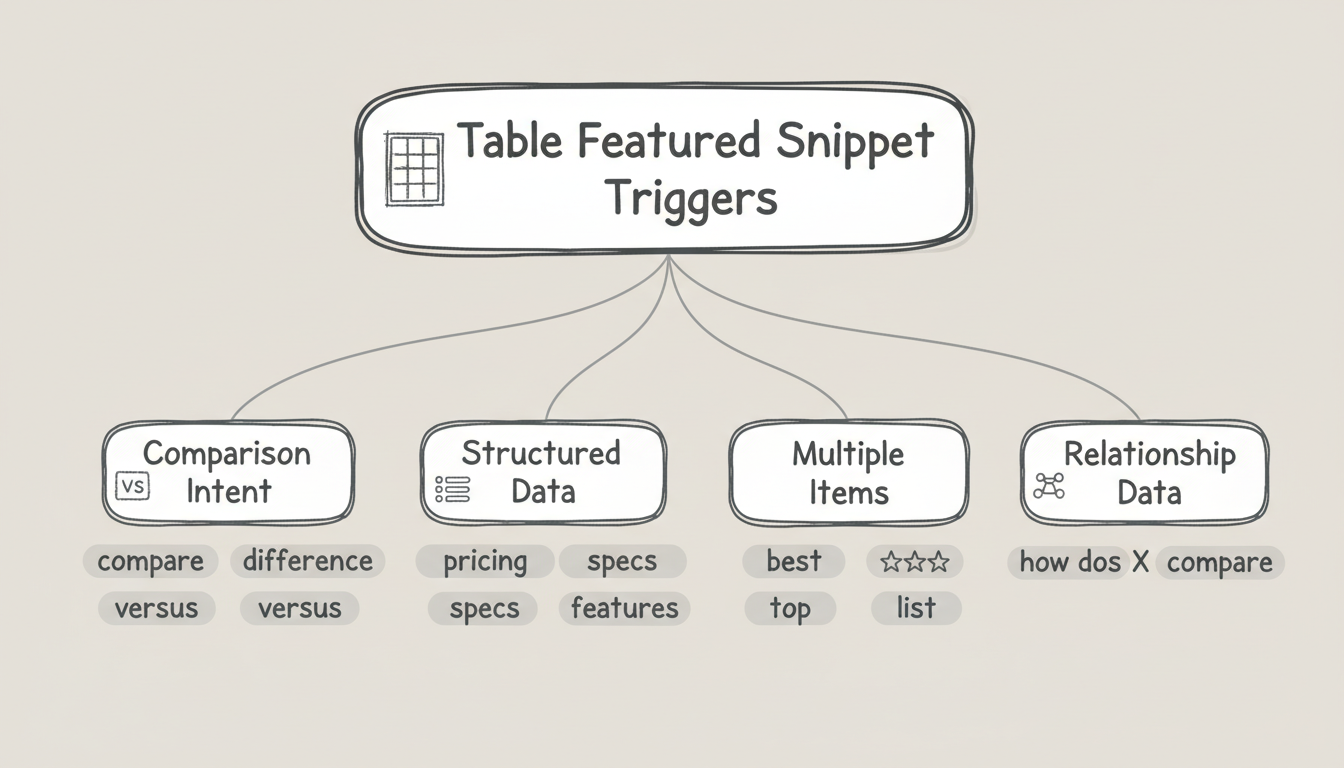
Table Snippet Triggers:
├── Query contains comparison intent
│   └── "vs", "compare", "difference"
│
├── Query seeks structured data
│   └── "pricing", "specs", "features"
│
├── Query implies multiple items
│   └── "best", "top", "list of"
│
└── Query requests relationship data
    └── "how does X compare to Y"
Understanding these triggers helps you identify which of your pages have table snippet potential.
Google has specific requirements for extracting table data into snippets.
Essential structural elements:
Element | Requirement | Why It Matters |
Header row | Clear column labels | Google needs to understand data categories |
First column | Item identifiers | Names the things being compared |
Consistent cells | Same data type per column | Enables clean extraction |
HTML tables | Proper <table> markup | CSS grid tables may not extract |
Technical markup requirements:
<table>
  <thead>
    <tr>
      <th>Product</th>
      <th>Price</th>
      <th>Features</th>
    </tr>
  </thead>
  <tbody>
    <tr>
      <td>Option A</td>
      <td>$99/mo</td>
      <td>Feature list</td>
    </tr>
    <!-- Additional rows -->
  </tbody>
</table>
Common mistakes that prevent extraction:
Google displays table snippets with specific size constraints.
Dimension guidelines:
Dimension | Optimal Range | Maximum Displayed |
Columns | 3-5 | 4-5 visible |
Rows | 4-8 | 6-8 visible |
Cell content | 1-3 words | Longer content truncates |
Total width | Fits desktop viewport | Responsive handling |
Row and column prioritization:
Display Priority:
├── Rows: First 6-8 rows displayed
│   └── Put most important items first
│
├── Columns: First 4-5 columns displayed
│   └── Put comparison criteria by importance
│
└── Cell content: First ~40 characters
    └── Front-load key information
If your table exceeds these dimensions, Google either truncates or may not select it for the snippet.

Column headers determine how Google interprets your table data.
Header optimization tactics:
Tactic | Implementation |
Use searchable terms | Include keywords users search for |
Keep headers concise | 1-3 words maximum |
Match query patterns | Align with how users ask questions |
Be specific | "Monthly Price" not just "Price" |
Example header optimization:
Weak headers:
| A | B | C | D |

Better headers:
| Product | Cost | Rating | Features |

Optimal headers:
| CRM Software | Monthly Price | G2 Rating | Key Features |
Headers that match user search terms increase snippet eligibility.
Cell content requires specific formatting for snippet extraction.
Cell content best practices:
Practice | Example |
Concise values | "$99/mo" not "Ninety-nine dollars per month" |
Consistent format | All prices in same format, all ratings same scale |
Factual content | Data, not marketing copy |
Current values | Updated information with visible dates |
Content types that work well:
High-Extraction Content:
├── Numeric values
│   └── Prices, percentages, ratings
│
├── Short text
│   └── Yes/No, product names, brief labels
│
├── Specifications
│   └── Dimensions, capacity, features
│
└── Comparisons
    └── Better/Worse, Faster/Slower
Content that performs poorly:
Where you place tables affects snippet eligibility, especially as AI overview content requirements continue to evolve and prioritize well-structured, semantically clear data presentation.
Placement guidelines:
Factor | Recommendation |
Position on page | Near the top, not buried at bottom |
Section heading | Use H2 that matches target query |
Surrounding context | Brief intro paragraph explaining the table |
Multiple tables | Separate with clear headings |
Optimal structure:
## [Query-Matching H2]

[1-2 sentence intro explaining what the table compares]

| Header 1 | Header 2 | Header 3 |
|----------|----------|----------|
| Data     | Data     | Data     |

[Optional: brief conclusion or methodology note]
The heading above your table should match how users search for this information.
Structured data enhances table snippet eligibility. Understanding the role of JSON-LD vs microdata for knowledge graphs helps you choose the right implementation approach for table markup.
Relevant schema types:
Schema | Use Case |
Product | Product comparison tables |
ItemList | Ranked lists in table format |
Table | Generic structured data tables |
Offer | Pricing comparison tables |
Implementation priority:
Schema markup doesn't guarantee snippets but provides additional signals about table content. For broader visibility optimization, consider how HowTo schema supports AI search by providing clear step-by-step structure that complements tabular data.
Win table snippets from competitors with weaker implementations.
Opportunity identification:
Signal | Opportunity |
Outdated data | Your current data wins |
Missing columns | Your more complete comparison wins |
Poor formatting | Your cleaner table wins |
Truncated display | Your optimized dimensions win |
Competitive analysis process:
Tables with fresh data and complete comparisons typically outperform outdated alternatives. As you refine your approach, tracking knowledge panel success stories can reveal how structured data investments pay off across multiple SERP features beyond just featured snippets.
Table featured snippet optimization requires specific structural attention:
Tables represent one of the highest-value snippet formats for commercial queries. Optimizing specifically for table extraction captures comparison traffic that often has strong purchase intent.
By submitting this form, you agree to our Privacy Policy and Terms & Conditions.



