
February 19, 2026


A Google Knowledge Panel establishes immediate credibility when someone searches your name or brand. That information box appearing beside search results signals that Google recognizes you as a notable entity—not just another website competing for attention. In 2026, with AI systems increasingly referencing Knowledge Graph data, earning a Knowledge Panel matters more than ever.
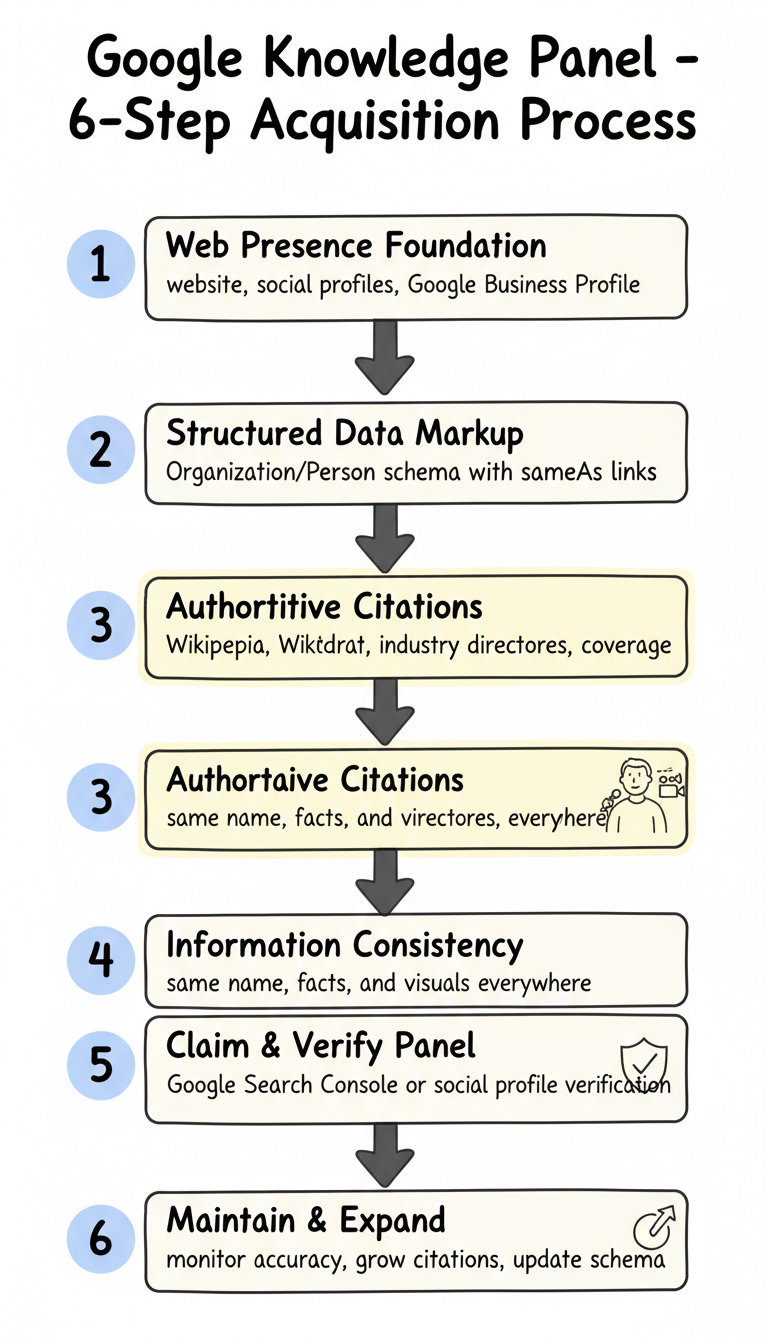
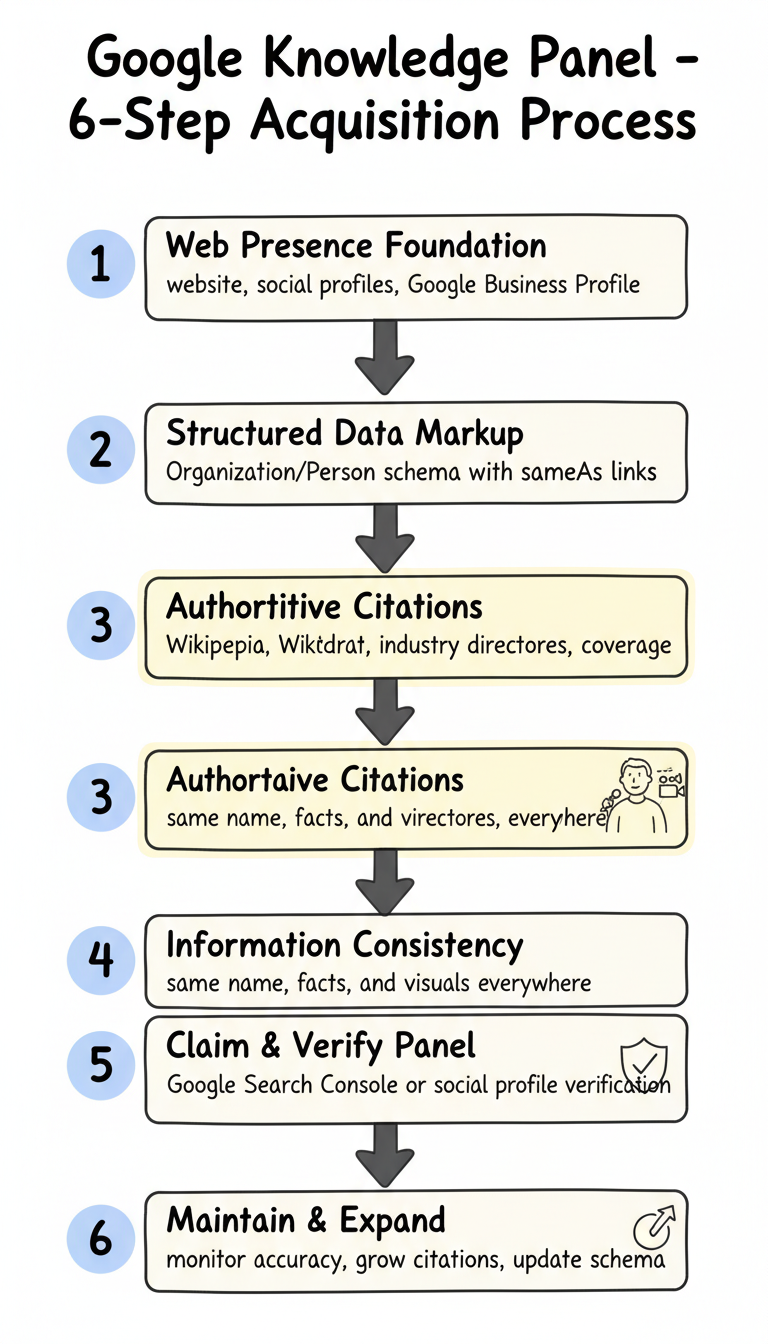
This guide walks through the specific steps required to get a Google Knowledge Panel, from establishing entity eligibility to claiming and verifying your panel.
Knowledge Panels are information boxes that appear on Google search results when you search for entities—people, places, organizations, and things that Google's Knowledge Graph recognizes. The panel displays key facts about the entity: photos, descriptions, social profiles, related entities, and other relevant details.
For brands, a Knowledge Panel shows company information, logos, founding date, leadership, and related companies. For individuals, it displays biographical information, accomplishments, social profiles, and professional affiliations.
Knowledge Panels pull information from Google's Knowledge Graph database, which synthesizes data from authoritative sources across the web. Appearing in a Knowledge Panel means Google has determined you're notable enough to exist as a recognized entity in their system.
Google doesn't grant Knowledge Panels to everyone who wants one. Meeting eligibility requirements is the first hurdle.
Google follows guidelines similar to Wikipedia's notability standards. You need significant coverage in independent, reliable sources. This means:
A single article doesn't establish notability. Google looks for consistent coverage across multiple sources over time.
Google must understand what kind of entity you are. Ambiguous entities that could be confused with others face difficulty getting panels. Your brand name, personal name, or organization name needs to be distinct or clearly disambiguated in available sources.
The information Google would display must be verifiable from authoritative sources. If basic facts about you—founding dates, locations, key people, descriptions—can't be confirmed from reliable sources, Google can't confidently create a panel.
Before pursuing a Knowledge Panel, ensure your foundational web presence supports entity recognition. Similar to how you optimize for AI-powered search engines, establishing clear entity signals across your web presence helps both traditional search engines and AI systems recognize your brand.
Your official website should contain detailed information about the entity:
Establish profiles on major platforms with consistent information:
Each profile should use the same entity name, description, and key facts. Inconsistency fragments your identity and confuses Google's entity recognition.
For businesses, claiming and verifying your Google Business Profile is essential. This provides direct confirmation to Google that your entity exists and the basic facts about it.
Schema markup explicitly tells Google what entities exist on your pages and their attributes. Just as clear definitions improve content for answer engine optimization, structured data helps search engines understand exactly what your entity represents.
For businesses, implement Organization schema with complete properties:
{
  "@context": "https://schema.org",
  "@type": "Organization",
  "name": "Your Company Name",
  "legalName": "Your Company Legal Name",
  "url": "https://yourcompany.com",
  "logo": "https://yourcompany.com/logo.png",
  "foundingDate": "2015",
  "founders": [{"@type": "Person", "name": "Founder Name"}],
  "address": {...},
  "sameAs": [
    "https://linkedin.com/company/yourcompany",
    "https://twitter.com/yourcompany"
  ]
}
For individuals seeking personal Knowledge Panels:
{
  "@context": "https://schema.org",
  "@type": "Person",
  "name": "Your Name",
  "jobTitle": "Your Title",
  "worksFor": {"@type": "Organization", "name": "Company"},
  "alumniOf": {"@type": "Organization", "name": "University"},
  "sameAs": [
    "https://linkedin.com/in/yourprofile",
    "https://twitter.com/yourhandle"
  ]
}
The sameAs property links your entity to other authoritative sources. Include links to Wikipedia, Wikidata, LinkedIn, verified social profiles, and industry databases. These connections help Google understand that references across different sources represent the same entity.
Google builds Knowledge Graph entries from authoritative external sources. Your own website isn't enough—you need independent citations.
Wikipedia is the most influential source for Knowledge Graph data. If you meet Wikipedia's notability guidelines, create or improve your Wikipedia article:
Wikipedia has strict rules about self-promotion. Violations can result in article deletion and editor bans.
Wikidata is easier to work with than Wikipedia. Creating a Wikidata entry for your entity provides structured data that Google directly ingests. You can create Wikidata entries without meeting Wikipedia's notability standards.
Include comprehensive properties:
Get listed in authoritative industry sources:
Each listing reinforces your entity's existence and attributes.
Generate news coverage that establishes notability:
The coverage must be in recognized publications, not paid placements or press release distribution.
Entity recognition requires consistent information across all sources. Audit your presence for:
Use the exact same entity name everywhere. "ABC Company," "ABC Company Inc.," and "ABC Co." fragment your identity. Choose one canonical name and use it consistently.
Founding dates, locations, descriptions, and key facts must match across all sources. Conflicting information prevents confident entity recognition.
Use the same logo and imagery across platforms. Visual consistency supports brand recognition and entity disambiguation.
Once Google creates a Knowledge Panel for your entity, you can claim it for management capabilities.
Search for your entity name. If a Knowledge Panel appears, look for "Claim this knowledge panel" at the bottom. If no panel exists yet, continue building your presence and citations.
Google offers multiple verification methods:
Complete the verification process to gain panel management access.
Once verified, you can:
Google reviews suggested changes but doesn't guarantee acceptance. Changes must align with information from authoritative sources.
Knowledge Panels require ongoing attention.
Regularly check your panel for incorrect information. Report inaccuracies through the panel management interface.
Continue building citations from authoritative sources. More reliable sources strengthen your entity's position in the Knowledge Graph. Understanding what an answer engine is helps you recognize which platforms now reference Knowledge Graph data beyond traditional search.
Keep schema markup current as information changes. Outdated structured data can conflict with other sources.
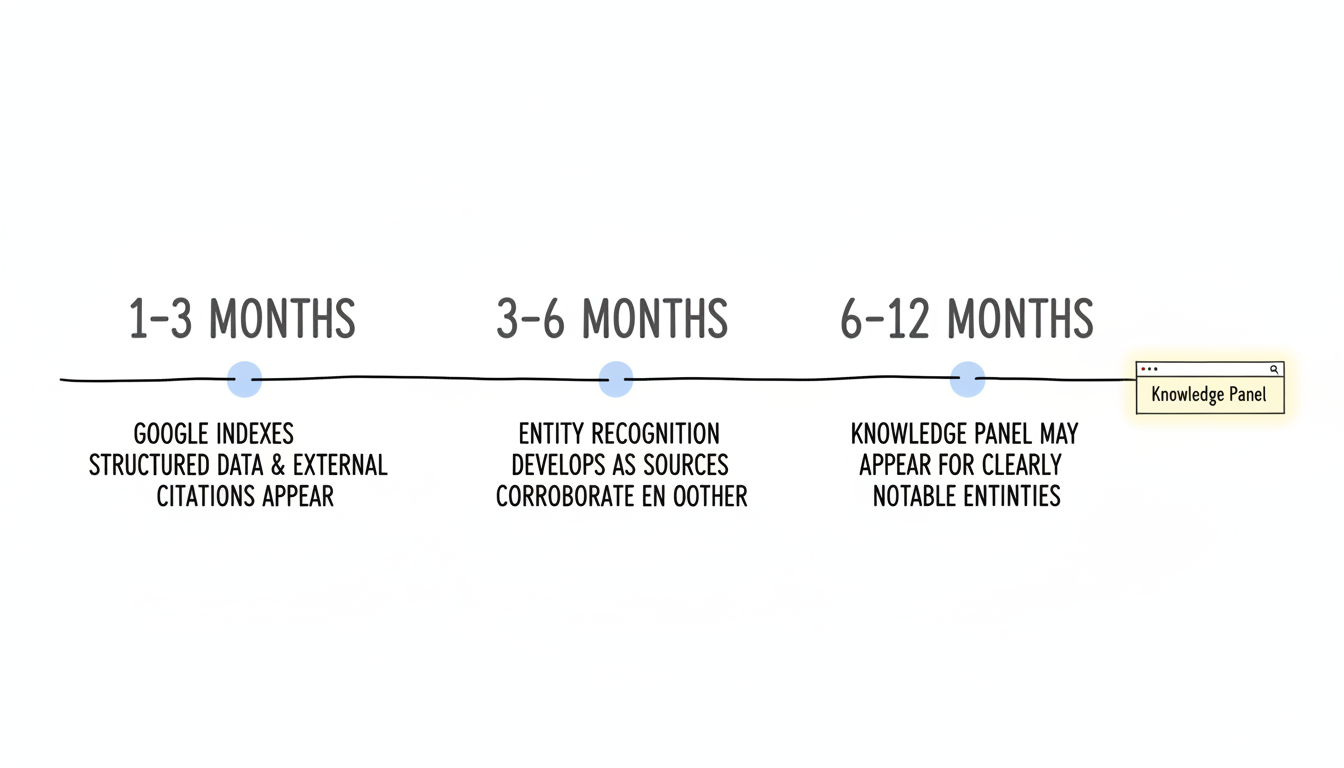
Knowledge Panel creation isn't instant. Expect:
Some entities wait years before panels appear. Others with strong existing notability get panels quickly. The timeline depends on how clearly you meet Google's criteria.
Beyond search visibility, Knowledge Panels signal entity recognition that AI systems reference. ChatGPT, Perplexity, and Google's AI features draw from Knowledge Graph data. Entities with established Knowledge Panel presence appear more frequently and accurately in AI-generated answers. This makes Knowledge Panels a critical component of generative engine optimization best practices.
Investing in Knowledge Panel qualification isn't just about the panel itself—it's about establishing the entity presence that modern search systems recognize and reference.
By submitting this form, you agree to our Privacy Policy and Terms & Conditions.



