
February 19, 2026


Deploying Microsoft Copilot for Microsoft 365 introduces AI capabilities across your organization's productivity tools—Word, Excel, PowerPoint, Teams, Outlook. For IT and security leaders, this deployment carries significant implications beyond typical software rollouts. Copilot accesses data across Microsoft Graph, potentially surfacing information in ways traditional search couldn't. Understanding the security model, governance requirements, and risk mitigation strategies is essential before enterprise deployment.
This guide addresses IT and security decision-makers evaluating or implementing Copilot for Microsoft 365.
Understanding Copilot's data access model reveals where security considerations apply.
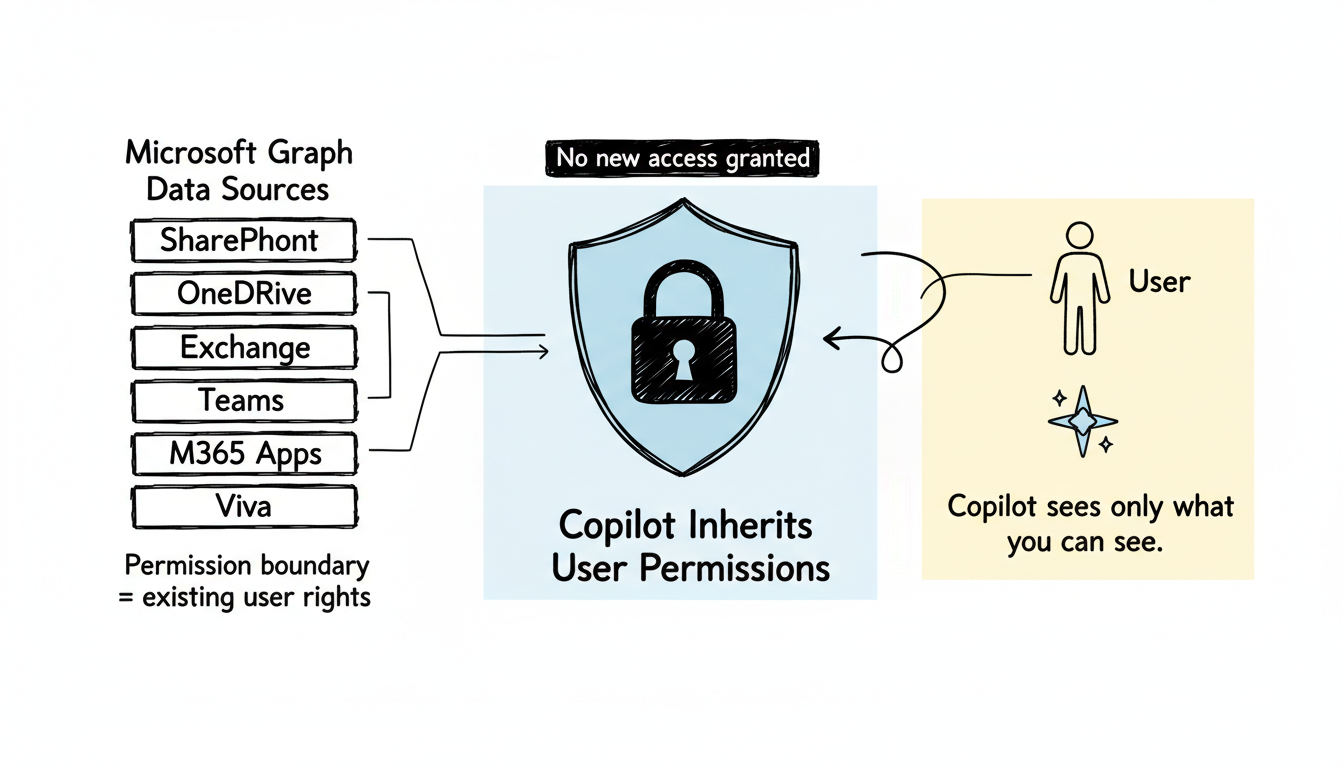
Copilot doesn't create new data access—it leverages existing Microsoft Graph permissions.
What Copilot can access:
Microsoft Graph Data Sources:
├── SharePoint (documents, sites, lists)
├── OneDrive (personal and shared files)
├── Exchange (emails, calendars)
├── Teams (messages, channels, meetings)
├── Microsoft 365 apps (Word, Excel, PowerPoint files)
└── Viva (engagement, learning data)
Key security principle: Copilot inherits the user's existing permissions. It cannot access content the user couldn't already access through normal Microsoft 365 navigation.
Copilot's permission model mirrors existing access controls.
Scenario | Copilot Behavior |
User has access to document | Copilot can reference document content |
User lacks access | Copilot cannot see or reference content |
Shared folder access | Copilot can use shared content |
External sharing enabled | Copilot can access externally shared content user has access to |
The exposure amplification concern: While Copilot respects permissions, it surfaces content more efficiently than manual search. Information that was technically accessible but practically obscured becomes easily discoverable.
Deploying Copilot surfaces several security concerns requiring attention.
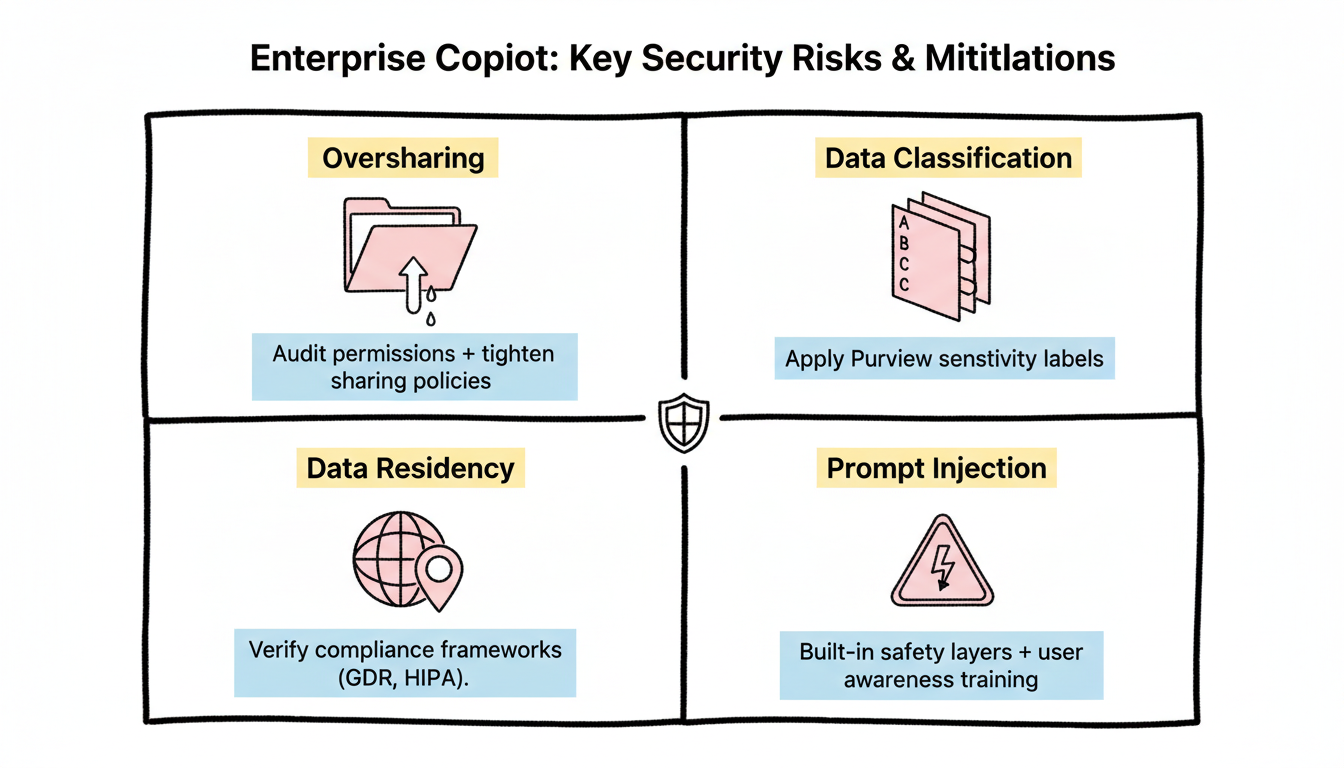
The risk: Organizations often have overly permissive sharing settings accumulated over years. Copilot makes this visible.
Example scenario: An HR document with company-wide sharing was created years ago for a specific purpose. Employees could technically access it but never found it. With Copilot Teams optimization, any employee asking about HR policies might receive content from this document.
Mitigation strategies:
Strategy | Implementation |
Permission audit | Review site and folder permissions before Copilot deployment |
Sensitivity labels | Apply Microsoft Purview labels to restrict AI access |
Sharing policy review | Tighten default sharing settings |
"Anyone" link cleanup | Remove anonymous sharing links |
Stale permission removal | Revoke access no longer needed |
Pre-deployment checklist:
Microsoft Purview sensitivity labels control Copilot's content access.
Label protection options:
Sensitivity Label Setting | Copilot Effect |
No restrictions | Copilot can access and reference |
Encrypt | Copilot can access if user has decrypt rights |
Restrict Copilot access | Copilot excluded from using labeled content |
Mark as confidential | Visual marking, Copilot access depends on additional settings |
Recommended approach:
Geographic considerations:
Microsoft Copilot processing occurs within Microsoft's infrastructure. For regulated industries:
Concern | Consideration |
Data residency requirements | Verify Copilot processing aligns with data location commitments |
Cross-border transfer | Understand where prompts and responses are processed |
Regulatory compliance | Map Copilot data flows to compliance requirements |
Compliance frameworks to evaluate:
Microsoft provides compliance documentation specific to Copilot—review for your regulatory context.
Emerging risks:
Risk | Description | Mitigation |
Prompt injection | Malicious content designed to manipulate AI responses | Microsoft's built-in safety layers; user awareness training |
Data extraction attempts | Users trying to access content beyond their permissions | Permission model prevents; audit logging detects attempts |
Hallucination in responses | AI generating inaccurate information presented as fact | User training on verification; citation checking |
Microsoft implements guardrails, but user awareness remains essential. Organizations implementing how to optimize for AI search engines should consider similar guardrails for enterprise AI deployments.
Establish governance before deployment, not after.
Essential governance policies:
Policy Area | Coverage |
Acceptable use | What Copilot should/shouldn't be used for |
Data handling | How to handle AI-generated content |
Verification requirements | When to verify AI outputs |
Confidential discussions | Guidance on using Copilot with sensitive topics |
External sharing | Rules for sharing Copilot-generated content |
Sample acceptable use guidelines:
Appropriate Copilot Uses:
├── Document drafting and editing
├── Meeting summarization
├── Data analysis assistance
├── Email composition help
└── Research and information synthesis

Require Human Review:
├── Client-facing communications
├── Legal or compliance content
├── Financial figures and calculations
├── External presentations
└── Personnel decisions
Available audit capabilities:
Audit Area | What's Logged |
Copilot interactions | User prompts and interaction patterns |
Content access | What data Copilot retrieved |
Response generation | AI outputs (for compliance review) |
Failed access attempts | Blocked queries (permission denied) |
Monitoring recommendations:
Similar to AI search analytics dashboard implementations, monitoring AI interactions provides visibility into usage patterns and potential security concerns.
Training topics:
Topic | Why It Matters |
Permission model understanding | Users know Copilot respects existing access |
Verification responsibility | Users must validate AI outputs |
Confidentiality awareness | Guidance on sensitive topic handling |
Reporting procedures | How to report concerns or issues |
Labeling requirements | How to properly classify content |
Effective training reduces security incidents and support burden.
Phased deployment reduces risk.
Pilot group characteristics:
Factor | Recommendation |
Size | 50-200 users |
Composition | Mix of roles and departments |
Technical aptitude | Include both technical and non-technical users |
Data access | Representative of typical permission patterns |
Pilot objectives:
Recommended progression:
Phase 1 (Month 1-2): IT and Security teams
├── Internal testing
├── Policy finalization
└── Monitoring setup

Phase 2 (Month 3): Selected departments
├── Controlled expansion
├── User feedback collection
└── Issue remediation

Phase 3 (Month 4-6): Organization-wide
├── Full deployment
├── Ongoing monitoring
└── Continuous improvement
Prepare for issues:
Scenario | Response |
Security incident | License removal, access restriction |
Compliance concern | Pause deployment, legal review |
User adoption issues | Additional training, targeted support |
Performance problems | Throttling, scope reduction |
Have documented rollback procedures before deployment begins. Organizations familiar with generative engine optimization best practices understand the importance of fallback strategies when implementing AI systems.
Deployment isn't the end of security work.
Periodic activities:
Activity | Frequency |
Permission audits | Quarterly |
Audit log review | Monthly |
Policy updates | As needed (minimum annually) |
User training refresh | Annually |
Compliance reassessment | With regulatory changes |
Copilot-specific incidents:
Incident Type | Response Steps |
Data exposure | Identify scope, revoke access, remediate permissions |
Inappropriate content generation | Document, report to Microsoft, user counseling |
Compliance violation | Legal consultation, remediation, documentation |
Include Copilot in existing incident response procedures.
IT and security considerations for Copilot for Microsoft 365:
Copilot for Microsoft 365 offers productivity benefits, but responsible deployment requires IT and security preparation. Organizations treating this as a standard software rollout miss critical governance requirements.
By submitting this form, you agree to our Privacy Policy and Terms & Conditions.



