
February 19, 2026


As AI platforms like ChatGPT, Perplexity, and Google AI Overviews drive increasing traffic to websites, marketers need reliable methods to track this new referral source. Google Analytics 4 offers built-in capabilities to monitor AI search traffic, though proper configuration is required. This guide explains how to set up GA4 for comprehensive AI search tracking in 2026.
AI referral traffic represents a distinct user behavior pattern that traditional analytics categories miss. Users who arrive from AI platforms have already received context about your brand—often including recommendations or citations—making them qualitatively different from standard organic or direct visitors.
What AI traffic tracking reveals:
Without proper tracking, AI traffic often gets categorized as direct or organic, hiding valuable insights about your generative engine optimization performance. Marketers who track AI referral traffic in GA4 using custom regex filters for ChatGPT and Perplexity gain actual visibility data that informs strategy.
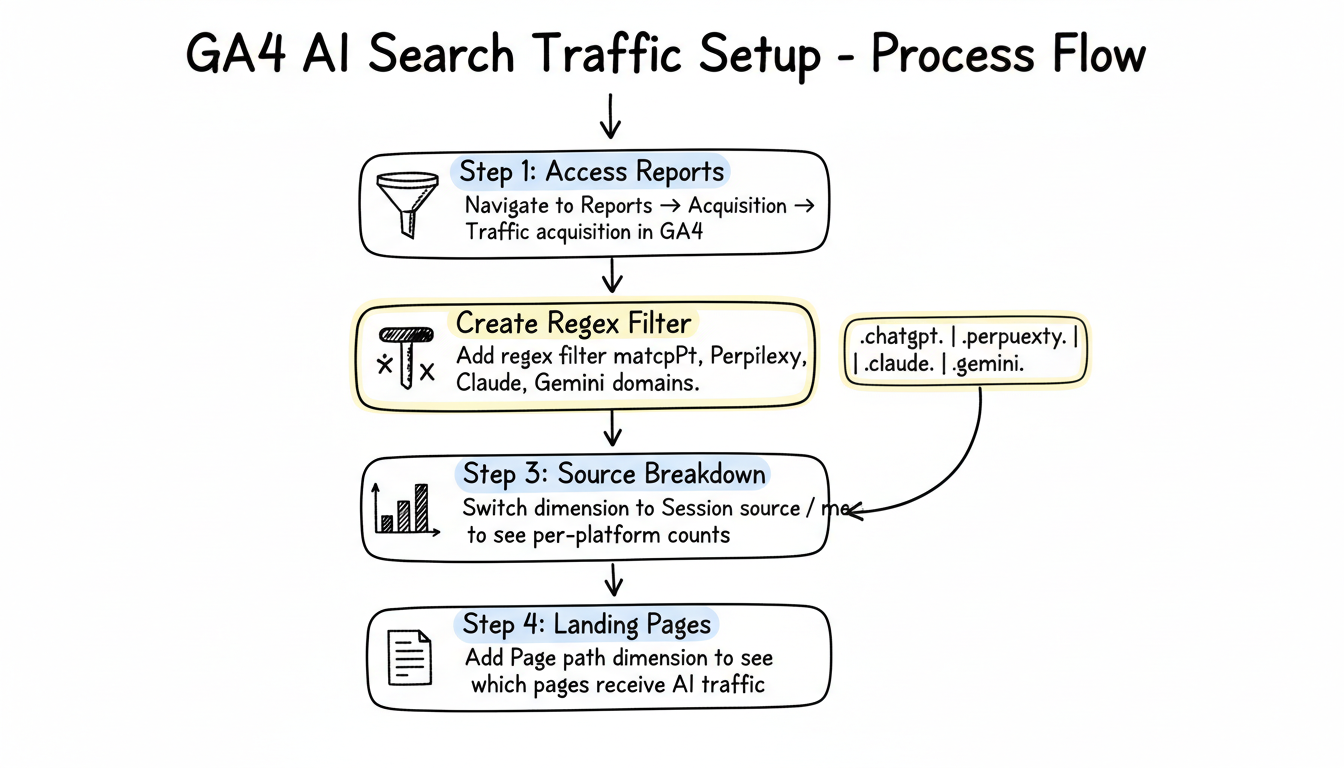
Setting up AI traffic tracking in GA4 requires creating filters that identify traffic from AI platforms as distinct referral sources.
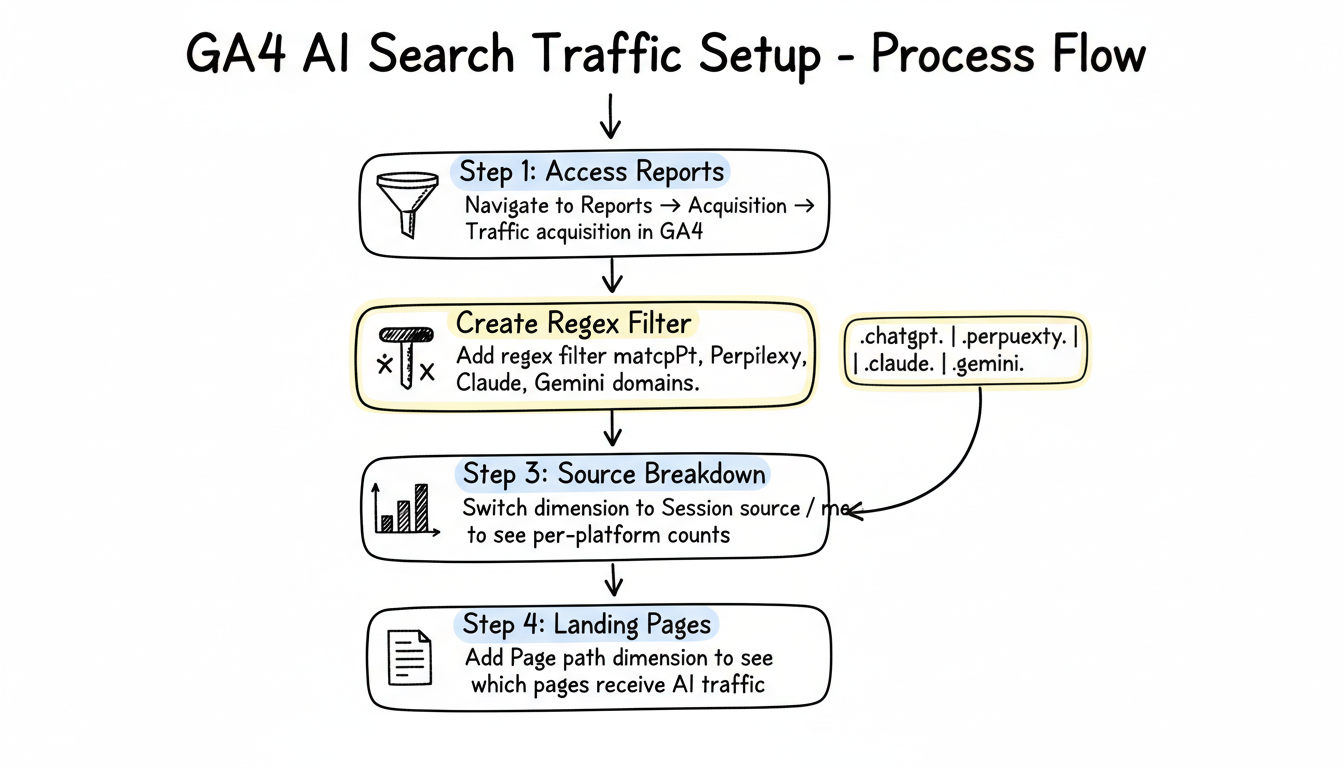
Begin in your GA4 property:
Apply a filter to identify AI referral traffic:
(.gpt.|.chatgpt.|.openai.|.perplexity.|.gemini.google.|.bard.|.claude.|.anthropic.|.copilot.|.edgeservices.)This regex captures traffic from major AI platforms. The pattern uses partial matches to catch variations in how these platforms pass referrer data.
After applying the filter, refine the view:
You'll now see specific traffic counts from ChatGPT, Perplexity, Claude, and other AI sources that match your filter pattern.
To see which pages receive AI traffic:
This identifies which content earns clicks from AI platforms—valuable data for understanding what content performs well in AI search contexts.
Beyond basic traffic tracking, custom dimensions enable deeper AI search analysis. Understanding how AI content optimization impacts your traffic patterns helps refine your overall strategy.
Build a reusable segment for AI-referred users:
This exploration lets you compare how AI-referred users behave versus other traffic sources on engagement time, conversion rate, and path length.
Monitor how AI-referred visitors interact with your site:
Engagement metrics show whether AI traffic provides quality visits. Track:
Conversion tracking reveals business impact:
Create dedicated reports for AI traffic monitoring:
Beyond referral tracking, consider tracking events related to AI discovery. Implementing comprehensive AI SEO best practices 2026 ensures you capture the full picture of how AI platforms influence user behavior.
If you have site search enabled:
Create events that measure AI traffic quality:
Scroll depth indicates content engagement—AI-referred users who scroll deeply likely found relevant content.
Time on page shows content consumption patterns. High engagement time suggests good query-content match.
Return visits from AI traffic indicate successful brand introduction through AI platforms.
GA4 AI traffic tracking has important limitations to understand.
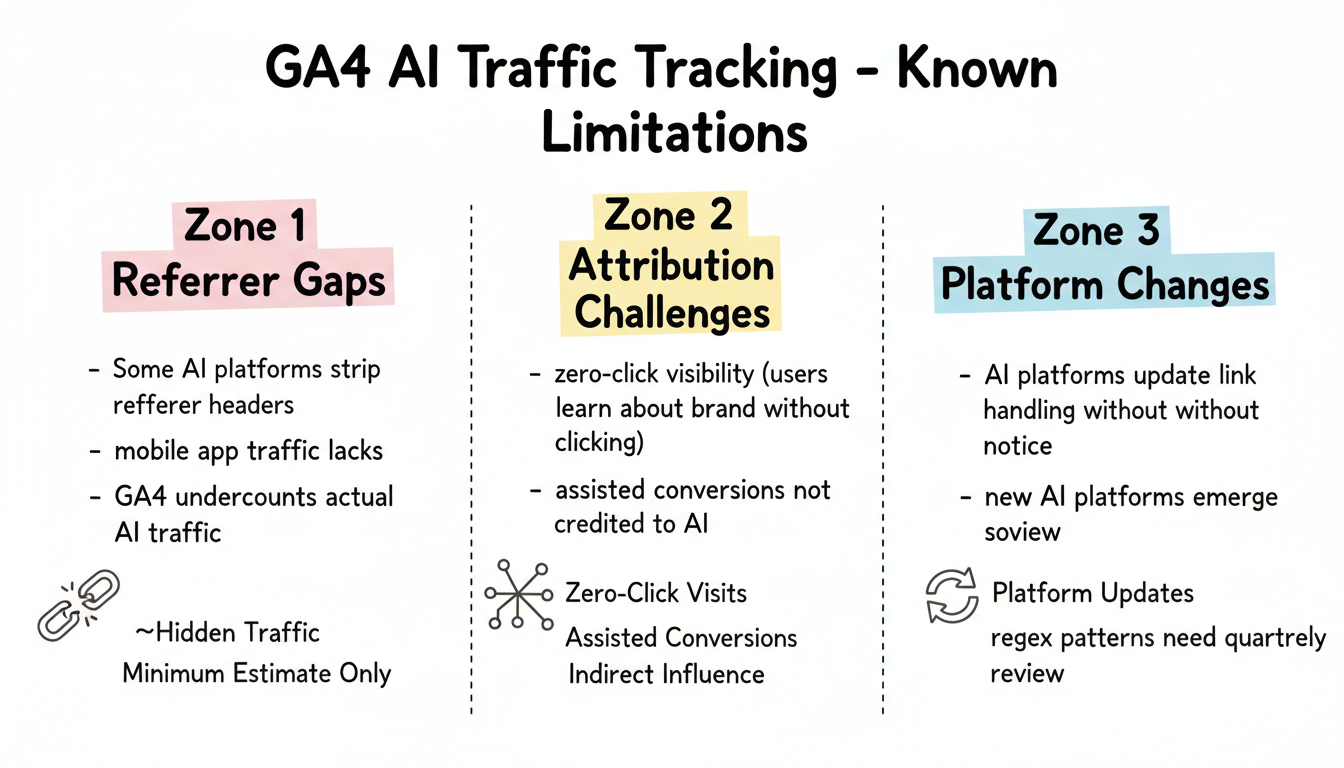
Not all AI platforms consistently pass referrer data:
These gaps mean GA4 likely undercounts actual AI-driven traffic. Use GA4 data as directional rather than absolute measurement. Learning how to apply Google AI overview optimization tips can help you maximize the trackable visibility you do receive.
AI influence often extends beyond trackable clicks:
Zero-click visibility occurs when users learn about your brand from AI responses without clicking through. This awareness drives later direct visits or branded searches that GA4 can't attribute to AI.
Assisted conversions from AI traffic may not receive proper credit in standard attribution models. Users might discover you through AI, research further, then convert through another channel.
Consider AI traffic metrics alongside branded search volume and direct traffic trends for fuller picture of AI impact.
AI platforms frequently update how they handle outbound links:
Review and update your regex patterns quarterly to maintain accuracy.
GA4 provides your own site data. Combine with AI visibility tools for competitive context.
What GA4 shows: Your traffic from AI sources, landing page performance, conversion data.
What visibility tools add: Competitor AI traffic, citation frequency, brand mention tracking across AI platforms.
Together, these data sources reveal whether your AI visibility translates to traffic and how you compare to competitors in AI-driven discovery. Exploring GEO optimization tools alongside GA4 creates a complete measurement framework for your AI search performance.
Popular AI visibility tools that complement GA4 include:
Establish effective AI traffic monitoring with these practices.
Compare AI traffic segments against:
These comparisons reveal whether AI traffic delivers value equivalent to other acquisition channels.
Track metrics that matter for business decisions:
This data justifies continued investment in generative engine optimization.
Most likely causes: AI traffic is being categorized as direct or organic, your regex filter has syntax errors, or AI platforms aren't passing referrer data. Test your filter with known AI traffic sources and verify regex syntax in GA4's filter builder.
GA4 captures AI traffic when platforms pass referrer data, but not all do consistently. Consider GA4 numbers as minimum estimates—actual AI-driven traffic is likely higher due to referrer stripping and zero-click visibility.
Yes. Creating a dedicated channel group prevents AI traffic from being miscategorized and enables cleaner reporting. This is especially valuable for organizations investing significantly in GEO strategies.
By submitting this form, you agree to our Privacy Policy and Terms & Conditions.



