
February 19, 2026


Google PPC advertising remains the cornerstone of paid search strategy for businesses worldwide. With Google processing over 8.5 billion searches daily, mastering Google Ads PPC is essential for reaching customers actively searching for your products and services. This guide covers everything you need to know about Google PPC in 2026, from ad types to best practices and when to expand your reach with additional platforms.
Google PPC (pay-per-click) advertising is a model where you pay only when someone clicks your ad. Your ads appear on Google's search results pages, partner websites, YouTube, Gmail, and mobile apps based on keywords you target and audiences you define.
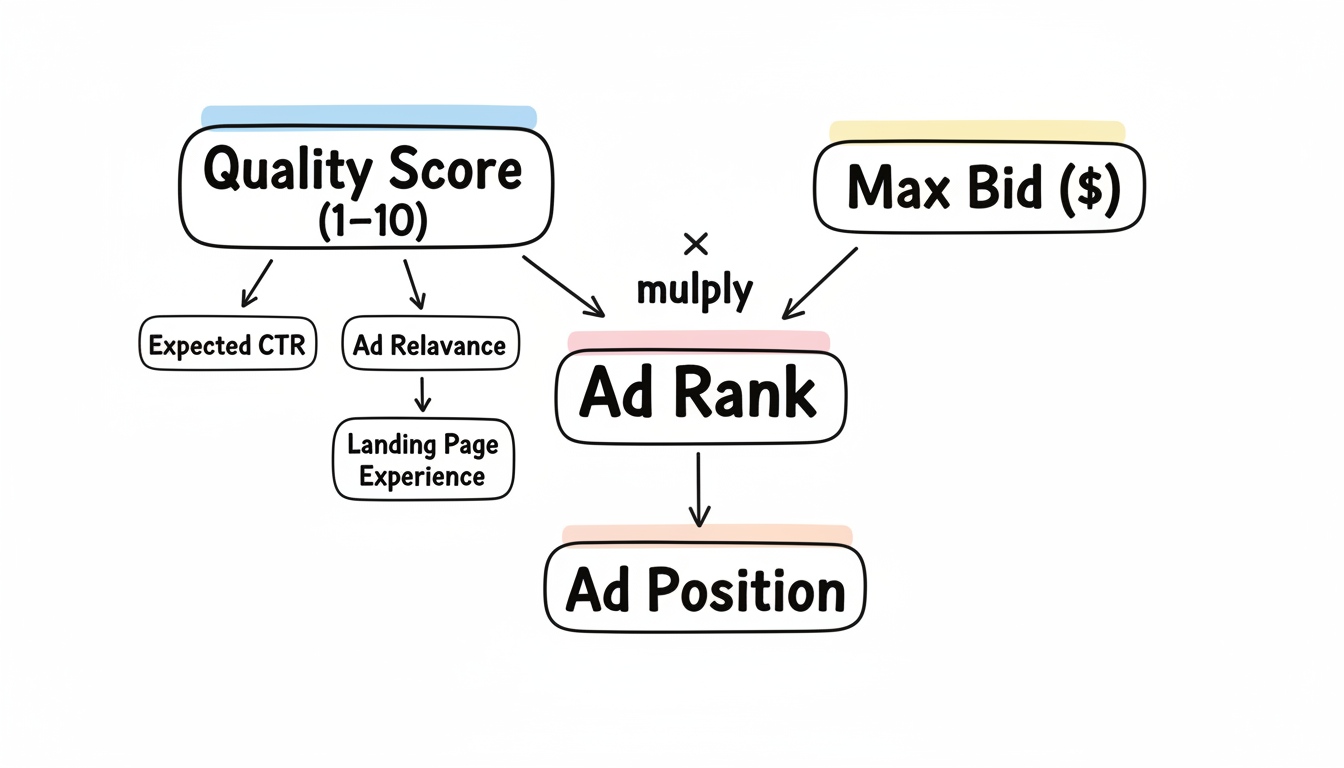
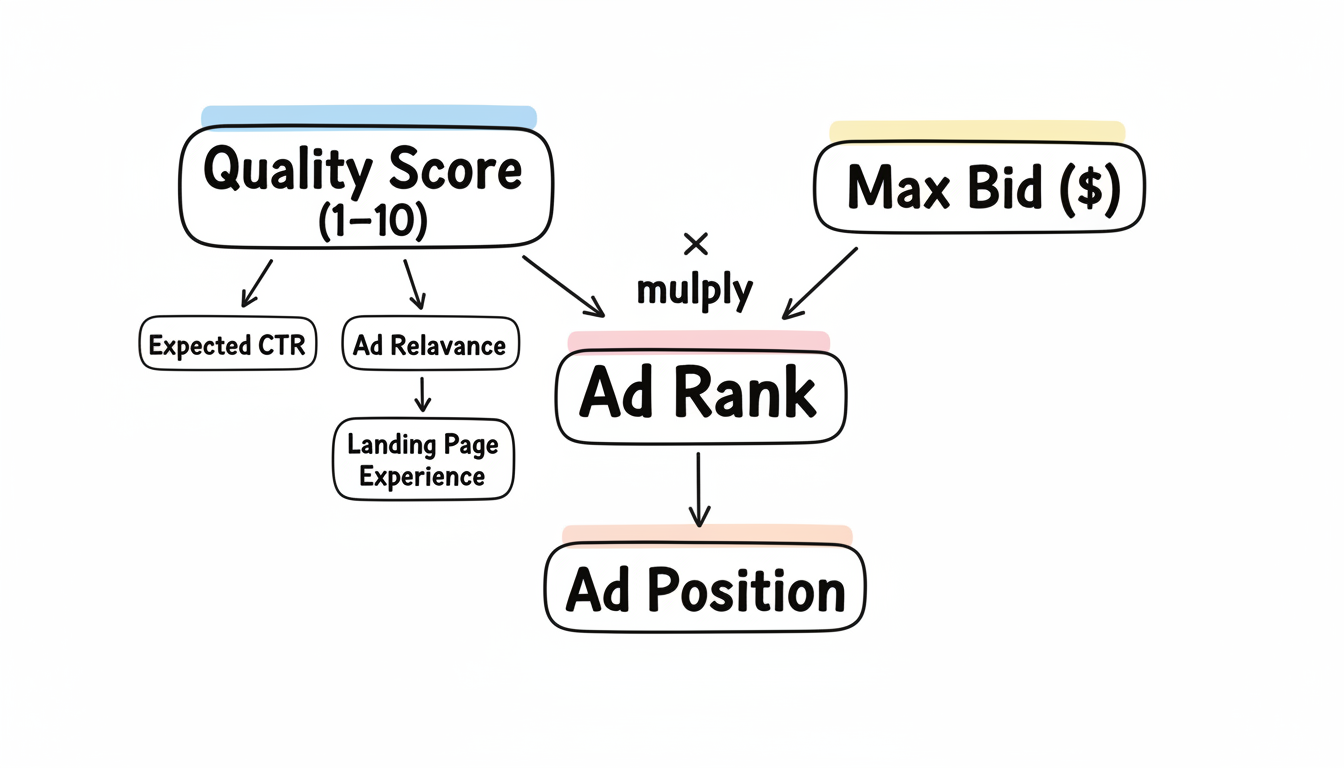
Google Ads operates on an auction system. When someone searches, Google runs an instant auction among advertisers bidding on relevant keywords. Your ad's position depends on:
Quality Score: Google rates your ad quality (1-10) based on:
Max Bid: The maximum you're willing to pay per click
Ad Rank: Quality Score × Max Bid determines your position
Higher Quality Scores let you achieve better positions at lower costs.
According to WordStream, account structure significantly impacts Quality Score, making proper campaign organization essential.
62% of Google Ads professionals now use Smart Bidding, which uses machine learning to optimize bids automatically. Common strategies include:
Smart Bidding requires accurate conversion tracking to work effectively. Without proper tracking, automation works against you.
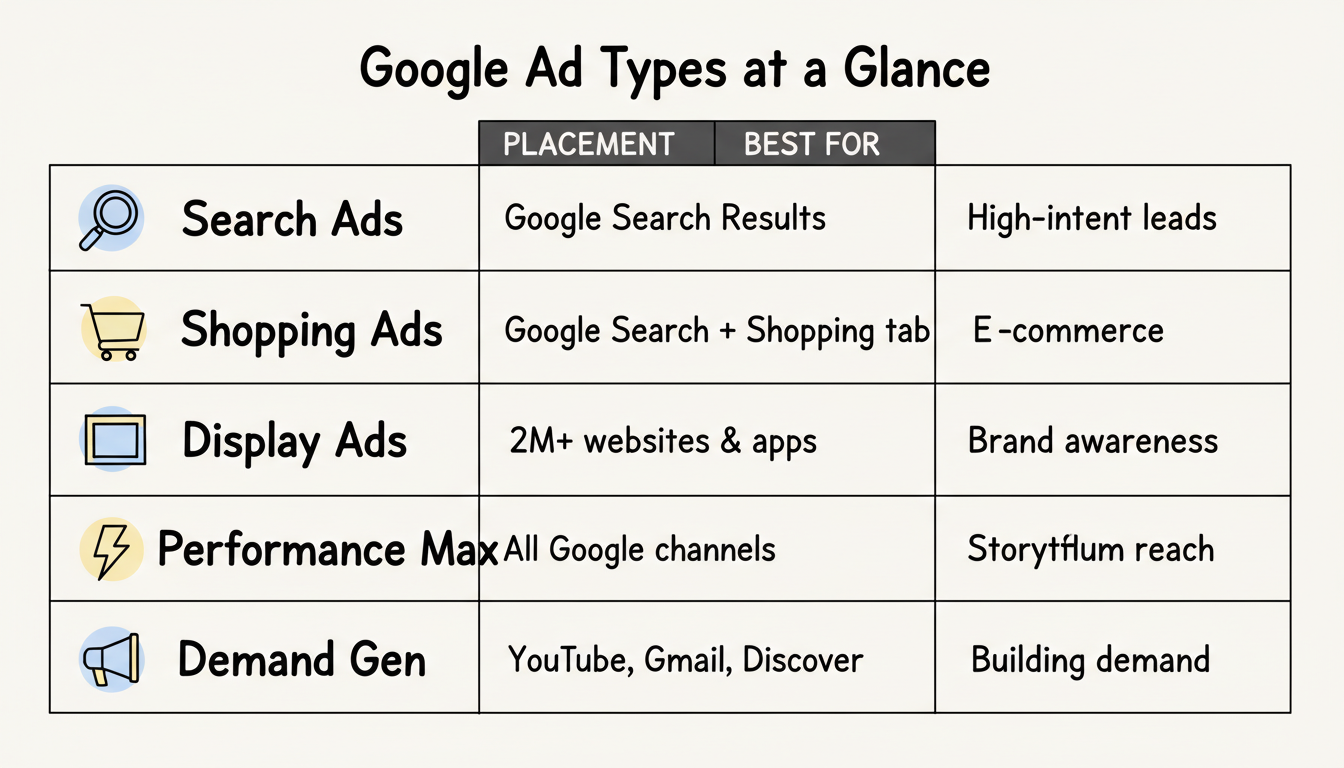
Google offers multiple ad formats, each suited to different marketing objectives. Understanding when to use each format is fundamental to your overall PPC advertising strategy.
Text-based ads appearing on Google search results. Best for capturing high-intent users actively searching for your products or services.
Components:
Best for: Lead generation, direct response, bottom-funnel conversions.
Product listings with images, prices, and merchant names. These appear on Google Search and the Shopping tab.
According to LitCommerce, Shopping Ads (also called Product Listing Ads or PLAs) display products directly in search results, making them essential for e-commerce.
Requirements:
Best for: E-commerce, retail, product-focused businesses. For comprehensive e-commerce campaign management, consider working with an ecommerce PPC agency.
Visual banner ads appearing across Google's Display Network of over 2 million websites and apps.
Formats:
Best for: Brand awareness, remarketing, upper-funnel engagement. Learn more about display advertising vs paid search to understand when each approach works best.
Ads on YouTube and Google video partners. Video remains critical for reaching audiences where they consume content.
Types:
Best for: Brand building, product demonstrations, storytelling.
Google's most automated campaign type. Your ads can appear across Search, Display, YouTube, Gmail, and Maps from a single campaign.
According to the Google Ads Performance Max Strategy Guide, Performance Max requires sufficient conversion data (typically 30+ conversions/month) to optimize effectively.
Best for: Businesses with strong conversion tracking wanting maximum reach with minimal manual management.
Upper-to-mid-funnel campaigns appearing across YouTube, Gmail, and Discover. Closest to social media advertising within Google's ecosystem.
Best for: Building awareness, creating demand, reaching audiences before they search.
Follow these steps to launch your first Google Ads campaign.
Choose what you want to achieve:
Identify terms your customers search. Use Google's Keyword Planner to find:
Focus on transactional and commercial intent keywords that indicate buying readiness.
Follow this hierarchy for optimal organization:
Account → Campaigns → Ad Groups → Keywords/Ads
As WordStream advises, group keywords by theme within ad groups so ads can be highly relevant to each search.
Create ads that match search intent:
Start with modest budgets, monitor performance, and scale what works. Review metrics daily in the first weeks.
Apply these principles for better campaign performance.
The most important advice for Google Ads in 2026 is ensuring accurate conversion tracking. Smart Bidding and automated features depend entirely on conversion data quality.
Track meaningful actions:
Showing key content above-the-fold improves results. Your landing page should:
Review what searches trigger your ads. Add valuable terms as keywords, and add irrelevant terms as negative keywords to prevent wasted spend.
Test ad variations systematically:
As Google Ads becomes more automated, success comes from providing better inputs:
Google Ads shouldn't be your only PPC channel. Microsoft Advertising offers compelling reasons to expand your reach.
Microsoft's Search Network (Bing, Yahoo, AOL) reaches users who don't use Google, including higher-income demographics and B2B decision-makers. Understanding the full landscape of Microsoft Ads targeting features can help you reach these valuable audiences.
Microsoft Ads typically deliver 30-40% lower cost-per-click than Google Ads for similar keywords, stretching your budget further. The platform offers unique advantages including LinkedIn integration, which is the only search platform offering LinkedIn profile targeting, enabling B2B advertisers to target by company, job function, and industry.
Fewer advertisers on Microsoft means less crowded auctions and often better ad positions.
Consider adding Microsoft Ads when:
Microsoft Advertising offers direct import from Google Ads, making expansion straightforward. Import your campaigns, adjust bids for the new platform, and launch.
Google PPC costs vary widely by industry. Average cost-per-click ranges from $1-$2 for most industries to $50+ in competitive sectors like legal and insurance. Most businesses spend $1,000-$10,000 monthly on Google Ads, plus 10-20% for management if using an agency.
Yes, when done correctly. Google Ads lets you set any budget, target specific geographic areas, and reach customers actively searching for what you offer. Start with focused campaigns, track conversions carefully, and scale what works.
PPC (pay-per-click) is the pricing model; Google Ads is Google's advertising platform. You can run PPC campaigns on multiple platforms including Google Ads, Microsoft Ads, Meta Ads, and LinkedIn Ads.
By submitting this form, you agree to our Privacy Policy and Terms & Conditions.



