
February 19, 2026


Last Updated: January 2026
Quality SEO tools typically cost $100-500+ monthly. But what if you're just starting out, testing strategies, or working with limited resources? The good news: several powerful AI SEO tools offer genuinely useful free tiers.
This guide covers the best free AI SEO tools available in 2026, what each actually delivers without payment, and how to build an effective free tool stack for your SEO workflow.
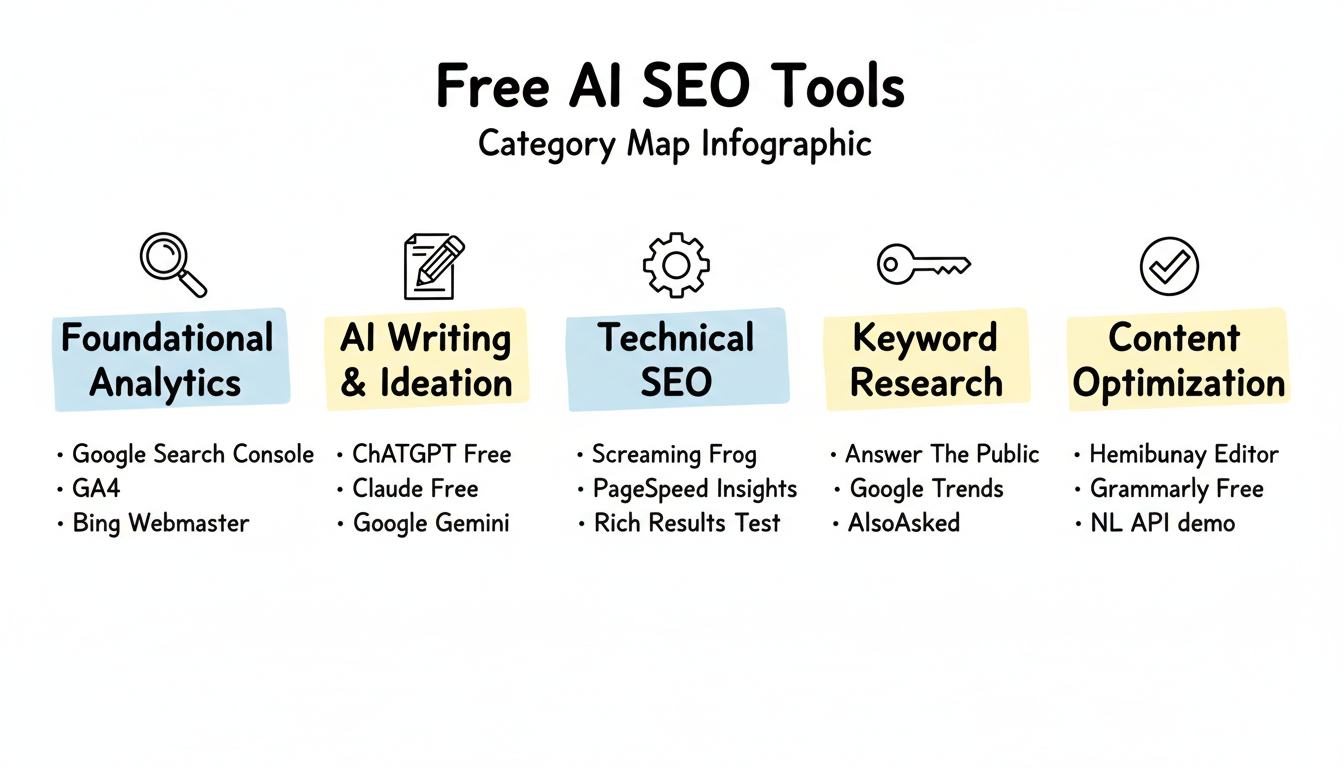
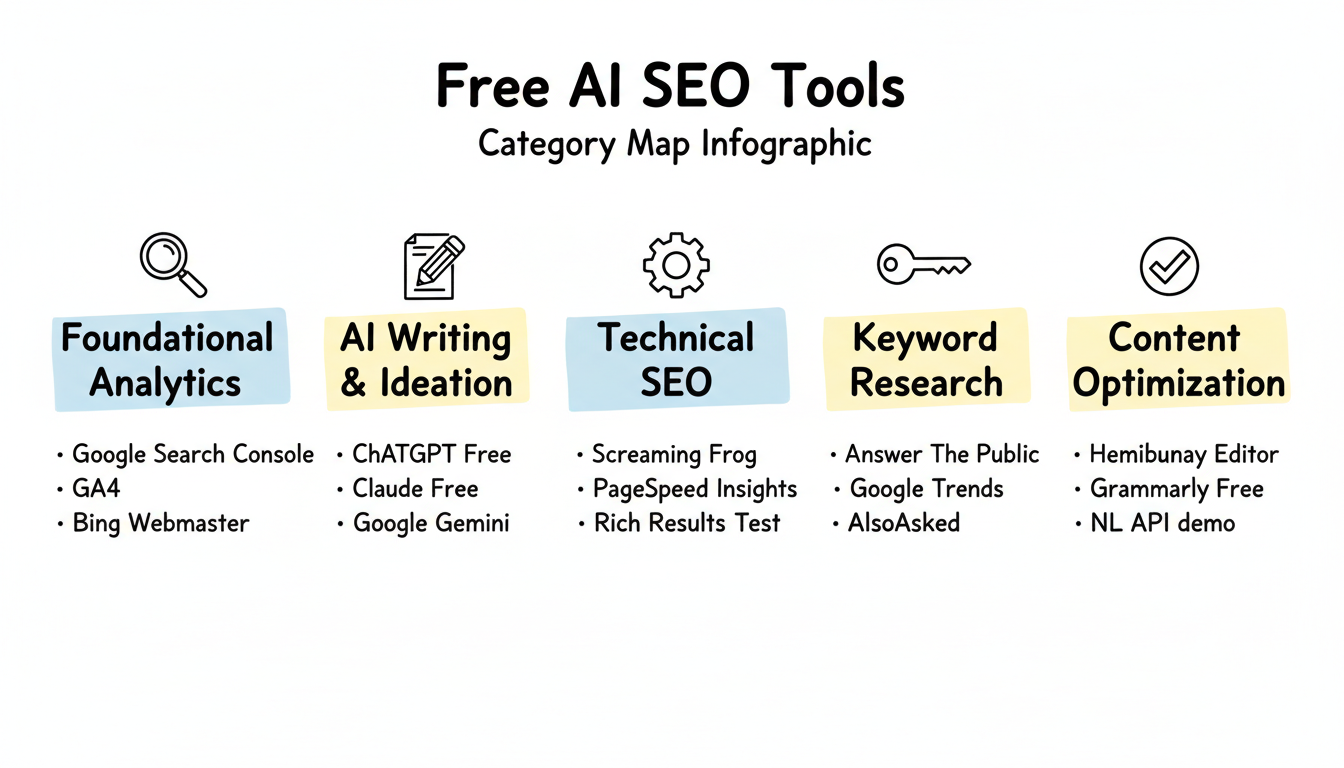
Free AI SEO tools fall into several categories, each serving different optimization needs:
Foundational Analytics
AI Writing and Ideation
Technical SEO
Keyword Research
Content Optimization
The key to maximizing free tools is understanding their limitations and combining them strategically. No single free tool replaces a paid suite, but the right combination covers most essential SEO functions. When evaluating free vs paid AEO tools, consider how these options fit into your broader optimization strategy.
Cost: Completely free
Google Search Console remains the most valuable free SEO tool available. It provides data directly from Google about how your site performs in search. For those implementing Google Search Console AEO strategies, this tool serves as the foundation for tracking AI Overview visibility.
Key Features:
Limitations:
Best For: Everyone. This is non-negotiable—every website should have GSC configured.
Cost: Free tier available (GPT-4o mini, limited GPT-4o)
ChatGPT's free tier offers substantial value for SEO tasks, though with usage limits. Understanding ChatGPT optimization tactics can help you maximize visibility in AI-generated responses.
Key Features:
Limitations:
Best For: Content ideation, draft creation, and repetitive writing tasks like meta descriptions.
Cost: Free tier with daily limits
Claude's free tier offers strong capabilities for SEO writing and technical tasks.
Key Features:
Limitations:
Best For: Technical SEO tasks, content analysis, and longer writing projects when ChatGPT limits are reached.
Cost: Free for up to 500 URLs
Screaming Frog's free version provides professional-grade technical SEO auditing for smaller sites.
Key Features:
Limitations:
Best For: Small sites needing comprehensive technical audits. Sites over 500 pages need the paid version ($259/year).
Cost: Completely free
GA4 provides essential traffic and user behavior data for SEO analysis.
Key Features:
Limitations:
Best For: Understanding which pages drive traffic and conversions, measuring SEO impact on business goals.
Cost: Completely free
PageSpeed Insights analyzes Core Web Vitals and provides actionable performance recommendations.
Key Features:
Limitations:
Best For: Page-by-page performance optimization, Core Web Vitals monitoring.
Cost: Limited free searches per day
Answer The Public visualizes question-based queries around any topic, valuable for content planning. When combined with voice search AEO optimization strategies, this tool helps identify natural language queries that AI systems prioritize.
Key Features:
Limitations:
Best For: Content ideation, FAQ planning, understanding how people ask questions about topics.
Cost: Completely free
Google's Rich Results Test validates structured data implementation. For comprehensive schema validation and testing for AI search, this tool serves as your first line of defense against implementation errors.
Key Features:
Limitations:
Best For: Validating schema markup before and after implementation.
Cost: Completely free
Google Trends shows search interest patterns over time and by geography.
Key Features:
Limitations:
Best For: Identifying trending topics, understanding seasonality, comparing topic interest.
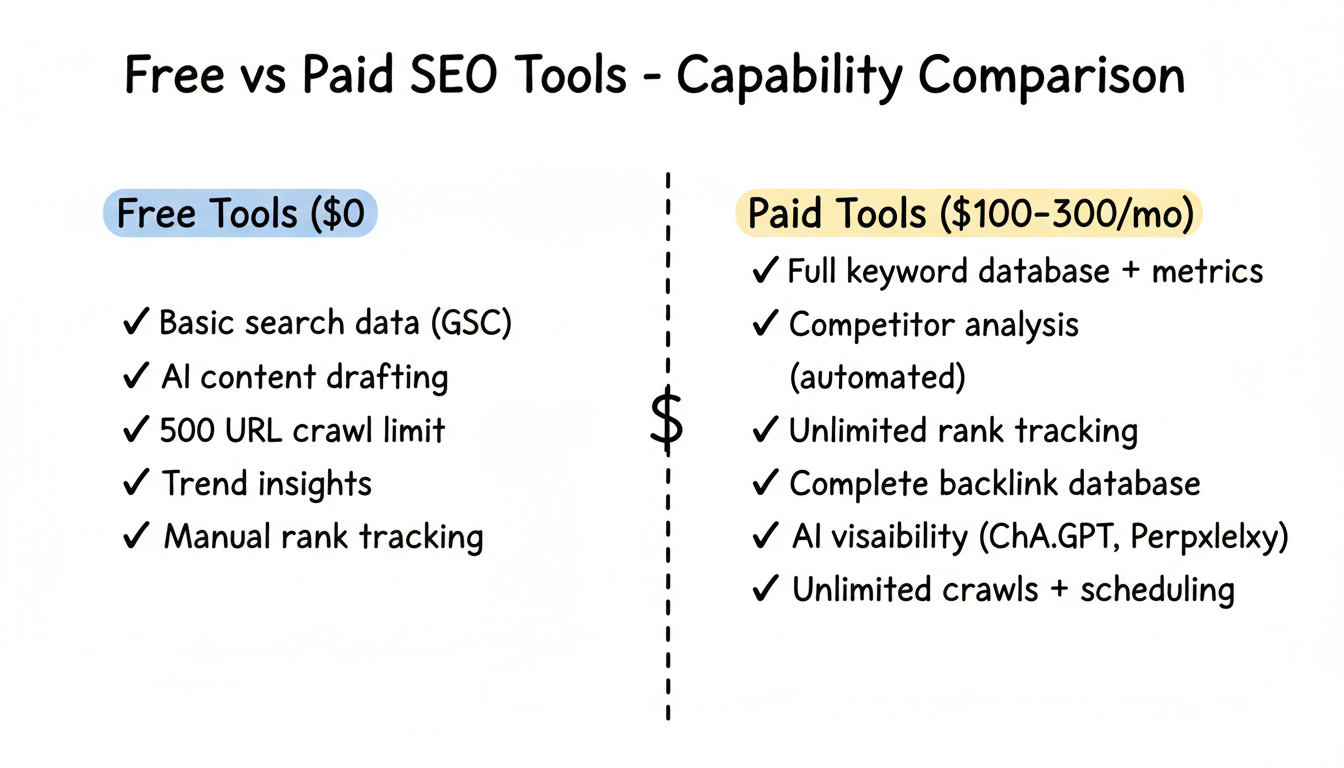
Understanding the gap between free and paid tools helps set realistic expectations. If you're evaluating whether to invest in professional assistance, reviewing affordable AEO services can provide perspective on when DIY tools reach their limits.
Capability | Free Tools | Paid Tools ($100-300/mo) |
Keyword research | Basic suggestions | Full database + metrics |
Competitor analysis | Manual research | Automated insights |
Rank tracking | GSC (own site only) | Track competitors too |
Backlink data | None | Full backlink database |
AI visibility | None | LLM mention tracking |
Technical audits | 500 URLs | Unlimited + scheduling |
Content optimization | Manual | AI-guided scoring |
Getting value from free tools requires strategic usage. Understanding AI SEO best practices 2026 helps ensure you're applying these tools to the right optimization priorities.
Don't try to force one tool to do everything. Build workflows that leverage each tool's strengths:
Weekly Workflow Example:
Free AI tools can help analyze data from other free tools:
Using generative AI for structured data creation can significantly accelerate your implementation speed.
Without paid rank tracking, create spreadsheets to monitor:
Be realistic about what free tools cannot do:
Free tools don't show competitor data. You won't know:
Free tiers impose restrictions:
Free tools don't track:
This blind spot grows more significant as AI search adoption increases. Dedicated answer engine optimization tools become necessary for comprehensive visibility tracking.
Paid tools automate what free tools require manually:
Consider investing in paid tools when:
Screaming Frog's free limit becomes restrictive. Budget for the $259/year license or consider alternatives.
If you're competing in a serious market, flying blind on competitor activity isn't sustainable. Keyword gap analysis and backlink research require paid tools. Researching AI SEO companies or generative engine optimization companies can help identify the right solution partners.
Manual processes that free tools require cost time. Calculate whether 10+ hours monthly of manual work justifies $100-300 in tool subscriptions.
If your audience uses ChatGPT, Perplexity, or voice assistants, you need paid AI visibility tools. Free options don't exist for this category. Understanding GEO vs AEO differences helps clarify which specialized tools you need.
Free tier limits multiply with additional sites. Agency and multi-site workflows need paid subscriptions.
Tool | Purpose |
Google Search Console | Performance tracking |
Google Analytics 4 | Traffic analysis |
ChatGPT Free | Content ideation |
Hemingway Editor | Readability |
Answer The Public | Topic research |
Total Cost: $0
Tool | Purpose |
Google Search Console | SEO monitoring |
Google Analytics 4 | Conversion tracking |
Screaming Frog Free | Technical audits |
PageSpeed Insights | Performance optimization |
ChatGPT + Claude | Content and schema |
Rich Results Test | Schema validation |
Total Cost: $0
For small businesses looking to expand beyond free tools, exploring AEO software options can bridge the gap between DIY and full agency support.
Tool | Purpose | Cost |
Google Search Console | Foundation | Free |
Screaming Frog Paid | Full technical audits | $259/year |
SE Ranking or Ubersuggest | Keyword research | $50-80/month |
ChatGPT Plus | Enhanced AI | $20/month |
Total Cost: ~$100/month
This hybrid approach provides competitive data while minimizing spend.
Yes, especially Google Search Console and GA4 which provide data unavailable elsewhere. Free AI tools add significant value for content work. However, free tools alone won't match comprehensive paid suites for competitive analysis or scale.
Google Search Console. It's the only source of direct Google data about your site's search performance, and it's completely free with no limitations based on site size.
For basic SEO on a small site, yes. GSC, GA4, free AI tools, and Screaming Frog's free version cover fundamentals. Competitive analysis and AI visibility tracking require paid tools.
ChatGPT's free tier offers the best balance of capability and access for most SEO tasks. Claude's free tier excels at longer-form content. Use both to maximize daily limits.
Indefinitely for personal blogs or very small sites. Growing businesses typically need paid tools within 6-12 months as competitive pressure and scale requirements increase.
Screaming Frog's paid license ($259/year) if you have more than 500 pages. Otherwise, an all-in-one tool like SE Ranking ($52/month) or Semrush ($129/month) for keyword research and competitive data.
Free AI SEO tools can support genuine SEO progress when used strategically. Google's free offerings—Search Console, Analytics, PageSpeed Insights—remain industry standards. AI assistants add powerful content capabilities at no cost.
The key is understanding limitations. Free tools require more manual effort, lack competitive intelligence, and can't track AI search visibility. For serious SEO in competitive markets, paid tools eventually become necessary.
Start with free tools to learn SEO fundamentals and validate your strategy. As your site grows and competition intensifies, invest in paid tools that multiply your effectiveness. The goal isn't to stay free forever—it's to spend wisely when you do invest.
By submitting this form, you agree to our Privacy Policy and Terms & Conditions.



