
February 19, 2026


SEO has always been labor-intensive. Keyword research, technical audits, rank tracking, content optimization, reporting—the tasks pile up quickly. Manual execution of these processes doesn't scale. Teams that rely entirely on human effort hit capacity limits that prevent growth.
SEO automation tools change this equation. They handle repetitive tasks systematically, freeing SEO professionals to focus on strategy, creativity, and decisions that require human judgment. This guide covers what to automate, the best tools by category, and how to build workflows that maximize efficiency.
SEO automation uses software to perform repetitive optimization tasks without manual intervention. Instead of manually checking rankings daily, an automated tool does it. Instead of manually auditing thousands of pages, a crawler handles it in minutes.
Automation doesn't replace SEO expertise—it amplifies it. The goal is removing busywork so your energy goes into growth rather than maintenance. Much like how generative AI search optimization transforms content strategy, automation transforms operational efficiency.
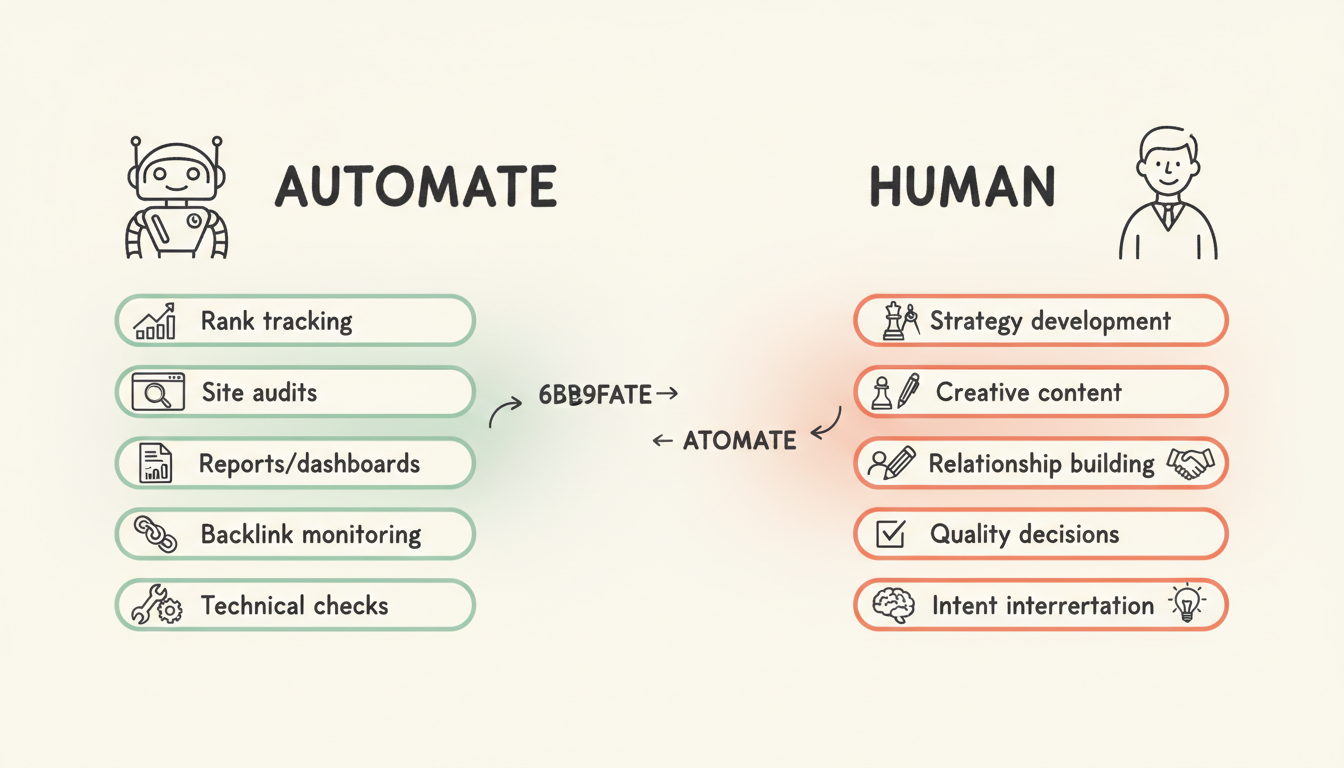
Modern automation tools handle tasks across the SEO spectrum:
Some tasks still require human judgment:
The best automation strategies identify which tasks benefit from speed and scale versus which require human insight. This becomes especially important when considering geo optimization tactics that require local market understanding.
Different tools excel at different automation needs. Here's what leads in each category.
These platforms automate multiple SEO functions within a single ecosystem.
Semrush ($139.95+/month) The most comprehensive automation suite available. Semrush automates:
Best for teams wanting a unified platform that handles most automation needs.
Ahrefs ($129+/month) Renowned for backlink data quality with strong automation capabilities:
Best for teams prioritizing link building automation.
SE Ranking ($65+/month) Cost-effective automation for agencies and SMBs:
Best for agencies needing scalable automation at lower price points. When combined with best generative engine optimization tools, these platforms create powerful optimization ecosystems.
These tools automate technical audits and implementation.
Screaming Frog (Free up to 500 URLs / $259/year) The industry standard for technical crawling:
Best for technical SEOs needing comprehensive crawl data.
Sitebulb ($35+/month) Visual technical audits with automated prioritization:
Best for teams with varying technical expertise.
Alli AI ($299+/month) Automated implementation, not just analysis:
Best for large sites where manual implementation is impractical. Understanding aeo schema markup priority helps maximize the value of automated schema implementation.
Dedicated tools for monitoring ranking positions.
AccuRanker ($140+/month) Fast, accurate rank tracking with robust automation:
Best for teams needing frequent, reliable rank data. This becomes essential for competitive ai search benchmarking efforts.
SERP Robot ($29+/month) Budget-friendly rank automation:
Best for smaller sites with basic tracking needs.
Tools that automate content analysis and recommendations.
Surfer SEO ($89+/month) Real-time content optimization scoring:
Best for content teams needing optimization guidance.
Clearscope ($170+/month) Enterprise content automation:
Best for larger content operations.
Frase ($15+/month) Research and optimization automation:
Best for teams prioritizing research efficiency. Tools like hubspot ai search grader complement these platforms by providing additional optimization insights.
Tools that automate outreach and link prospecting.
BuzzStream ($24+/month) Outreach workflow automation:
Best for teams doing manual outreach at scale.
Pitchbox (Custom pricing) Enterprise outreach automation:
Best for agencies and large link building operations.
Tool | Best For | Starting Price | Key Automation |
Semrush | All-in-one automation | $139.95/mo | Full suite |
Ahrefs | Backlink monitoring | $129/mo | Link analysis |
SE Ranking | Budget agencies | $65/mo | Rank/audit |
Screaming Frog | Technical audits | Free/$259/yr | Site crawling |
Sitebulb | Visual audits | $35/mo | Issue prioritization |
Alli AI | Implementation | $299/mo | Bulk changes |
Surfer SEO | Content optimization | $89/mo | Real-time scoring |
Clearscope | Enterprise content | $170/mo | Content grading |
BuzzStream | Outreach | $24/mo | Email sequences |
Effective automation requires thoughtful workflow design.
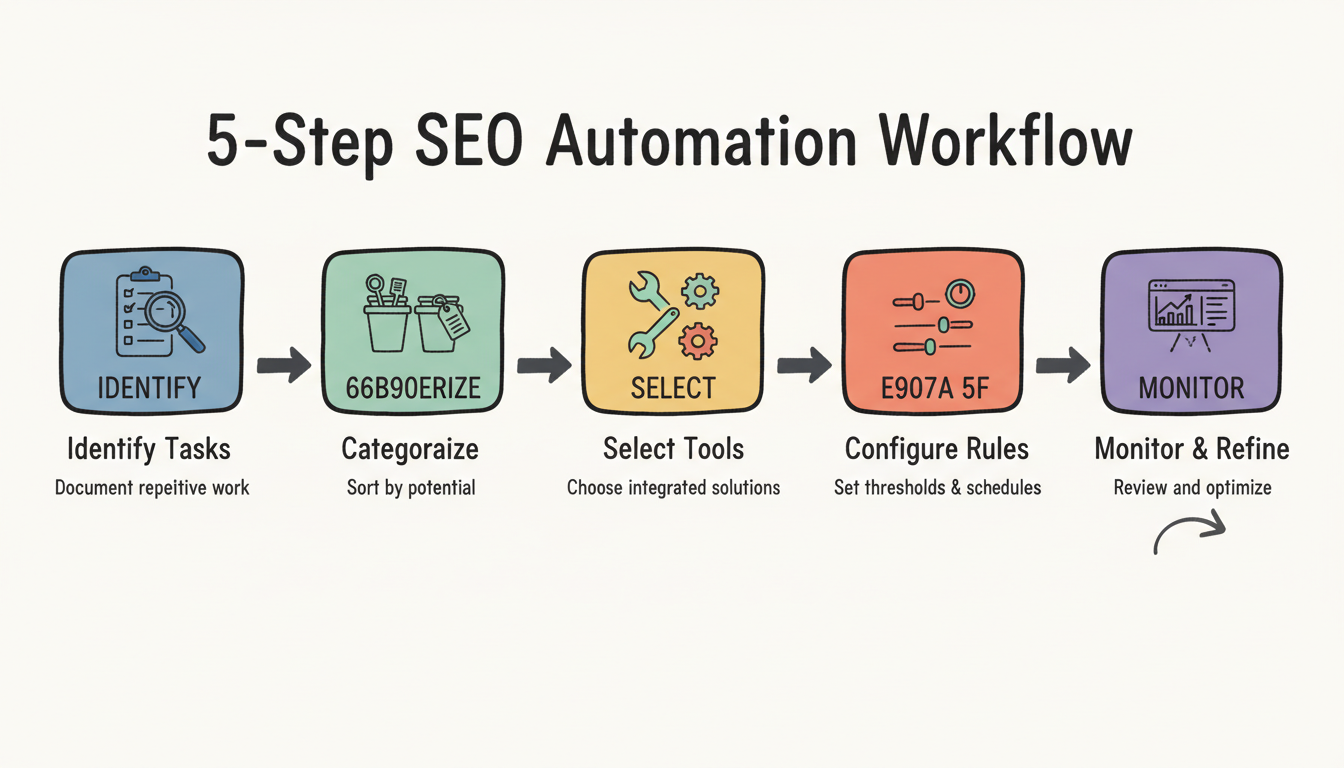
Document everything your team does repeatedly:
Understanding ai search team structure roles helps identify which tasks each team member should automate.
Sort tasks into categories:
High automation potential:
Partial automation potential:
Low automation potential:
Choose tools that work together:
When evaluating enterprise ai seo platforms, integration capabilities should be a primary consideration.
Configure automation thoughtfully:
Automation isn't set-and-forget:
Smart automation knows its limits.
Manual rank checks waste time. Automate daily or weekly tracking with alerts for significant changes. This is especially valuable when monitoring google ai overview update frequency and its impact on rankings.
No one should manually check thousands of pages. Scheduled crawls catch issues automatically.
Tools track competitors continuously while you sleep.
Generate dashboards and reports automatically. Spend time analyzing, not compiling.
New and lost links should trigger automatic alerts.
Broken links, missing meta tags, and crawl errors can be flagged automatically.
What topics matter and why requires human judgment about business goals and audience needs. Understanding what is geo in search engine optimization requires strategic thinking automation cannot provide.
Automated scoring helps, but humans judge what actually resonates with readers. This applies whether you're optimizing for traditional search or landing page optimization ai search.
Templates can be automated, but genuine relationships require personal touch.
When rankings change, humans must interpret what happened and decide how to respond.
Automated tools surface issues, but humans must decide what matters most. This decision-making becomes critical when weighing in house vs agency ai search resource allocation.
Measuring automation value helps justify investment.
Calculate hours saved by automation:
A $200/month tool saving 10 hours monthly at $50/hour effective rate delivers 2.5x ROI on time alone.
Automation improves consistency:
Automation lets small teams handle enterprise-level work:
There's no single best tool—it depends on your needs. For all-in-one automation, Semrush leads. For technical audits, Screaming Frog is the standard. For content optimization, Surfer SEO excels. Most teams use multiple tools together.
No. Automation handles repetitive data tasks well but cannot replace strategic thinking, creative content, or relationship building. The best results come from automating routine work so humans can focus on what requires judgment.
Costs range widely. Free options like Screaming Frog (up to 500 URLs) and Google Search Console handle basics. Mid-range tools run $50-200/month. Enterprise solutions cost $500-5,000+/month depending on scale and features.
Overlap exists, but AI tools use machine learning to generate insights, content, or recommendations. Automation tools execute tasks systematically without necessarily using AI. Many modern tools combine both—automating tasks while using AI for analysis.
Start small. Automate one task (like rank tracking) and master that workflow before adding more. Gradually expand automation as you understand what helps and what creates noise. Don't try to automate everything at once.
By submitting this form, you agree to our Privacy Policy and Terms & Conditions.



