
February 19, 2026


If you've ever searched for something online and noticed the "Sponsored" results at the top of the page, you've seen PPC advertising in action. Pay-per-click advertising remains one of the most effective ways to drive targeted traffic to your website, and Microsoft Advertising (formerly known as Bing Ads) offers a powerful—and often overlooked—platform for reaching high-value customers.
In this comprehensive guide, we'll cover everything you need to know about PPC advertising and Microsoft Ads in 2026, from the fundamentals to advanced best practices. Whether you're new to paid search or looking to expand beyond Google Ads, this guide will help you understand the opportunity Microsoft Advertising presents.
PPC (pay-per-click) advertising is a digital advertising model where advertisers pay a fee each time someone clicks on their ad. Rather than earning visits organically through SEO, businesses essentially "buy" visits to their website. The most common form of PPC is search advertising, where ads appear on search engine results pages (SERPs) when users search for specific keywords.
The PPC model is primarily based on keyword targeting and an auction system. Understanding how pay-per-click works is crucial for success:
According to the Corporate Finance Institute, the system is designed to drive targeted traffic to websites, making it one of the most effective forms of digital marketing because you're reaching people actively searching for what you offer.
Term | Definition |
CPC (Cost Per Click) | The amount you pay for each click on your ad |
CTR (Click-Through Rate) | Percentage of people who click your ad after seeing it |
Quality Score | A rating of ad relevance and landing page quality |
Impression | Each time your ad is displayed to a user |
Conversion | When a user completes a desired action (purchase, form fill, etc.) |
ROAS | Return on Ad Spend—revenue generated per dollar spent |
Microsoft Advertising is Microsoft's pay-per-click advertising platform, enabling businesses to display ads across the Microsoft Search Network. This includes Bing, Yahoo, AOL, and partner sites, as well as newer placements like Microsoft Start, MSN, Outlook, and the Microsoft Audience Network. To learn more about what is Microsoft Advertising platform and how it differs from competitors, it's important to understand the ecosystem.
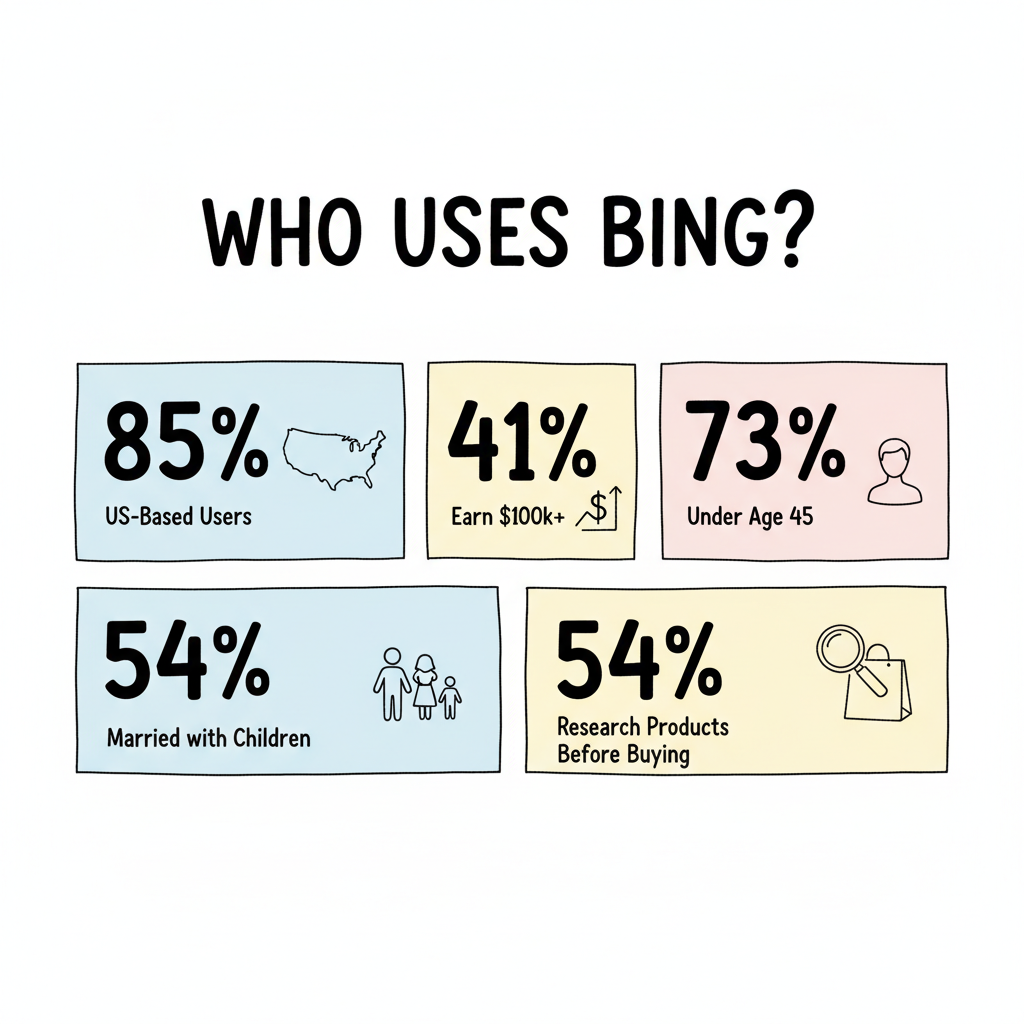
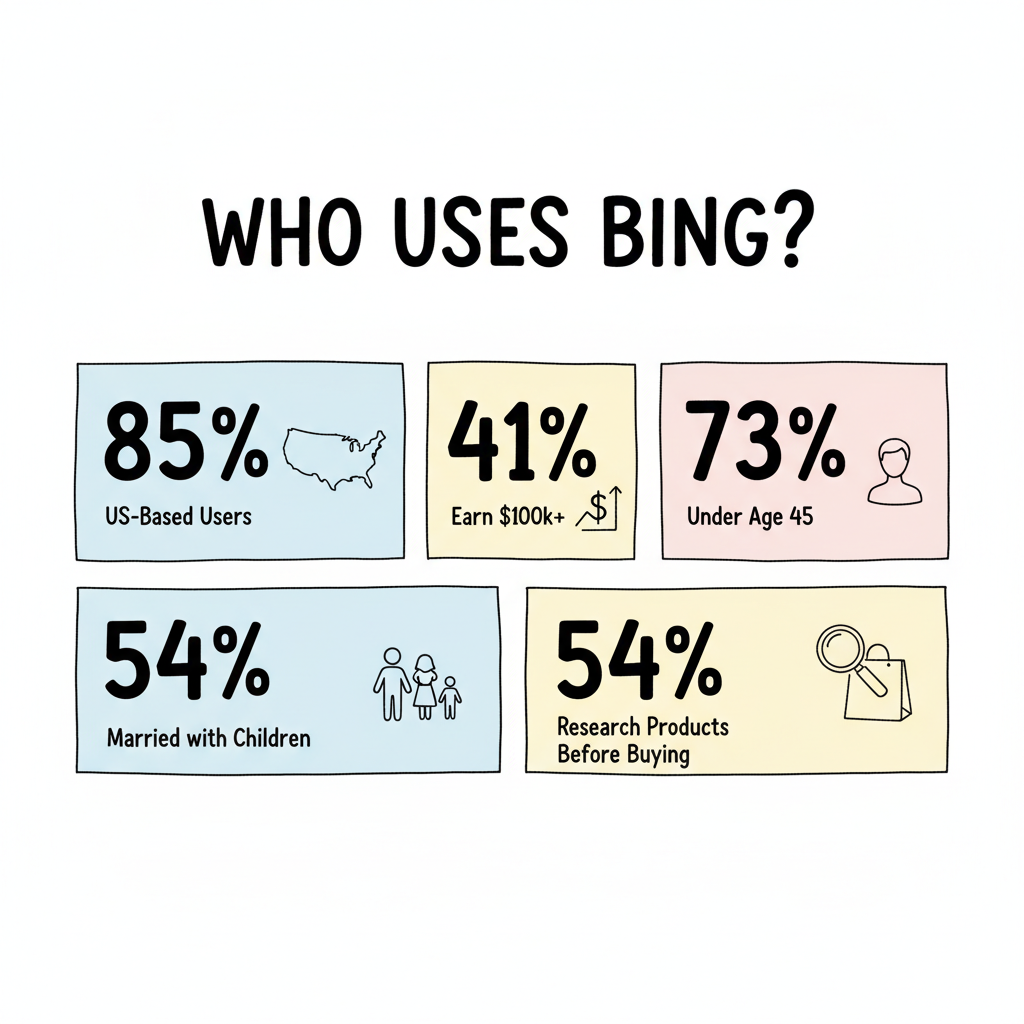
While Google dominates search with roughly 90% global market share, Microsoft's Bing holds approximately 4-5% globally and around 8% in the United States. That might seem small, but it represents over 100 million daily active searchers with some compelling demographic characteristics.
The Microsoft Search Network reaches a unique and valuable audience:
This audience profile makes Microsoft Advertising particularly valuable for B2B advertisers, luxury goods, financial services, and any business targeting high-income decision-makers.
One key differentiator is Microsoft's deep integration across its entire ecosystem:
This ecosystem reach is especially powerful in enterprise environments, where Microsoft products dominate the workplace.
Microsoft Advertising operates on a similar auction-based model to Google Ads, but with some platform-specific nuances. For those exploring how to advertise on Bing, understanding the auction process is essential.
Your ad's position isn't determined by bid alone. Microsoft uses a Quality Score system that considers:
Higher Quality Scores can lead to better ad positions at lower costs—making ad optimization crucial for ROI.
Microsoft Ads uses a hierarchical structure:
Account
└── Campaign (budget, location, scheduling)
    └── Ad Group (keywords, audience)
        └── Ads (headlines, descriptions, URLs)
This structure allows for organized management of multiple products, services, or targeting strategies within a single account.
While both platforms share fundamental PPC mechanics, several important differences can affect your strategy and results. The Microsoft Ads vs Google Ads comparison reveals significant opportunities for advertisers.
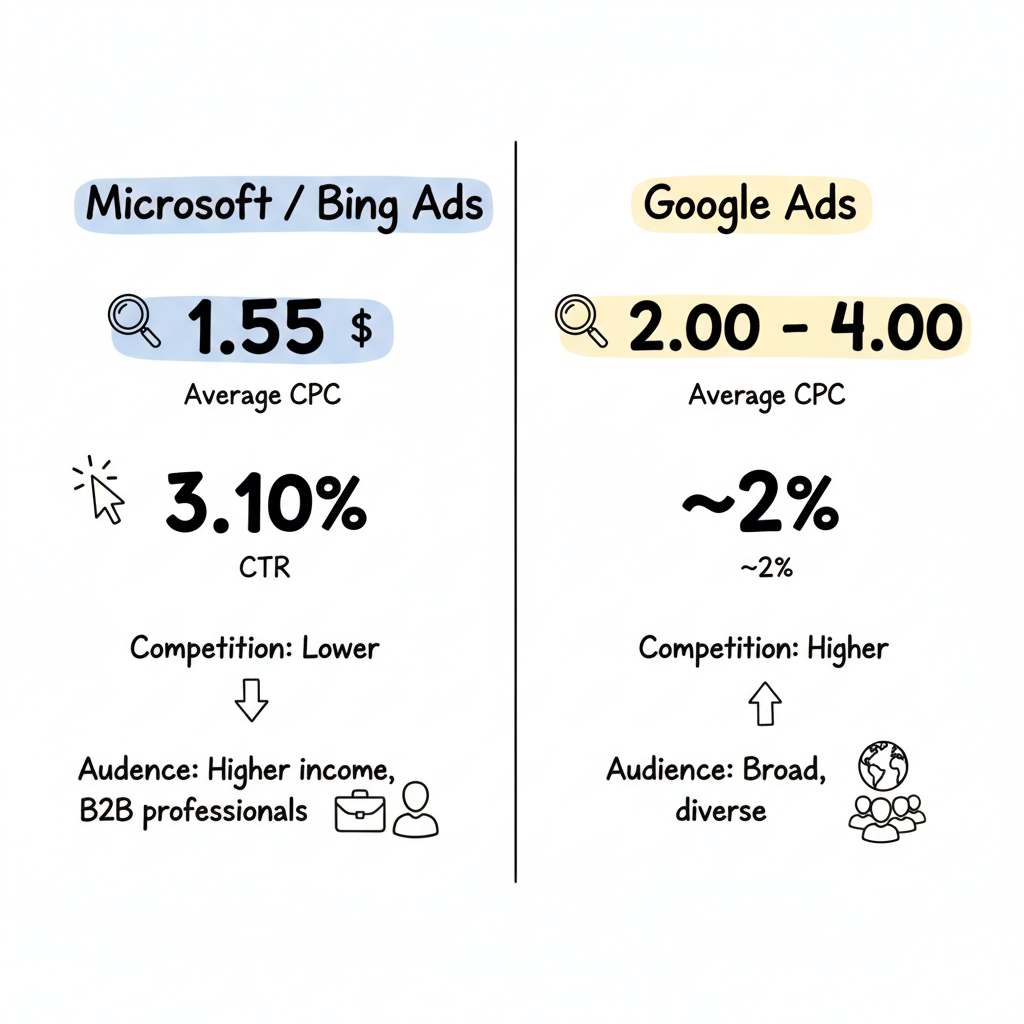
One of Microsoft Advertising's biggest advantages is cost efficiency, which is explored in depth in our Microsoft Advertising cost pricing guide:
Metric | Microsoft Ads | Google Ads |
Average CPC | $1.55 | $2.00-$4.00 |
Cost Difference | 30-50% lower | Baseline |
According to industry benchmarks, Microsoft Ads delivers an average CPC of $1.55—over 30% lower than Google Ads. ColonySpark reports that businesses consistently see 30-40% lower cost-per-click on Microsoft compared to Google.
Microsoft Advertising often delivers strong engagement, which you can track through Microsoft Ads reporting metrics:
These metrics suggest that while the audience is smaller, it can be highly engaged and conversion-ready.
Factor | Microsoft/Bing | |
Market Share | ~4-8% (varies by region) | ~90% |
User Demographics | Older, higher income, more B2B | Broader, diverse |
Competition | Lower | Higher |
Device Skew | Desktop-heavy | More mobile |
Microsoft offers several exclusive capabilities, including the powerful Microsoft Ads targeting features:
With fewer advertisers competing for clicks, Microsoft Ads typically delivers:
For businesses in expensive verticals like legal, insurance, or finance, this cost advantage can be substantial. Understanding the benefits of paid search advertising can help justify investment in the platform.
The Microsoft audience skews toward:
This is Microsoft's killer feature for B2B advertisers. You can target users based on:
According to Search Engine Land, LinkedIn targeting in Microsoft Advertising "exists to help brands message-map their best creative with the ideal audience" and is fully available across Search and Performance Max campaigns.
If you're already running Google Ads, Microsoft makes expansion simple:
Microsoft is integrating Copilot AI across its advertising platform:
Microsoft Advertising operates in 187 markets globally—5.5 times higher than in 2022—providing international expansion opportunities.
Microsoft Advertising supports multiple ad formats to match different marketing objectives.
The core ad format appearing on search results pages:
For e-commerce businesses:
Native ads appearing across the Microsoft Audience Network:
Microsoft's AI-driven, automated campaign type:
Emerging format for brand awareness:
Rich visual search ads featuring:
For beginners, our comprehensive Microsoft Advertising for beginners guide provides step-by-step instructions.
If you have Google Ads campaigns:
If starting fresh:
Based on current PPC trends and platform developments, here are essential best practices. For advanced tactics, consider exploring Bing Ads strategy advanced tactics.
AI and automation are running more of your campaigns in 2026. Microsoft's Smart Bidding and Performance Max use machine learning for optimization. However:
With privacy regulations tightening, first-party data has become your biggest advantage:
For B2B campaigns, LinkedIn targeting is essential. Organizations seeking specialized expertise might benefit from working with a B2B PPC agency:
Intent-based marketing beats keywords in 2026:
Most campaign failures happen on the landing page:
Learn from what PPC practitioners identify as costly errors. Understanding the disadvantages of paid search advertising can help you avoid common pitfalls.
Your ad promises one thing, but your landing page delivers something else. This disconnect kills conversion rates and wastes budget. Ensure your landing page directly addresses the search query and ad promise.
Failing to add negative keywords means your ads show for irrelevant searches. Review search term reports weekly and add negatives aggressively to prevent wasted spend.
PPC requires ongoing optimization. Markets change, competition evolves, and consumer behavior shifts. Campaigns that aren't regularly monitored will decline in performance. Effective PPC campaign management services understand this need for continuous attention.
Impressions and clicks don't pay the bills—conversions do. Many advertisers get excited about high CTRs while ignoring poor conversion rates. Always optimize for business outcomes.
Spreading small budgets across too many campaigns prevents any single campaign from gathering sufficient data. Better to fully fund fewer campaigns than underfund many. Use a PPC budget calculator to determine appropriate spend levels.
While importing from Google is convenient, Microsoft's audience and competitive landscape differ. Customize your approach:
Ensure your ads, landing pages, and conversion process work flawlessly on smartphones, even though Microsoft skews more desktop than Google.
You can't optimize what you can't measure. Set up proper conversion tracking before launching any campaign—tracking not just purchases but also calls, form submissions, and other valuable actions.
Managing PPC campaigns effectively requires time, expertise, and ongoing attention. Many businesses benefit from Microsoft Advertising agency services or specialized Microsoft Ads PPC agency services. Consider working with an agency if:
Some organizations opt for Microsoft Advertising managed services to handle day-to-day operations, while others outsource PPC management entirely.
Working with a Microsoft Advertising consultant can provide fresh perspective and strategic guidance.
Learning how to find the best PPC agency can help you identify the right partner. Consider Microsoft Advertising partner benefits when evaluating agencies.
Indicator | What to Look For |
Certifications | Microsoft Advertising Partner status |
Transparency | Clear reporting and honest communication |
Track Record | Case studies with specific metrics |
Strategic Focus | Business outcomes over vanity metrics |
Pricing Clarity | Defined fee structures without hidden costs |
Understanding PPC agency pricing before engaging helps set proper expectations.
PPC (Pay-Per-Click) refers specifically to the payment model where advertisers pay for each click. SEM (Search Engine Marketing) is a broader term that encompasses all marketing efforts on search engines, including both paid advertising (PPC) and organic optimization (SEO). Essentially, PPC is one component of SEM. For more detail, see our guide on what is SEM marketing.
Yes, for many businesses. Microsoft Advertising reaches over 100 million daily searchers with 30-50% lower CPCs than Google. The audience skews toward higher incomes and B2B professionals. If you're only advertising on Google, you're missing a significant, often lower-cost audience segment. Our analysis on is Bing Ads worth it provides comprehensive data.
Microsoft Ads costs vary by industry and competition, but the average CPC is approximately $1.55—significantly lower than Google's $2-4 average. You control your budget with daily caps and bid limits. Many businesses start with $500-1,000/month to test the platform.
Yes, Microsoft makes it easy to import Google Ads campaigns. However, best practice is to customize your Microsoft campaigns for the platform's unique audience and lower competition. Don't just copy and forget—optimize for each platform.
LinkedIn Profile Targeting is a Microsoft-exclusive feature that lets you target ads based on professional attributes: company name, industry, job function, and more. This uses LinkedIn's data integrated into Microsoft Advertising, making it incredibly valuable for B2B marketers.
Initial data typically appears within days of launching. However, meaningful optimization requires 2-4 weeks of data collection. Expect ongoing improvement as you refine keywords, ads, and targeting based on performance insights. Reviewing Microsoft Ads case studies can provide realistic timeframe expectations.
By submitting this form, you agree to our Privacy Policy and Terms & Conditions.



