
February 19, 2026


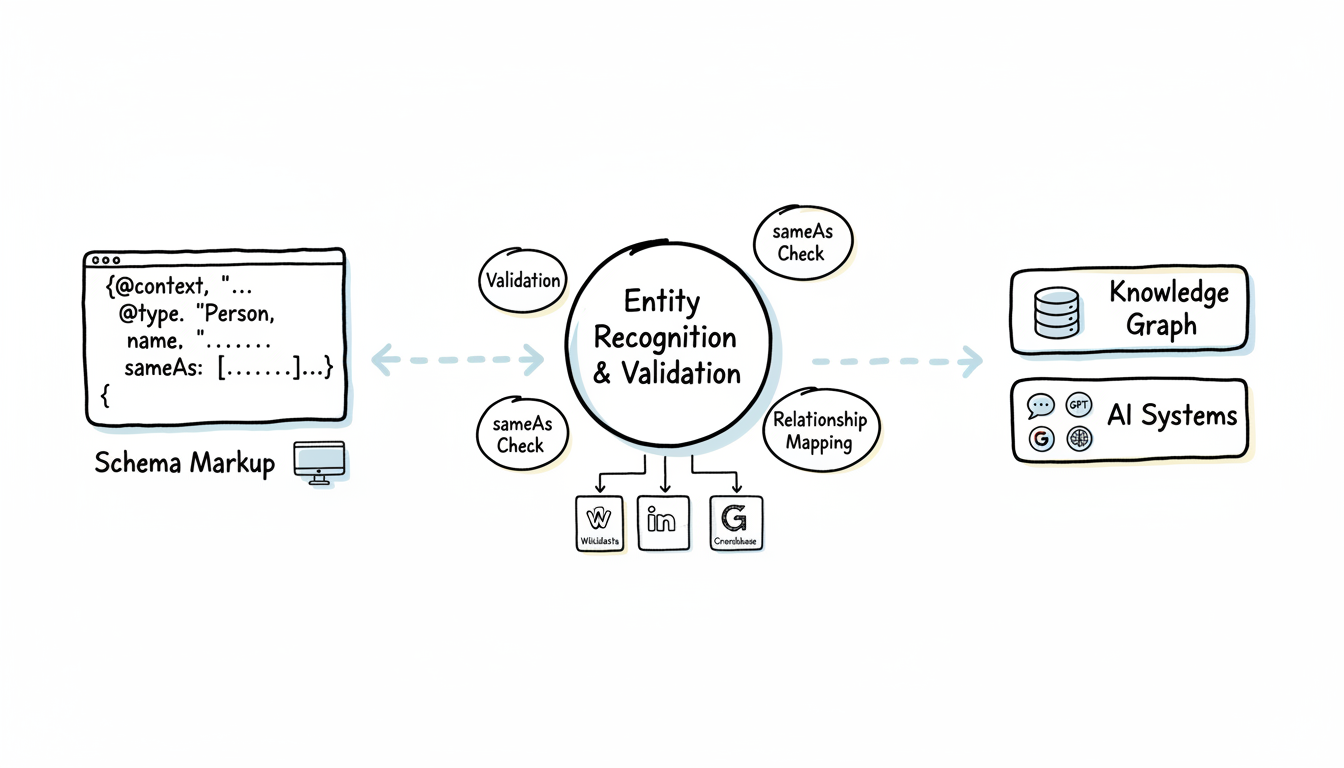
Schema markup is the language you use to communicate with Google's Knowledge Graph. While traditional SEO focuses on helping search engines understand your content, schema markup tells them exactly what your content is—and how it connects to the broader web of entities.
According to Backlinko's schema markup guide, when you use schema markup to tell Google what your content is about, you reduce the work a search engine has to do—literally optimizing content delivery for both traditional search and AI systems.
This guide covers everything you need to implement schema markup that strengthens your Knowledge Graph presence in 2026.
Schema markup and the Knowledge Graph share a fundamental relationship: schema provides the structured data that helps Google populate and verify entities within its Knowledge Graph database.
How the connection works:
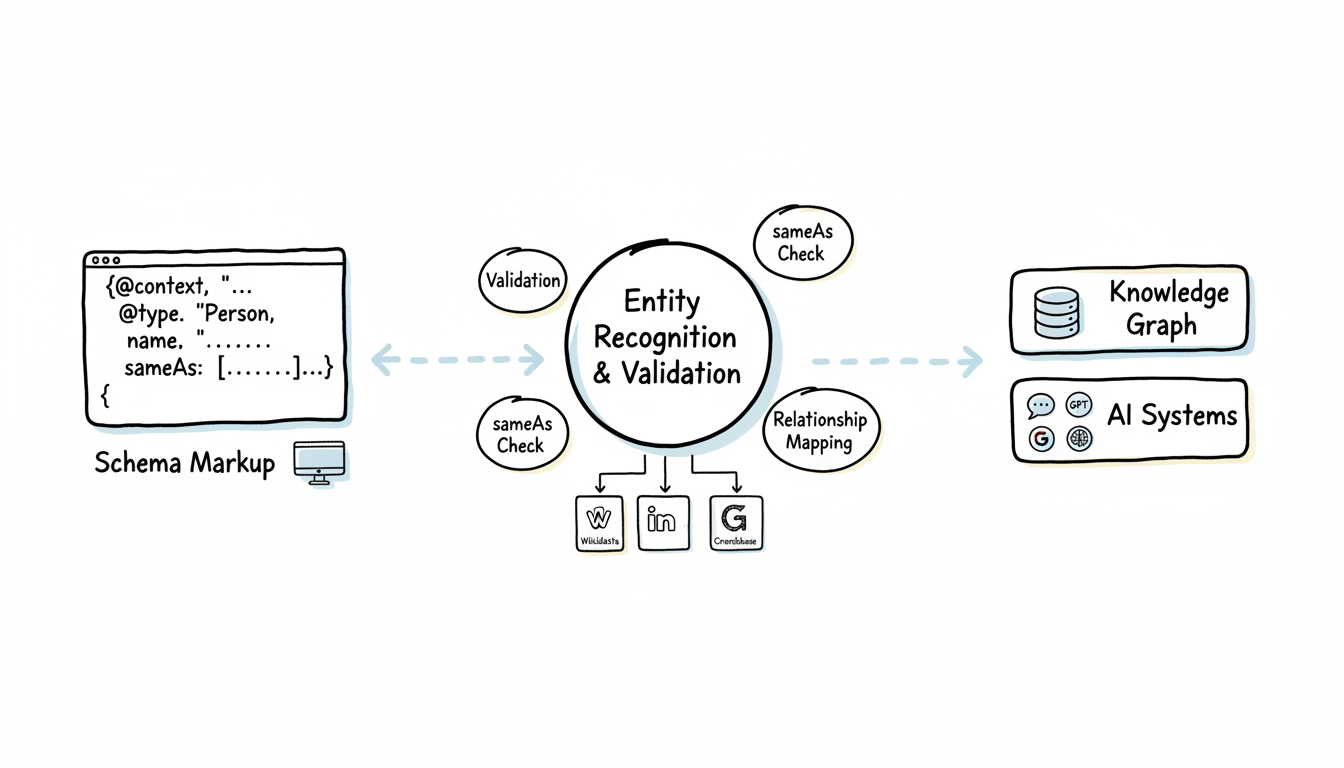
According to ALM Corp's schema guide, sites with comprehensive Organization schema are 3.7x more likely to earn Knowledge Panels than those with basic or missing implementation.
Why schema matters more in 2026:
The rise of AI search has amplified schema's importance. According to Addlly's AI SEO research, structured data enables 300% higher accuracy for AI information extraction compared to unstructured content.
Schema markup serves three critical functions in the AI era:
Function | Traditional SEO Benefit | AI/Knowledge Graph Benefit |
Entity identification | Rich snippets in search | Knowledge Panel eligibility |
Relationship mapping | Breadcrumb display | Entity graph connections |
Fact verification | Review stars, ratings | AI citation accuracy |
When implementing AEO best practices for 2026, structured data should be a cornerstone of your strategy, as it directly influences how AI systems interpret and cite your content.
Not all schema types contribute equally to Knowledge Graph presence. Some types directly influence entity recognition while others primarily affect search appearance.
Organization schema is the foundation of business entity recognition. According to Schema.org documentation, it defines your company as a distinct entity with verifiable properties.
Required properties for Knowledge Graph:
{
  "@context": "https://schema.org",
  "@type": "Organization",
  "@id": "https://yoursite.com/#organization",
  "name": "Your Company Name",
  "url": "https://yoursite.com",
  "logo": {
    "@type": "ImageObject",
    "url": "https://yoursite.com/logo.png",
    "width": 600,
    "height": 60
  },
  "description": "Your company description that matches other sources",
  "foundingDate": "2020",
  "founder": {
    "@type": "Person",
    "@id": "https://yoursite.com/team/founder/#person",
    "name": "Founder Name"
  },
  "address": {
    "@type": "PostalAddress",
    "streetAddress": "123 Main Street",
    "addressLocality": "San Francisco",
    "addressRegion": "CA",
    "postalCode": "94102",
    "addressCountry": "US"
  },
  "sameAs": [
    "https://www.linkedin.com/company/yourcompany",
    "https://twitter.com/yourcompany",
    "https://www.crunchbase.com/organization/yourcompany",
    "https://www.wikidata.org/wiki/Q12345678"
  ]
}
Person schema establishes individual authority—critical for E-E-A-T signals in the AI era. According to Search Engine Land's analysis, Person schema helps AI systems validate author credentials.
Key properties:
{
  "@context": "https://schema.org",
  "@type": "Person",
  "@id": "https://yoursite.com/team/expert/#person",
  "name": "Expert Name",
  "jobTitle": "Chief Marketing Officer",
  "worksFor": {
    "@id": "https://yoursite.com/#organization"
  },
  "alumniOf": {
    "@type": "EducationalOrganization",
    "name": "University Name"
  },
  "knowsAbout": ["AI SEO", "Content Marketing", "Generative AI"],
  "sameAs": [
    "https://www.linkedin.com/in/expertname",
    "https://twitter.com/expertname"
  ]
}
This structured approach to author identity is essential when building AI Overview authority signals that influence citation decisions.
Product schema defines offerings as distinct entities with specifications, pricing, and availability. For businesses implementing AEO for eCommerce, product schema becomes critical for AI-powered shopping recommendations.
LocalBusiness extends Organization with location-specific properties critical for Google Business Profile integration.
These types help Google understand your site structure and identify canonical entity homes.
Implementation follows a structured process to ensure schema is valid, comprehensive, and properly connected.
Before adding new markup, understand your current state:
This audit should be part of your broader AI SEO implementation checklist to ensure all technical elements are aligned.
Map your entities and their relationships:
Organization (Your Company)
├── Person (Founder/CEO)
├── Person (Team Members)
├── Product (Offerings)
├── WebSite
│   └── WebPage (Key Pages)
└── LocalBusiness (If applicable)
The @id property creates unique identifiers that allow entities to reference each other. According to Digital Information World, consistent @id usage is essential for entity graph connections.
@id naming convention:
Organization: https://yoursite.com/#organization
Person: https://yoursite.com/team/name/#person
Product: https://yoursite.com/product/name/#product
WebSite: https://yoursite.com/#website
Place JSON-LD in the <head> section of relevant pages:
According to Yoast's SEO research, validation should follow a three-step process:
When tracking implementation success, consider monitoring AEO metrics and KPIs specific to structured data impact on AI citations.
While multiple structured data formats exist, JSON-LD has emerged as the clear winner for Knowledge Graph optimization.
Format comparison:
Feature | JSON-LD | Microdata | RDFa |
Google recommendation | Preferred | Supported | Supported |
Implementation ease | High | Low | Medium |
Maintenance burden | Low | High | Medium |
CMS compatibility | Excellent | Limited | Good |
Debugging difficulty | Easy | Hard | Medium |
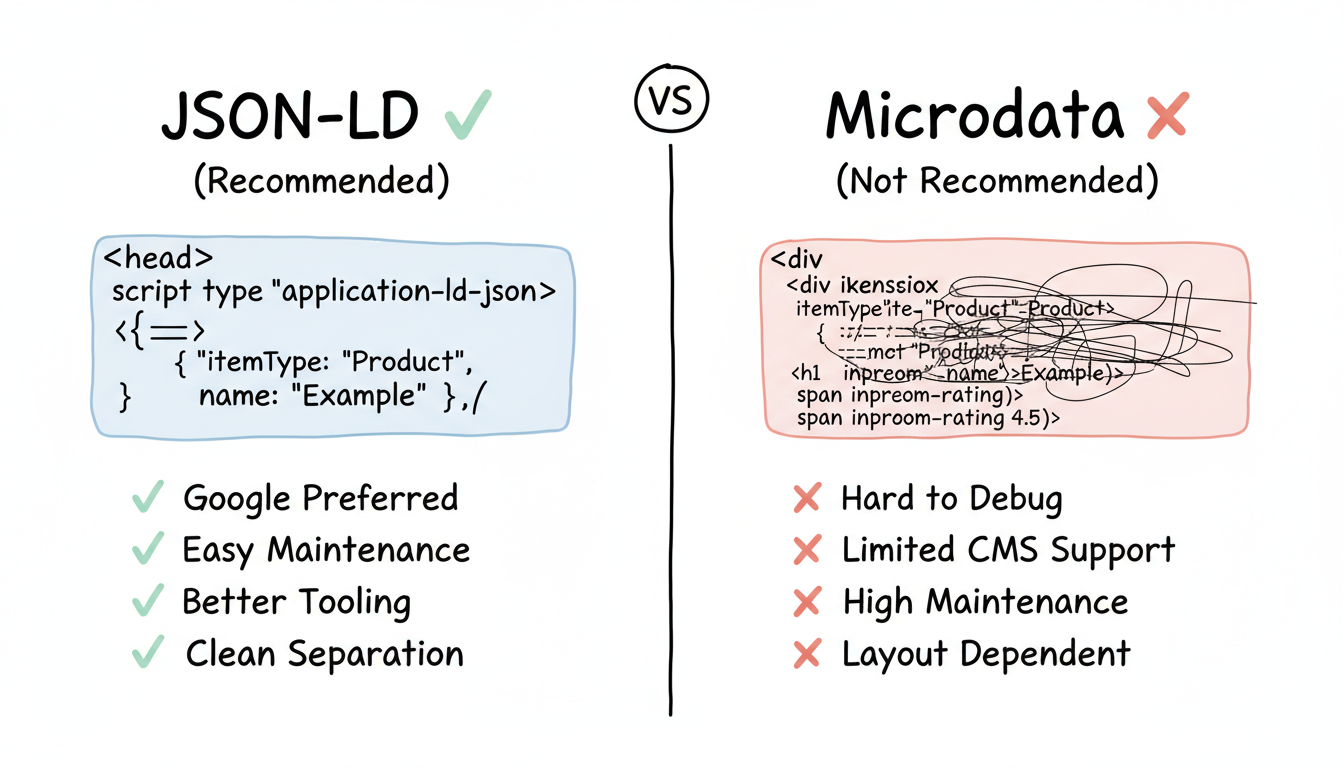
Why JSON-LD wins:
According to Google's structured data documentation, JSON-LD is recommended because:
JSON-LD example:
<head>
  <script type="application/ld+json">
  {
    "@context": "https://schema.org",
    "@type": "Organization",
    "name": "Example Company",
    "url": "https://example.com"
  }
  </script>
</head>
Microdata equivalent (not recommended):
<div itemscope itemtype="https://schema.org/Organization">
  <span itemprop="name">Example Company</span>
  <a itemprop="url" href="https://example.com">Website</a>
</div>
The JSON-LD version is cleaner, easier to maintain, and doesn't require restructuring your HTML.
Entity relationships are where schema becomes truly powerful for Knowledge Graph. The connections between entities provide context that isolated schema cannot.
sameAs is the most important property for entity validation. It tells Google that your entity is the same entity represented on other authoritative platforms.
Critical sameAs connections:
"sameAs": [
  "https://www.wikidata.org/wiki/Q12345678",
  "https://www.linkedin.com/company/yourcompany",
  "https://www.crunchbase.com/organization/yourcompany",
  "https://twitter.com/yourcompany",
  "https://www.facebook.com/yourcompany",
  "https://www.youtube.com/c/yourcompany"
]
According to Kalicube's entity research, the sameAs property creates a network of corroborating signals that AI systems use to validate identity and distinguish you from similarly named entities. This cross-platform validation is a key component of off-page AEO optimization.
Use @id references to connect entities within your schema:
{
  "@context": "https://schema.org",
  "@type": "Article",
  "headline": "Complete Guide to AI SEO",
  "author": {
    "@id": "https://yoursite.com/team/expert/#person"
  },
  "publisher": {
    "@id": "https://yoursite.com/#organization"
  },
  "about": {
    "@type": "Thing",
    "name": "AI SEO",
    "sameAs": "https://www.wikidata.org/wiki/Q123456"
  }
}
These properties establish organizational relationships:
{
  "@type": "Person",
  "name": "Expert Name",
  "worksFor": {
    "@id": "https://yoursite.com/#organization"
  },
  "memberOf": {
    "@type": "Organization",
    "name": "Industry Association"
  }
}
Understanding these relationship properties is essential when developing SEO strategies for generative AI that rely on entity validation.
Proper validation prevents schema errors that can hurt rather than help your Knowledge Graph presence.
Tool | Purpose | URL |
Rich Results Test | Check Google-supported schema | search.google.com/test/rich-results |
Search Console | Monitor live schema issues | search.google.com/search-console |
Structured Data Markup Helper | Generate basic schema | google.com/webmasters/markup-helper |
Tool | Best For |
Schema.org Validator | Comprehensive syntax checking |
Schema Markup Validator (TechnicalSEO.com) | Detailed error reporting |
JSON-LD Playground | Testing complex nested structures |
Many free AI SEO software tools now include schema validation as part of their technical SEO audits.
According to Backlinko, follow this sequence:
Certain schema errors actively harm your Knowledge Graph presence rather than simply providing no benefit.
Problem: Schema says "Acme Inc." while LinkedIn says "Acme Incorporated"
Fix: Audit all platforms and standardize entity names exactly. Use identical strings in schema name properties and sameAs target profiles.
Problem: sameAs URLs point to deleted profiles or incorrect pages
Fix: Regularly audit sameAs links. Each URL must resolve to a profile that clearly represents your entity.
Problem: Multiple entities share the same @id, creating confusion
Fix: Every entity needs a unique @id. Use consistent naming conventions (organization, person, product) to avoid collisions.
Problem: Person schema exists without connection to Organization
Fix: Always link entities with @id references. A person's worksFor should reference the organization's @id.
Problem: Marking up content that doesn't qualify for the schema type
Fix: Only use schema types that accurately represent your content. Google penalizes misleading markup.
Problem: Using schema types without their required properties
Fix: Check schema.org documentation for required vs. optional properties. Start with required properties, then add optional ones.
When working with an AEO implementation service, ensure they audit for these common errors during onboarding.
For mature organizations, basic schema is just the beginning. Advanced strategies maximize Knowledge Graph impact.
Instead of isolated schema blocks, create a connected graph:
{
  "@context": "https://schema.org",
  "@graph": [
    {
      "@type": "Organization",
      "@id": "https://yoursite.com/#organization",
      "name": "Your Company",
      "founder": { "@id": "https://yoursite.com/team/founder/#person" }
    },
    {
      "@type": "Person",
      "@id": "https://yoursite.com/team/founder/#person",
      "name": "Founder Name",
      "worksFor": { "@id": "https://yoursite.com/#organization" }
    },
    {
      "@type": "WebSite",
      "@id": "https://yoursite.com/#website",
      "publisher": { "@id": "https://yoursite.com/#organization" }
    }
  ]
}
This interconnected approach aligns with universal AI search tactics that optimize for multiple answer engines simultaneously.
Mark up notable events that establish authority:
{
  "@type": "Event",
  "name": "Industry Award Ceremony",
  "award": {
    "@type": "Award",
    "name": "Best AI SEO Agency 2025",
    "recipient": { "@id": "https://yoursite.com/#organization" }
  }
}
According to Search Engine Land, speakable schema identifies sections suitable for text-to-speech:
{
  "@type": "WebPage",
  "speakable": {
    "@type": "SpeakableSpecification",
    "cssSelector": [".summary", ".key-points"]
  }
}
This becomes particularly important when optimizing for ChatGPT and other conversational AI platforms.
These types are heavily used by AI systems:
{
  "@type": "HowTo",
  "name": "How to Implement Organization Schema",
  "step": [
    {
      "@type": "HowToStep",
      "name": "Define your @id structure",
      "text": "Create unique identifiers for each entity..."
    }
  ]
}
Proper HowTo schema implementation can significantly improve performance across AI search success metrics by industry.
Schema markup is foundational to Knowledge Graph optimization in 2026:
When evaluating AEO tools and software for your implementation, prioritize platforms that offer comprehensive schema validation and relationship mapping capabilities.
JSON-LD is the recommended format for Knowledge Graph optimization. Google officially prefers JSON-LD because it separates structured data from HTML content, making it easier to implement, maintain, and debug. JSON-LD also works better with JavaScript frameworks and dynamic content.
Schema changes typically take 2-8 weeks to be processed and reflected in Knowledge Graph and search results. Google must recrawl your pages, validate the schema, and update its entity database. Monitor progress through Search Console's Rich Results reports.
Yes. While Wikipedia provides strong entity signals, schema markup on your own website gives Google direct, structured information about your entity. The combination of Wikipedia presence plus comprehensive schema is more powerful than either alone.
Incorrect schema can hurt your presence. Common issues include misleading markup (claiming reviews you don't have), conflicting information (schema says one thing, page says another), and technical errors (invalid JSON-LD). Always validate before deployment.
By submitting this form, you agree to our Privacy Policy and Terms & Conditions.



