
February 19, 2026


LinkedIn advertising has become the cornerstone of B2B marketing strategy in 2026. With over 1.1 billion members and 82% of users directly influencing or approving purchasing decisions, the platform offers unmatched access to decision-makers across industries. This comprehensive guide to LinkedIn advertising covers everything you need to know to launch, optimize, and scale successful campaigns.
Whether you're exploring how to advertise on LinkedIn for the first time or looking to refine your existing strategy, this LinkedIn advertising guide will walk you through ad formats, targeting options, pricing benchmarks, and proven best practices for 2026.
LinkedIn advertising is the platform's paid promotion system that enables businesses to reach professionals through targeted campaigns. Unlike traditional advertising, LinkedIn ads appear in a professional context where users are actively thinking about business solutions, career growth, and industry trends.
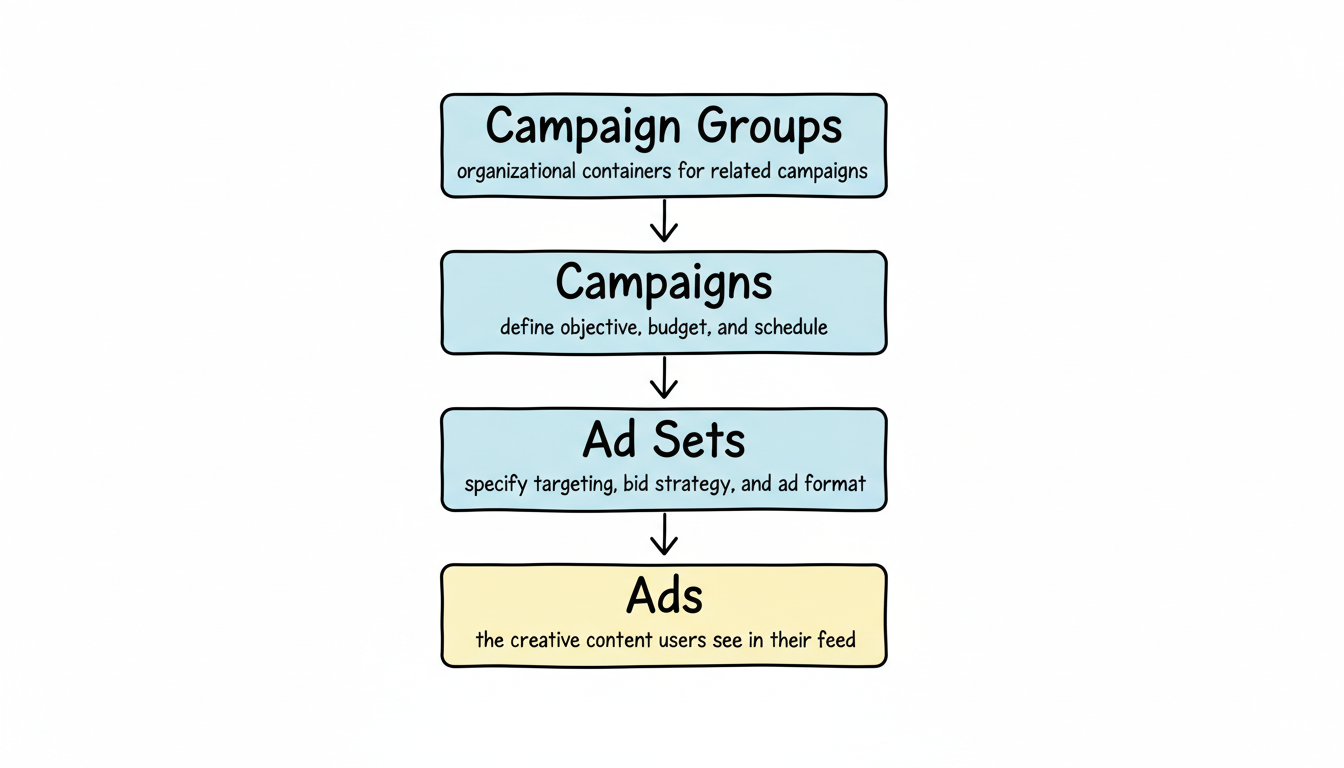
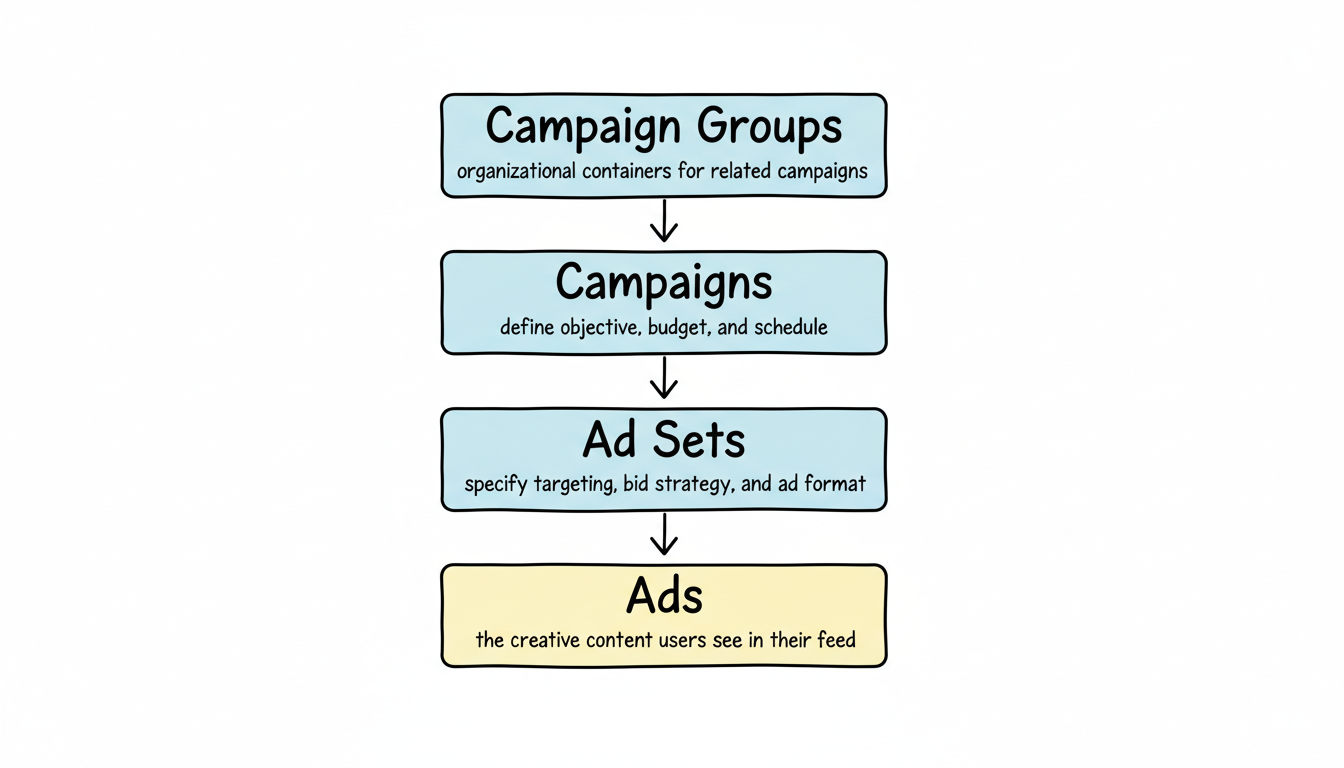
The platform operates through LinkedIn Campaign Manager, a self-service advertising interface where you create campaigns, define audiences, set budgets, and track performance. LinkedIn advertising works on an auction-based system where your bid competes against other advertisers targeting similar audiences.
LinkedIn advertising follows a hierarchical structure:
When a LinkedIn member matches your targeting criteria, your ad enters an auction. LinkedIn considers your bid amount, ad relevance score, and historical engagement to determine ad placement and cost.
LinkedIn has evolved from a job search platform into the primary B2B marketing channel for sophisticated organizations. Here's why LinkedIn advertising deserves a central role in your 2026 marketing strategy:
LinkedIn users are 2.7 times more likely to engage with branded content compared to users on other social platforms. When professionals scroll LinkedIn, they're in a business mindset—actively seeking solutions, partnerships, and industry insights.
According to LinkedIn Marketing Solutions, 4 out of 5 LinkedIn members drive business decisions at their companies. No other platform offers this concentration of purchasing authority across industries.
While LinkedIn's cost-per-click exceeds other platforms, the lead quality justifies the investment. Industry benchmarks show B2B marketers achieve cost-per-qualified-lead rates 31-38% lower than Google Search for deals exceeding $25,000 in annual contract value.
In 2026, trust has become the most valuable currency in B2B marketing. LinkedIn's professional environment and real identity requirement create a foundation of credibility that anonymous platforms cannot match.
Understanding LinkedIn advertising formats is critical for campaign success. Each format serves different objectives and performs differently across the marketing funnel. For detailed specifications, consult our guide on LinkedIn ad specs and sizes.
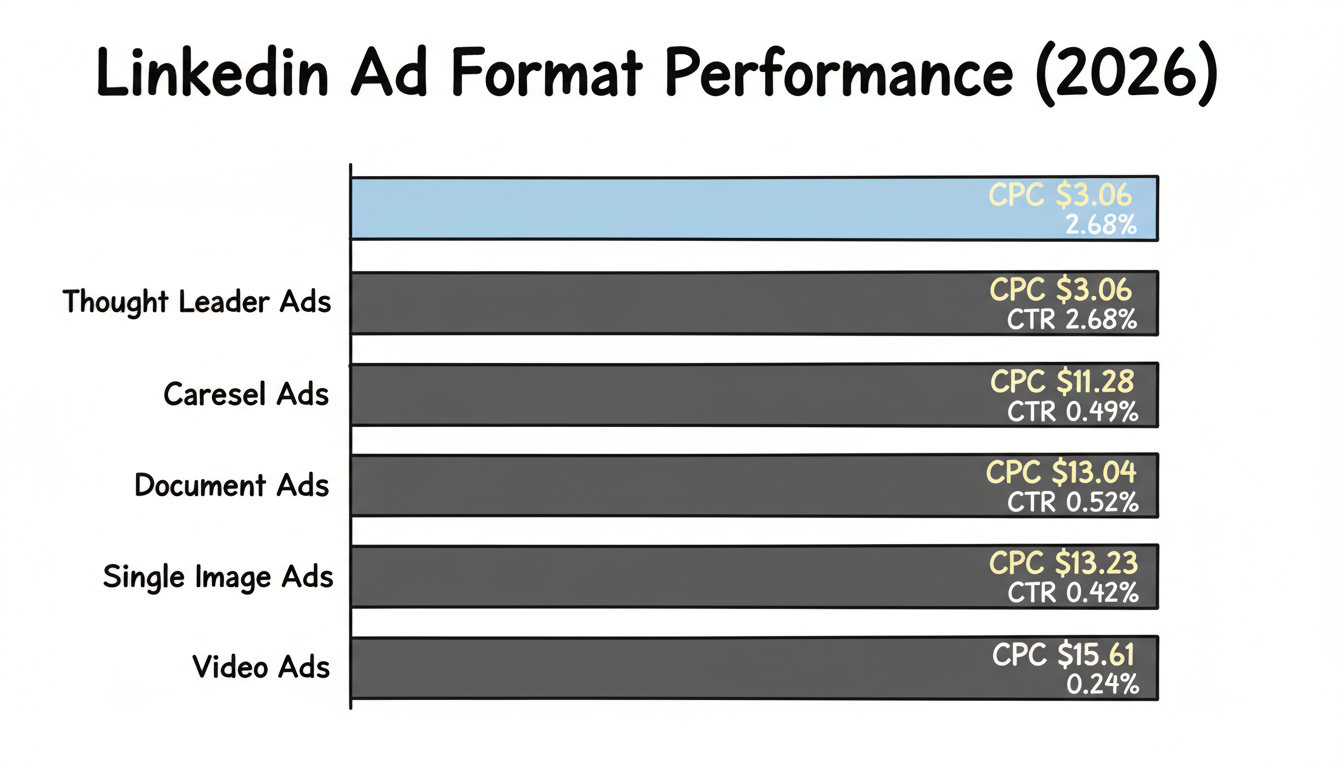
Single image ads are the most popular LinkedIn advertising format, appearing natively in the feed with one image and accompanying text. According to 2026 benchmark data, single image ads achieve a median CTR of 0.42% with an average CPC of $11-13.
Best for: Brand awareness, content promotion, event registration
Specifications:
Video ads capture attention through motion and sound, ideal for storytelling and product demonstrations. While video commands significant budget allocation (31% of typical spend), recent benchmarks show video underperforms other formats with a 0.24% median CTR and $15.61 CPC. For optimization tips, see our video ad best practices guide.
Best for: Brand storytelling, product demos, thought leadership content
Specifications:
Carousel ads display multiple images in a swipeable format, enabling sequential storytelling or multi-product showcases. With a median CTR of 0.49% and $11.28 CPC, carousels offer balanced performance across reach and engagement.
Best for: Product features, case studies, multi-step processes
Specifications:
Document ads allow users to view PDFs, whitepapers, and presentations directly in the feed without leaving LinkedIn. This format has emerged as a top performer for lead generation, with form completion rates of 22.73% compared to just 2.26% for video.
Best for: Gated content, whitepapers, case studies, educational resources
Specifications:
Thought Leader Ads promote posts from personal profiles rather than company pages, appearing as boosted organic content. 2026 data reveals TLAs are the most cost-efficient format, with CPC of just $3.06 compared to $13.23 for single image ads—a 77% cost reduction.
Best for: Personal branding, founder-led marketing, authentic engagement
Specifications:
Lead Gen Forms attach to Sponsored Content, allowing users to submit their information without leaving LinkedIn. Forms pre-populate with profile data, reducing friction and increasing completion rates to 6-13% for well-optimized campaigns.
Best for: Lead capture, webinar registration, content downloads
Message Ads deliver direct messages to prospects' LinkedIn inboxes. Conversation Ads extend this with interactive, choose-your-own-adventure style messaging. These formats achieve 11-18% reply rates but require careful frequency management—LinkedIn recommends maximum 1-2 messages per recipient every 30 days.
Best for: High-value offers, demo requests, account-based marketing
Follow this step-by-step process to launch your first LinkedIn advertising campaign in Campaign Manager. For a complete walkthrough, see our guide on how to create LinkedIn ads and how to run LinkedIn ads.
Navigate to linkedin.com/campaignmanager and sign in with your LinkedIn account. If you haven't created an ad account, you'll need to set one up by connecting your company page and entering billing information.
Campaign groups organize related campaigns and allow budget optimization across multiple campaigns. Click "Create" and select "Campaign Group." Name it descriptively (e.g., "Q1 2026 Lead Generation").
LinkedIn offers objectives across three categories:
Awareness
Consideration
Conversion
Select the objective that aligns with your primary KPI. Your objective determines available ad formats and optimization options.
LinkedIn offers two ad set types:
For learning and optimization purposes, start with Classic ad sets to understand what drives performance before leveraging automation.
Build your target audience using LinkedIn's targeting dimensions (detailed in the next section). Start with a focused audience size of 50,000-300,000 members for optimal delivery.
Choose your ad format based on your creative assets and campaign objective. Decide whether to include the LinkedIn Audience Network (ads shown on partner sites) or limit placement to LinkedIn only.
Configure your budget approach:
Set your bid strategy:
Upload creative assets and write compelling copy. Include a clear value proposition, social proof where possible, and strong call-to-action. Review LinkedIn ads examples for inspiration. Create multiple ad variations for testing.
Review all settings and launch your campaign. Monitor performance metrics daily during the first week, making adjustments to targeting, creative, or bidding based on early data.
LinkedIn's targeting capabilities represent its greatest competitive advantage. Professional profile data enables precision impossible on other platforms. For a complete breakdown, see our LinkedIn advertising targeting options guide.
Matched Audiences enable custom targeting based on your data:
For advanced retargeting strategies, consult our LinkedIn retargeting guide.
LinkedIn introduced "Buying Group" targeting in early 2026, allowing advertisers to target multiple decision-makers at target accounts simultaneously. This feature supports complex B2B sales cycles involving multiple stakeholders.
Apply these proven practices to maximize your LinkedIn advertising performance in 2026. For comprehensive guidance, see our LinkedIn ads best practices article and review LinkedIn advertising case studies for real-world applications.
Start focused, then expand: Begin with your ideal customer profile and broaden only after validating messaging and creative. Narrow audiences yield clearer learning signals.
Use exclusions strategically: Exclude current customers, competitors, and employees to prevent wasted spend and awkward impressions.
Layer targeting thoughtfully: Combine job function with seniority rather than adding multiple restrictive filters. Over-layering shrinks audiences and increases costs.
Use real photography: Top-performing ads feature authentic photos of real people, not stock images. Authenticity drives engagement.
Include specific offers: Ads with specific value propositions ("FREE," specific pricing, time limits) perform 6.5 times better than generic messaging.
Write in first person for TLAs: 65% of top-performing Thought Leader Ads use first-person voice ("I" statements) with personal stories.
Keep headlines under 70 characters: Ensures full visibility across devices without truncation.
For additional creative inspiration, explore our collection of LinkedIn advertising templates and try LinkedIn ad mockup tools to preview your designs.
Consider manual bidding: While more labor-intensive, manual bidding delivers more predictable results than automated strategies that can overspend by 50%.
Disable "Enable audience expansion": This default setting lets LinkedIn broaden your audience beyond specified criteria. Turn it off for precise targeting.
Turn off LinkedIn Audience Network initially: Until you understand your core LinkedIn performance, keep ads on LinkedIn only.
LinkedIn's official 2026 guidance recommends:
Exceeding these limits tanks relevance scores and can increase CPC by 40-80% within 48 hours.
Understanding LinkedIn advertising costs helps you budget effectively and benchmark performance. For detailed pricing analysis, see our guides on LinkedIn ads cost, LinkedIn CPM explained, and sponsored content cost.
Based on 2026 industry benchmarks:
Metric | Median | Top Performer |
CPC | $11.04 | $3-8 |
CPM | $78.30 | $38-65 |
CTR | 0.69% | 1.3%+ |
Cost per Lead | $50-200 | $38-82 |
Format | CTR | CPC | CPM |
Thought Leader Ads | 2.68% | $3.06 | $82.14 |
Single Image | 0.42% | $13.23 | $59.15 |
Carousel | 0.49% | $11.28 | $52.36 |
Document | 0.52% | $13.04 | $62.06 |
Video | 0.24% | $15.61 | $38.94 |
LinkedIn requires:
For platform comparisons, see LinkedIn ads vs Google ads, LinkedIn ads vs Facebook ads, and Facebook ads cost comparison.
Track these metrics to evaluate LinkedIn advertising performance. For comprehensive measurement strategies, see our guides on LinkedIn ads performance metrics and LinkedIn ads reporting.
Install the LinkedIn Insight Tag on your website to track conversions and build retargeting audiences. Configure conversion tracking for key actions like form submissions, demo requests, and purchases.
Casting a wide net wastes budget on irrelevant impressions. Define your ideal customer profile precisely before launching campaigns.
Running a single ad indefinitely leads to creative fatigue. Test multiple headlines, images, and value propositions. Refresh creative every 4-6 weeks.
Maximum delivery bidding can overspend daily budgets by 50%. Understand pacing implications or use manual bidding for predictable spend.
Several default settings hurt performance:
Review and deliberately set every option.
Low CPC means nothing if leads don't convert. Track through to pipeline and revenue to understand true performance.
Showing the same ad to the same person repeatedly annoys prospects and increases costs. Monitor frequency and refresh creative accordingly.
Despite its popularity, video consistently underperforms other formats in 2026 benchmarks. Allocate budget to TLAs and document ads for better cost efficiency.
LinkedIn advertising costs vary by targeting, industry, and ad format. Current benchmarks show median CPC of $11.04 and median CPM of $78.30. Cost-per-lead typically ranges from $50-200 for B2B campaigns. Plan for a minimum monthly budget of $2,700-$6,500 to gather meaningful data.
Document Ads and Lead Gen Forms deliver the highest lead generation efficiency in 2026. Document Ads achieve 22.73% form completion rates, while Thought Leader Ads offer the lowest cost-per-click at $3.06 compared to $13.23 for single image ads.
Use job seniority targeting (Director, VP, C-Suite), combined with job function and industry filters. For high-value accounts, upload company lists as Matched Audiences and layer with seniority targeting. The new Buying Group targeting feature helps reach multiple stakeholders at target accounts.
LinkedIn advertising works for small businesses targeting B2B clients with deal values exceeding $5,000. The higher cost-per-click delivers qualified leads from decision-makers. Start with a focused campaign testing Thought Leader Ads (lowest CPC) before scaling spend.
Initial data becomes actionable within 1-2 weeks for engagement and click metrics. Lead generation results typically stabilize within 30 days. Pipeline attribution requires 60-90 days to account for B2B sales cycles. Run campaigns for at least 30 days before major optimization decisions.
LinkedIn offers superior professional targeting (job title, company, seniority) while Facebook provides lower costs and broader reach. LinkedIn excels for high-value B2B deals where lead quality matters more than volume. Many successful B2B marketers use Meta for awareness and LinkedIn for conversion. See LinkedIn vs Facebook business for detailed comparison.
If you're ready to accelerate your LinkedIn advertising results, consider working with specialists who focus exclusively on the platform. A LinkedIn ads expert or LinkedIn marketing consultant can help you avoid costly mistakes and optimize campaigns faster.
For businesses seeking comprehensive support, explore LinkedIn advertising services, LinkedIn ad management companies, or specialized LinkedIn lead generation services. If you're evaluating agencies, our guides on best LinkedIn ad agency and LinkedIn ad agency guide can help you make an informed decision.
For startups and SaaS companies, see our targeted resources on LinkedIn ads for startups and LinkedIn ads for SaaS. Looking to partner directly with LinkedIn? Learn about the LinkedIn partner program and LinkedIn marketing partners.
If you prefer a self-service approach, invest in LinkedIn ads training to build in-house expertise. For beginners, start with our comprehensive LinkedIn advertising for beginners guide.
By submitting this form, you agree to our Privacy Policy and Terms & Conditions.



